Don't miss your chance to take the Fabric Data Engineer (DP-600) exam for FREE! Find out how by watching the DP-600 session on-demand now through April 28th.
Learn moreJoin the FabCon + SQLCon recap series. Up next: Power BI, Real-Time Intelligence, IQ and AI, and Data Factory take center stage. All sessions are available on-demand after the live show. Register now
Good Morning All,
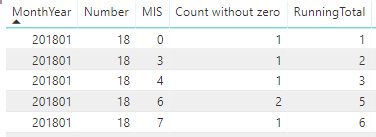
I have column called MIS (month in Service) . It can have different values 0,2,3,4 etc. I have another custom column that calculate the maximum MIS that particular record should have. All I want to do is that start the MIS from 0 to max MIS and I am not sure how to do.
The column "Number" is the maximum number that MIS should go to. "Count without zero" is simple count. And running total is just that. The idea bahind is that MIS should go to 18 (Number) and just repeating the running total.
Any help will be greatly appreciated.
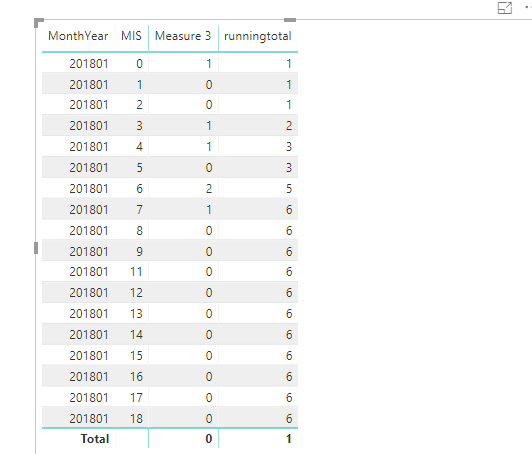
so basically I want output to look like following
201801 18 0 1 1
201801 18 1 0 1
201801 18 2 0 1
201801 18 3 1 2
201801 18 4 1 3
201801 18 5 0 3
201801 18 6 2 5
201801 18 7 1 6
201801 18 8 0 6
All the way to
201801 18 18 0 6
Hopefully that will help understand what I am trying to do.
Solved! Go to Solution.
Hi mukhan
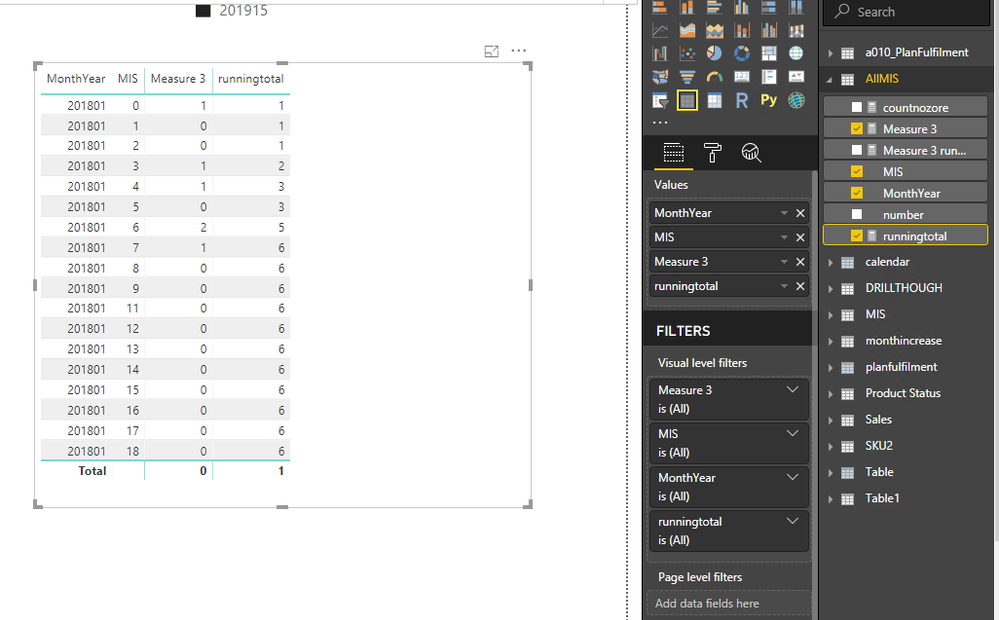
Based on your description, did you want to get result like below?
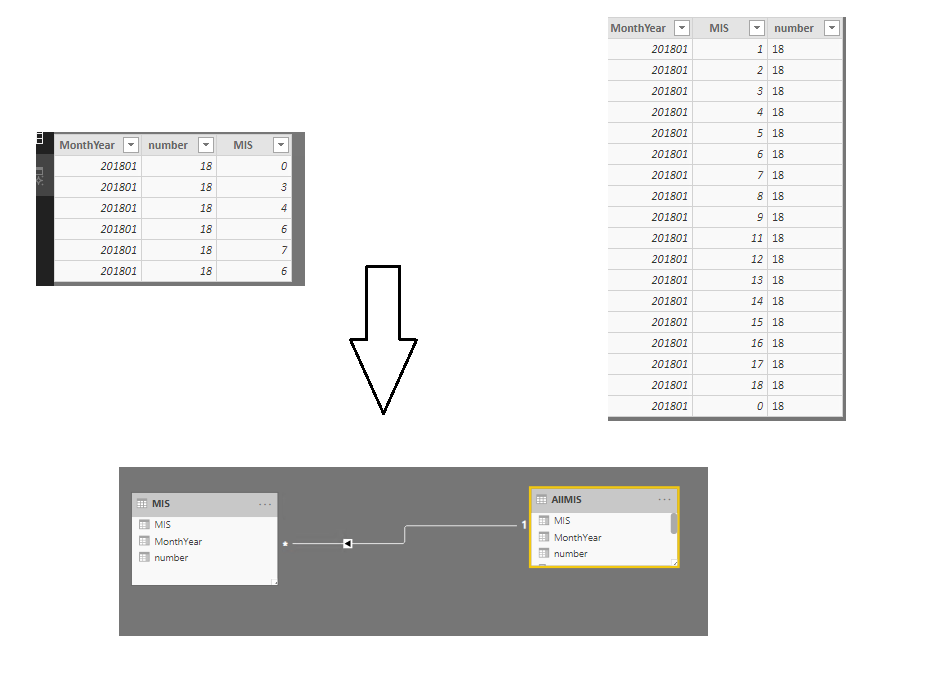
If so, you could create a new table use below measure below(ALLMIS)
ALLMIS=
VAR newt =
GENERATESERIES ( 0, 18 )
RETURN
SUMMARIZE ( newt, [Value], "Monnthyear", "201801", "number", 18 )
create relationship based on MIS
Measure 3 =
VAR selected =
SELECTEDVALUE ( MIS[MIS] )
RETURN
IF ( selected IN VALUES ( AllMIS[MIS] ), COUNT ( MIS[MIS] ), 0 )
runningtotal =
SUMX (
FILTER ( ALL ( AllMIS ), AllMIS[MIS] <= MIN ( AllMIS[MIS] ) ),
[Measure 3]
)If your data sample is not like this or this is not what you want, please inform me your detailed sample data and your expecting output.
Best Regards,
Zoe Zhi
If this post helps, then please consider Accept it as the solution to help the other members find it more quickly.
Hi mukhan
Based on your description, did you want to get result like below?
If so, you could create a new table use below measure below(ALLMIS)
ALLMIS=
VAR newt =
GENERATESERIES ( 0, 18 )
RETURN
SUMMARIZE ( newt, [Value], "Monnthyear", "201801", "number", 18 )
create relationship based on MIS
Measure 3 =
VAR selected =
SELECTEDVALUE ( MIS[MIS] )
RETURN
IF ( selected IN VALUES ( AllMIS[MIS] ), COUNT ( MIS[MIS] ), 0 )
runningtotal =
SUMX (
FILTER ( ALL ( AllMIS ), AllMIS[MIS] <= MIN ( AllMIS[MIS] ) ),
[Measure 3]
)If your data sample is not like this or this is not what you want, please inform me your detailed sample data and your expecting output.
Best Regards,
Zoe Zhi
If this post helps, then please consider Accept it as the solution to help the other members find it more quickly.
Check out the April 2026 Power BI update to learn about new features.
If you have recently started exploring Fabric, we'd love to hear how it's going. Your feedback can help with product improvements.
A new Power BI DataViz World Championship is coming this June! Don't miss out on submitting your entry.
| User | Count |
|---|---|
| 42 | |
| 37 | |
| 35 | |
| 22 | |
| 15 |
| User | Count |
|---|---|
| 67 | |
| 58 | |
| 29 | |
| 27 | |
| 25 |