cancel
Showing results for 
Search instead for 
Did you mean: 

Try your skills in the Power BI Dataviz World Championship! Round one ends June 26. Join now

Reply
mukhan169
Helper III
Helper III

Loop though maximum value

Good Morning All,

I have column called MIS (month in Service) . It can have different values 0,2,3,4 etc. I have another custom column that calculate the maximum MIS that particular record should have. All I want to do is that start the MIS from 0 to max MIS and I am not sure how to do.


Capture.PNG

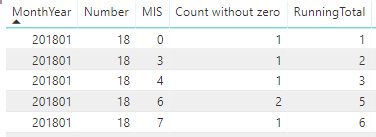
The column "Number" is the maximum number that MIS should go to. "Count without zero" is simple count. And running total is just that. The idea bahind is that MIS should go to 18 (Number) and just repeating the running total.

Any help will be greatly appreciated.

so basically I want output to look like following 


201801 18 0 1 1

201801 18 1 0 1

201801 18 2 0 1

201801 18 3 1 2

201801 18 4 1 3

201801 18 5 0 3

201801 18 6 2 5

201801 18 7 1 6

201801 18 8 0 6

All the way to

201801 18 18 0 6

Hopefully that will help understand what I am trying to do.

1 ACCEPTED SOLUTION
dax
Community Support
Community Support

Hi mukhan

Based on your description, did you want to get result like below?
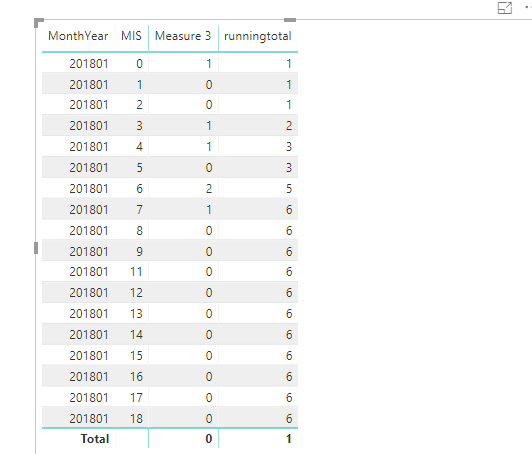
13.png

If so, you could create a new table use below measure below(ALLMIS)


ALLMIS=
VAR newt =
    GENERATESERIES ( 0, 18 )
RETURN
    SUMMARIZE ( newt, [Value], "Monnthyear", "201801", "number", 18 )
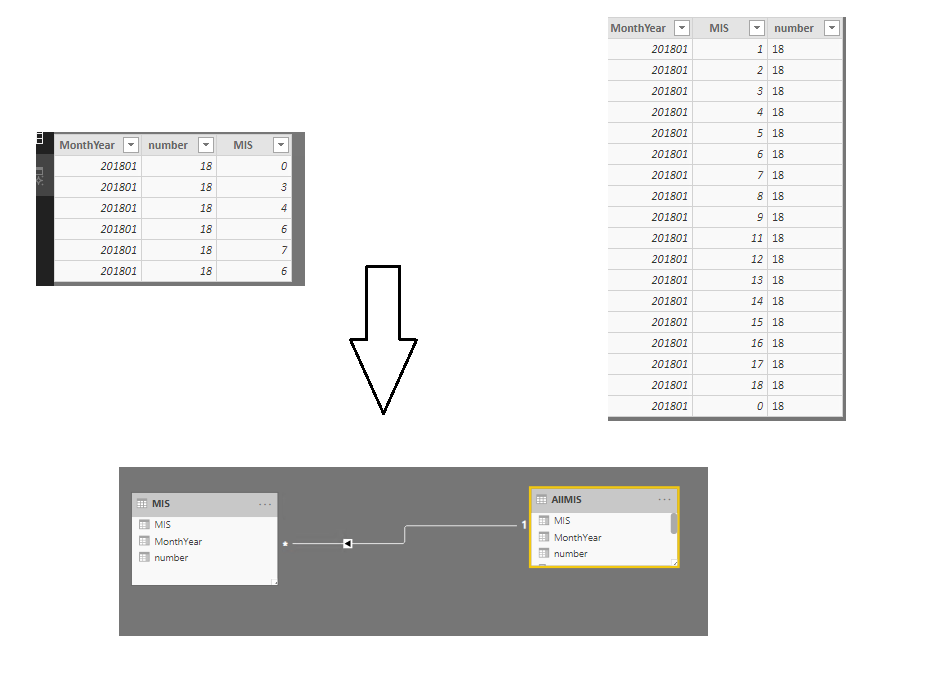


14.png

create relationship based on MIS

Measure 3 =
VAR selected =
    SELECTEDVALUE ( MIS[MIS] )
RETURN
    IF ( selected IN VALUES ( AllMIS[MIS] ), COUNT ( MIS[MIS] ), 0 )


runningtotal =
SUMX (
    FILTER ( ALL ( AllMIS ), AllMIS[MIS] <= MIN ( AllMIS[MIS] ) ),
    [Measure 3]
)
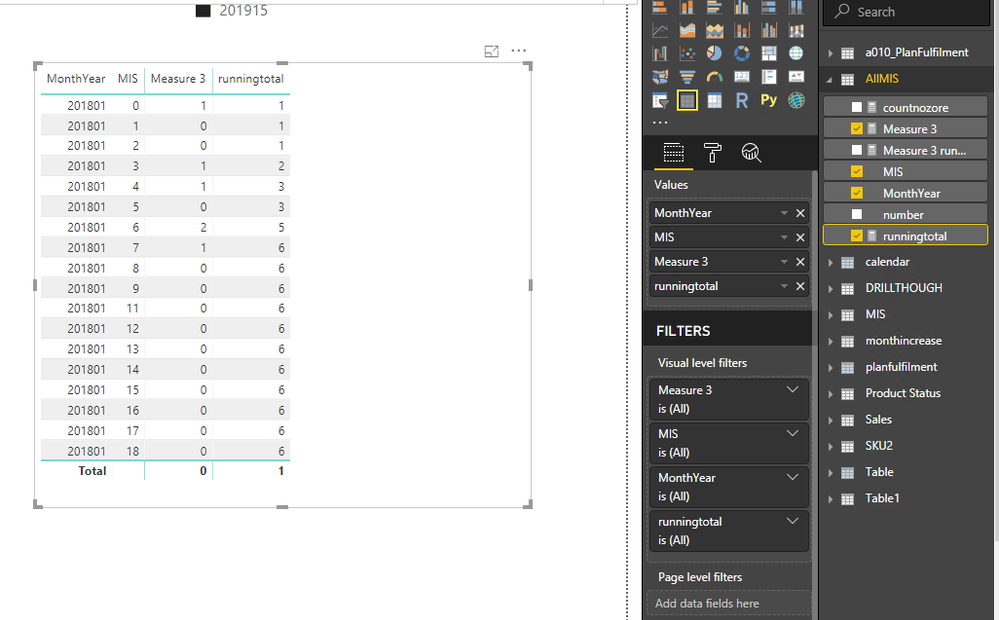
15.png

If your data sample is not like this or this is not what you want, please inform me your detailed sample data and your expecting output.

Best Regards,
Zoe Zhi


If this post helps, then please consider Accept it as the solution to help the other members find it more quickly.


View solution in original post

1 REPLY 1
dax
Community Support
Community Support

Hi mukhan

Based on your description, did you want to get result like below?

13.png

If so, you could create a new table use below measure below(ALLMIS)


ALLMIS=
VAR newt =
    GENERATESERIES ( 0, 18 )
RETURN
    SUMMARIZE ( newt, [Value], "Monnthyear", "201801", "number", 18 )


14.png

create relationship based on MIS

Measure 3 =
VAR selected =
    SELECTEDVALUE ( MIS[MIS] )
RETURN
    IF ( selected IN VALUES ( AllMIS[MIS] ), COUNT ( MIS[MIS] ), 0 )


runningtotal =
SUMX (
    FILTER ( ALL ( AllMIS ), AllMIS[MIS] <= MIN ( AllMIS[MIS] ) ),
    [Measure 3]
)

15.png

If your data sample is not like this or this is not what you want, please inform me your detailed sample data and your expecting output.

Best Regards,
Zoe Zhi


If this post helps, then please consider Accept it as the solution to help the other members find it more quickly.


Helpful resources

Announcements
Fabric Data Days is here Carousel

Data Days 2026

Don't miss out on Data Days, June 15 through August 7. Learn Fabric, Power BI, SQL, AI and more.

Power BI DataViz World Championships carousel

Power BI DataViz World Championships - June 2026

A new Power BI DataViz World Championship is coming this June! Don't miss out on submitting your entry.