Join us at FabCon Atlanta from March 16 - 20, 2026, for the ultimate Fabric, Power BI, AI and SQL community-led event. Save $200 with code FABCOMM.
Register now!The Power BI Data Visualization World Championships is back! Get ahead of the game and start preparing now! Learn more
Hello there!
I have five columns with the following data:
| Baltimore | Cincinnati | Cleveland | Pittsburgh | AFCNorth |
| 74 | 83 | 62 | 71 | 2 |
My requirement is: if each column has a number > 0, then make a set that equals '1'. So, my output would look like this:
| Baltimore | Cincinnati | Cleveland | Pittsburgh | AFCNorth | # of Sets |
| 74 | 83 | 62 | 71 | 2 | 2 |
How do I do this in Power BI using either a measure or column?
Thanks in advance
Hi @kreneec ,
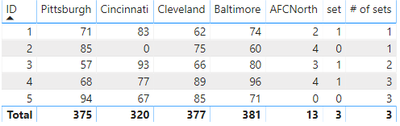
Thank you for your patient explanation. Please check following steps as blew and see if the result meet your expectations:
1. Create calculated column:
set = IF('Table'[Pittsburgh]*'Table'[Cincinnati]*'Table'[Cleveland]*'Table'[Baltimore]*'Table'[AFCNorth]>0,1,0)
2. Create Measure:
# of sets = CALCULATE(SUM('Table'[set]),FILTER(ALLSELECTED('Table'),'Table'[ID]<=MAX('Table'[ID])))
3. Result would be shown as below:
Pbix as attached.
Best Regards,
Jay
Community Support Team _ Jay Wang
If this post helps, then please consider Accept it as the solution to help the other members find it more quickly.
hi @Anonymous ,
If I understand you correctly, # of sets is the sum of set, so I’m confused about why # of sets is 2 in your table.
Please check following steps if it could solve your problem:
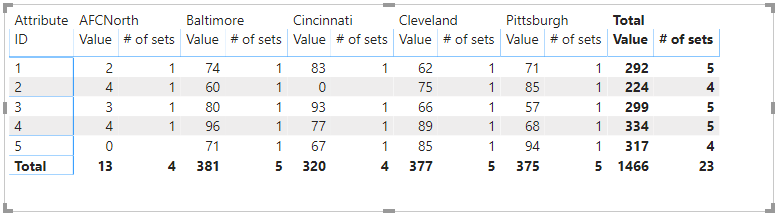
1. Unpivot table by columns except ID.
2. Create measure:
# of sets = CALCULATE(COUNT('Table'[Value]),FILTER('Table','Table'[Value]>0))
3. Create matrix visual and result would be shown as below:
Otherwise, please help me understand why # of sets is 2.
BTW, Pbix as attached, hopefully works for you.
Best Regards,
Jay
Community Support Team _ Jay Wang
If this post helps, then please consider Accept it as the solution to help the other members find it more quickly.
Hi Jay.
Thank you for responding. The number of sets is defined as "each column has to have greater than or equal to a 1 to define a set." So, as example:
Baltimore = 74; true;
Cincinnati = 83; true;
Cleveland = 62; true;
Pittsburgh = 71; true;
AFCNorth = 2; true
Since every column has more than 1, a set has been completed, i.e. add '1' to the # of sets column. Now, I need to reiterate again to check to see if another set has been completed. It has, which means add another '1' to the # of sets column, which means there are only 2 completed sets. Hope that makes sense.
Oh, I should mention this would be based on a unique id. So, I've updated the columns:
What it looks like now:
| ID | Baltimore | Cincinnati | Cleveland | Pittsburgh | AFCNorth |
| 1 | 74 | 83 | 62 | 71 | 2 |
What I would like for it to look like:
| ID | Baltimore | Cincinnati | Cleveland | Pittsburgh | AFCNorth | # of Sets |
| 1 | 74 | 83 | 62 | 71 | 2 | 2 |
The Power BI Data Visualization World Championships is back! Get ahead of the game and start preparing now!
| User | Count |
|---|---|
| 40 | |
| 36 | |
| 34 | |
| 31 | |
| 27 |
| User | Count |
|---|---|
| 135 | |
| 103 | |
| 65 | |
| 61 | |
| 55 |