Get Fabric or SQL Certified for Free.
Get certified for free when you join Fabric Data Days 2026 and dive into Fabric, Power BI, SQL, AI, and other essential data skills.
Join now- Power BI forums
- Get Help with Power BI
- Desktop
- Service
- Report Server
- Power Query
- Mobile Apps
- Developer
- DAX Commands and Tips
- Custom Visuals Development Discussion
- Health and Life Sciences
- Power BI Spanish forums
- Translated Spanish Desktop
- Training and Consulting
- Instructor Led Training
- Dashboard in a Day for Women, by Women
- Galleries
- Data Stories Gallery
- Themes Gallery
- Contests Gallery
- QuickViz Gallery
- Quick Measures Gallery
- Visual Calculations Gallery
- Notebook Gallery
- Translytical Task Flow Gallery
- TMDL Gallery
- R Script Showcase
- Webinars and Video Gallery
- Ideas
- Custom Visuals Ideas (read-only)
- Issues
- Issues
- Events
- Upcoming Events
July 7 - July 17 | Round 2 of the Power BI Dataviz World Championships. Don't miss your chance! Learn more
- Power BI forums
- Forums
- Get Help with Power BI
- Desktop
- Re: Lookupvalue value between two values
- Subscribe to RSS Feed
- Mark Topic as New
- Mark Topic as Read
- Float this Topic for Current User
- Bookmark
- Subscribe
- Printer Friendly Page

- Mark as New
- Bookmark
- Subscribe
- Mute
- Subscribe to RSS Feed
- Permalink
- Report Inappropriate Content
Lookupvalue value between two values
Hi all,
In one table I have the Age of IDcontacts, and in another table I have AgeRanges such as :
| Id | AgeFrom | AgeTo | Description |
| 1 | 0 | 10 | 0-10 |
| 2 | 11 | 20 | 11-20 |
| 3 | 21 | 30 | 21-30 |
| 4 | 31 | 40 | 31-40 |
| 5 | 41 | 50 | 41-50 |
| 6 | 51 | 60 | 51-60 |
| 7 | 61 | 70 | 61-70 |
| 8 | 71 | 80 | 71-80 |
| 9 | 81 | 90 | 81-90 |
| 10 | 91 | 200 | > 90 |
I would like to connect both tables. I would like to do the equivalent of a VLOOKUP TRUE in excel, such as 'if the value Age is between 0 and 10, then display'0-10'
I tried a column such as :
AgeID = IF([Age]<11,1,IF([Age]<21,2,IF([Age]<31,3,IF([Age]<41,4,IF([Age]<51,5,IF([Age]<61,6,IF([Age]<71,7,IF([Age]<81,8,IF([Age]<91,9,10)))))))))
so I could link it to the Age range table, but the rationale is wrong and I believe it's possible to do it with a Lookupvalue.
Any ideas?
Thanks in advance!
Solved! Go to Solution.


- Mark as New
- Bookmark
- Subscribe
- Mute
- Subscribe to RSS Feed
- Permalink
- Report Inappropriate Content
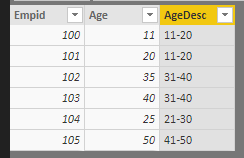
@Anonymous Please try this as a "New Column"
Assuming you age descriptions in a separate table and you want to retrieve the age description into another table based on the age.
AgeDesc = CALCULATE(VALUES(Test123Lkp[Description]),FILTER(Test123Lkp,Test123Data[Age]>=Test123Lkp[AgeFrom] && Test123Data[Age] <= Test123Lkp[AgeTo]))
Did I answer your question? Mark my post as a solution!
Proud to be a PBI Community Champion
- Mark as New
- Bookmark
- Subscribe
- Mute
- Subscribe to RSS Feed
- Permalink
- Report Inappropriate Content
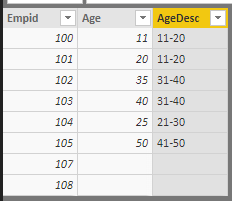
@Anonymous But if you see the screenshot that I've posted, it has age values like 25, 35 which are in between the age range but not as starting values. If you want to handle null values in age, then add another condition to exclude blank values.
AgeDesc = CALCULATE(VALUES(Test123Lkp[Description]),FILTER(Test123Lkp,Test123Data[Age]>=Test123Lkp[AgeFrom] && Test123Data[Age] <= Test123Lkp[AgeTo] && Test123Data[Age]<>BLANK()))
Did I answer your question? Mark my post as a solution!
Proud to be a PBI Community Champion

- Mark as New
- Bookmark
- Subscribe
- Mute
- Subscribe to RSS Feed
- Permalink
- Report Inappropriate Content
Hi how to write that in Power Query M Language to create a new column please ?
- Mark as New
- Bookmark
- Subscribe
- Mute
- Subscribe to RSS Feed
- Permalink
- Report Inappropriate Content
@Anonymous Please try this as a "New Column"
Assuming you age descriptions in a separate table and you want to retrieve the age description into another table based on the age.
AgeDesc = CALCULATE(VALUES(Test123Lkp[Description]),FILTER(Test123Lkp,Test123Data[Age]>=Test123Lkp[AgeFrom] && Test123Data[Age] <= Test123Lkp[AgeTo]))
Did I answer your question? Mark my post as a solution!
Proud to be a PBI Community Champion
- Mark as New
- Bookmark
- Subscribe
- Mute
- Subscribe to RSS Feed
- Permalink
- Report Inappropriate Content
@PattemManohar, actually it works only partially. With this formula it only notes as 11-20 those who's age is 11, 21-30 those who's age is 21, etc. Also, it notes 0-10 those who's age is Blank.
Any ideas?
- Mark as New
- Bookmark
- Subscribe
- Mute
- Subscribe to RSS Feed
- Permalink
- Report Inappropriate Content
@Anonymous But if you see the screenshot that I've posted, it has age values like 25, 35 which are in between the age range but not as starting values. If you want to handle null values in age, then add another condition to exclude blank values.
AgeDesc = CALCULATE(VALUES(Test123Lkp[Description]),FILTER(Test123Lkp,Test123Data[Age]>=Test123Lkp[AgeFrom] && Test123Data[Age] <= Test123Lkp[AgeTo] && Test123Data[Age]<>BLANK()))
Did I answer your question? Mark my post as a solution!
Proud to be a PBI Community Champion
- Mark as New
- Bookmark
- Subscribe
- Mute
- Subscribe to RSS Feed
- Permalink
- Report Inappropriate Content
It works nicely, thanks a lot!

- Mark as New
- Bookmark
- Subscribe
- Mute
- Subscribe to RSS Feed
- Permalink
- Report Inappropriate Content
@Anonymous
For ranges you need to use the AND statement
e.g IF ( AND([Age]>=21, [Age]<30), 1, ....
I dont think your logic is correct
Helpful resources

FabCon & SQLCon – Barcelona 2026
Join us in Barcelona for FabCon and SQLCon, the Fabric, Power BI, SQL, and AI community event. Save €200 with code FABCMTY200.

Data Days 2026
Join Data Days 2026: 60 days of free live/on-demand sessions, challenges, study groups, and certification opportunities.

Power BI DataViz World Championships - June 2026
A new Power BI DataViz World Championship is coming this June! Don't miss out on submitting your entry.

| User | Count |
|---|---|
| 29 | |
| 27 | |
| 24 | |
| 24 | |
| 18 |


| User | Count |
|---|---|
| 54 | |
| 50 | |
| 41 | |
| 33 | |
| 23 |


