This time we’re going bigger than ever. Fabric, Power BI, SQL, AI and more. We're covering it all. You won't want to miss it.
Learn moreLevel up your Power BI skills this month - build one visual each week and tell better stories with data! Get started
Hi, I've a Table with exchange Rates and Sales Table.
My Exchange Rate, don't have value for a weekends days, when I insert a New Column into a Sales Table with Exchange rate, I cannot obtain Exchange Rate for weekends day.
Have you any Ideas to search Friday Exchange Rate for weekends days?
Solved! Go to Solution.
Thanks for your reply, I resolved!!!
I'm copying my resolve:
ExchRate1 =
IF(
ISBLANK(LOOKUPVALUE('Exchange Rate'[Precio],'Exchange Rate'[Fecha],EstadVentas[Date])),
IF(
ISBLANK(LOOKUPVALUE('Exchange Rate'[Precio],'Exchange Rate'[Fecha],DATEADD(EstadVentas[Date],-1,1,DAY))),
LOOKUPVALUE('Exchange Rate'[Precio],'Exchange Rate'[Fecha],DATEADD(EstadVentas[Date],-2,1,DAY)),
LOOKUPVALUE('Exchange Rate'[Precio],'Exchange Rate'[Fecha],DATEADD(EstadVentas[Date],-1,1,DAY))),
LOOKUPVALUE('Exchange Rate'[Precio],'Exchange Rate'[Fecha],EstadVentas[Date])
)
Hi @pelucapampa
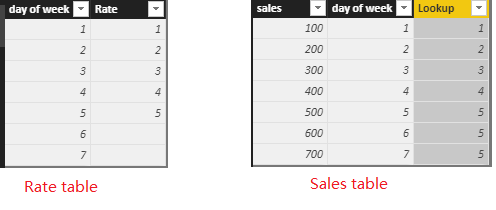
You may try to use LOOKUPVALUE Function. For example: 1-7 in 'day of week' column is from Monday to Sunday.
You may get the 'Lookup' column by calculated column:
Lookup =
IF (
ISBLANK ( LOOKUPVALUE ( 'Rate'[Rate], Rate[day of week], Sales[day of week] ) ),
MAXX ( FILTER ( Rate, Rate[day of week] > Rate[day of week] - 1 ), Rate[Rate] ),
LOOKUPVALUE ( 'Rate'[Rate], Rate[day of week], Sales[day of week] )
)
If it is not your case, please share some data sample and expected output.
Regards,
Cherie
Thanks for your reply, I resolved!!!
I'm copying my resolve:
ExchRate1 =
IF(
ISBLANK(LOOKUPVALUE('Exchange Rate'[Precio],'Exchange Rate'[Fecha],EstadVentas[Date])),
IF(
ISBLANK(LOOKUPVALUE('Exchange Rate'[Precio],'Exchange Rate'[Fecha],DATEADD(EstadVentas[Date],-1,1,DAY))),
LOOKUPVALUE('Exchange Rate'[Precio],'Exchange Rate'[Fecha],DATEADD(EstadVentas[Date],-2,1,DAY)),
LOOKUPVALUE('Exchange Rate'[Precio],'Exchange Rate'[Fecha],DATEADD(EstadVentas[Date],-1,1,DAY))),
LOOKUPVALUE('Exchange Rate'[Precio],'Exchange Rate'[Fecha],EstadVentas[Date])
)
Check out the April 2026 Power BI update to learn about new features.
Sign up to receive a private message when registration opens and key events begin.
If you have recently started exploring Fabric, we'd love to hear how it's going. Your feedback can help with product improvements.
| User | Count |
|---|---|
| 36 | |
| 30 | |
| 29 | |
| 21 | |
| 18 |
| User | Count |
|---|---|
| 68 | |
| 45 | |
| 33 | |
| 24 | |
| 23 |