Get Fabric or SQL Certified for Free.
Get certified for free when you join Fabric Data Days 2026 and dive into Fabric, Power BI, SQL, AI, and other essential data skills.
Join now- Power BI forums
- Get Help with Power BI
- Desktop
- Service
- Report Server
- Power Query
- Mobile Apps
- Developer
- DAX Commands and Tips
- Custom Visuals Development Discussion
- Health and Life Sciences
- Power BI Spanish forums
- Translated Spanish Desktop
- Training and Consulting
- Instructor Led Training
- Dashboard in a Day for Women, by Women
- Galleries
- Data Stories Gallery
- Themes Gallery
- Contests Gallery
- QuickViz Gallery
- Quick Measures Gallery
- Visual Calculations Gallery
- Notebook Gallery
- Translytical Task Flow Gallery
- TMDL Gallery
- R Script Showcase
- Webinars and Video Gallery
- Ideas
- Custom Visuals Ideas (read-only)
- Issues
- Issues
- Events
- Upcoming Events
July 7 - July 17 | Round 2 of the Power BI Dataviz World Championships. Don't miss your chance! Learn more
- Power BI forums
- Forums
- Get Help with Power BI
- Desktop
- Re: Lookup value - error multiple values was suppl...
- Subscribe to RSS Feed
- Mark Topic as New
- Mark Topic as Read
- Float this Topic for Current User
- Bookmark
- Subscribe
- Printer Friendly Page

- Mark as New
- Bookmark
- Subscribe
- Mute
- Subscribe to RSS Feed
- Permalink
- Report Inappropriate Content
Lookup value - error multiple values was supplied
Hi all,
I tried to create a calculated column from the left table to lookup value from the right table but it shows this error "A table of multiple values was supplied where a single value was expected.".
This is calculated column:
lookup = LOOKUPVALUE('USA recurring'[USD revenue],'USA recurring'[Customer ID],'monthly groupby'[customer_id],'USA recurring'[Year billed],'monthly groupby'[year],'USA recurring'[month billed converted],'monthly groupby'[month])
Is there a way to bypass it?
Here are my tables:
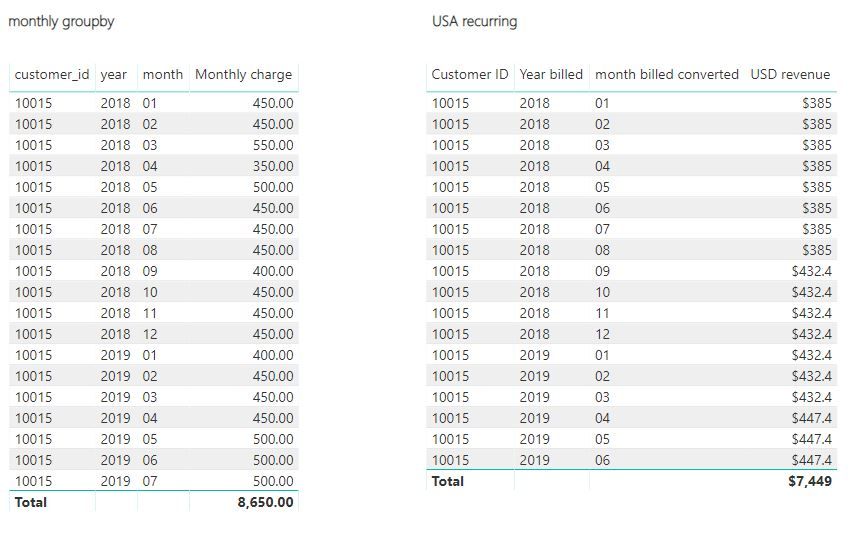
Much appreciate for any help!
Solved! Go to Solution.


- Mark as New
- Bookmark
- Subscribe
- Mute
- Subscribe to RSS Feed
- Permalink
- Report Inappropriate Content
Hi,
Does this work?
CALCULATE(SUM('USA recurring'[USD revenue]),FILTER('USA recurring','USA recurring'[Customer ID]=EARLIER('monthly groupby'[customer_id])&&'USA recurring'[Year billed]=EARLIER('monthly groupby'[year])&&'USA recurring'[month billed converted]=EARLIER('monthly groupby'[month])))
Regards,
Ashish Mathur
http://www.ashishmathur.com
https://www.linkedin.com/in/excelenthusiasts/


- Mark as New
- Bookmark
- Subscribe
- Mute
- Subscribe to RSS Feed
- Permalink
- Report Inappropriate Content
@Ashish_Mathur @v-juanli-msft - I have a similar requirement where I have to just bring multiple values from other table using Lookup value function.
When I use LOOKUPVALUE, I'm getting this error: "A table of multiple values was supplied where a single value was expected"
When I use FIRSTNONBLANK, I getting only one value from the other table. However I need all the matched values (few cases only 1 value, few cases more than 1).
Can you please help me with the same? Thanks!
- Mark as New
- Bookmark
- Subscribe
- Mute
- Subscribe to RSS Feed
- Permalink
- Report Inappropriate Content
Hi,
Both those functions will only bring over a single value. To bring over multiple values (in multiple rows), use the Query Editor to merge the two tables.
Regards,
Ashish Mathur
http://www.ashishmathur.com
https://www.linkedin.com/in/excelenthusiasts/


- Mark as New
- Bookmark
- Subscribe
- Mute
- Subscribe to RSS Feed
- Permalink
- Report Inappropriate Content
Hi @Anonymous
I tried your Expression, and it works well on my side.
The column is calculated in Table ‘monthly groupby’. You could try it again.
Regarding your error, it is often caused by duplicate values.
For example,
table a table b
col1 col2 col3
a a 1
b a 2
b 3
b 4
It may throw an error when we use "lookupvalue" to get value from table b into table a.
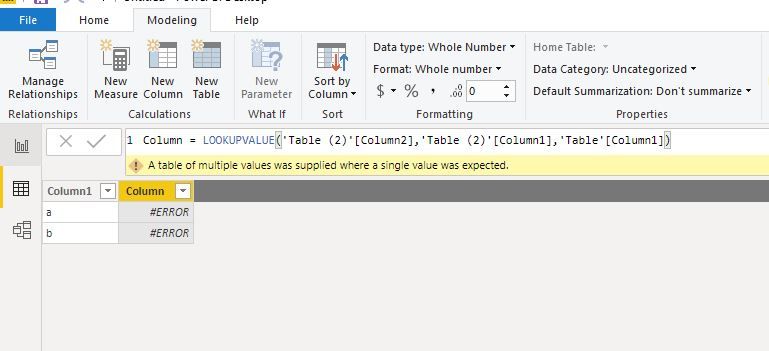
If so, please consider any other methods.
both solutions of georgy and Ashish_Mathur may work, it depends what final output you need.
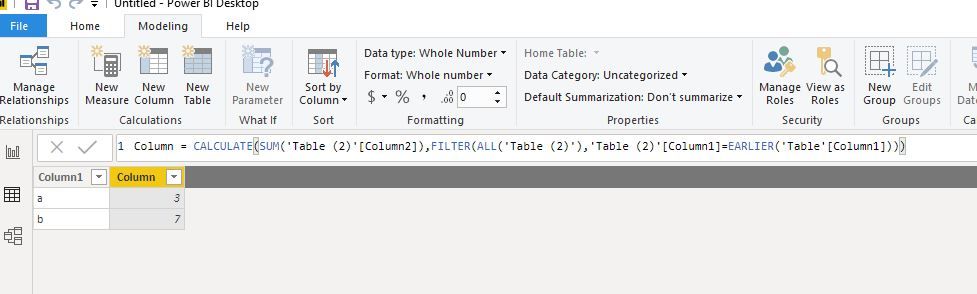
Best Regards
Maggie
Community Support Team _ Maggie Li
If this post helps, then please consider Accept it as the solution to help the other members find it more quickly.
- Mark as New
- Bookmark
- Subscribe
- Mute
- Subscribe to RSS Feed
- Permalink
- Report Inappropriate Content
Hi,
Does this work?
CALCULATE(SUM('USA recurring'[USD revenue]),FILTER('USA recurring','USA recurring'[Customer ID]=EARLIER('monthly groupby'[customer_id])&&'USA recurring'[Year billed]=EARLIER('monthly groupby'[year])&&'USA recurring'[month billed converted]=EARLIER('monthly groupby'[month])))
Regards,
Ashish Mathur
http://www.ashishmathur.com
https://www.linkedin.com/in/excelenthusiasts/
- Mark as New
- Bookmark
- Subscribe
- Mute
- Subscribe to RSS Feed
- Permalink
- Report Inappropriate Content
- Mark as New
- Bookmark
- Subscribe
- Mute
- Subscribe to RSS Feed
- Permalink
- Report Inappropriate Content
You are welcome.
Regards,
Ashish Mathur
http://www.ashishmathur.com
https://www.linkedin.com/in/excelenthusiasts/
- Mark as New
- Bookmark
- Subscribe
- Mute
- Subscribe to RSS Feed
- Permalink
- Report Inappropriate Content
Hi,
Try to use merge query instead. Go to edit queries, select your table, click merge queries (home tab) and left join with other table. Select columns that you need to match. Make sure your join kind is left outer. See attached photo. Then expand and select the column you need to join (lookup).
Cheers
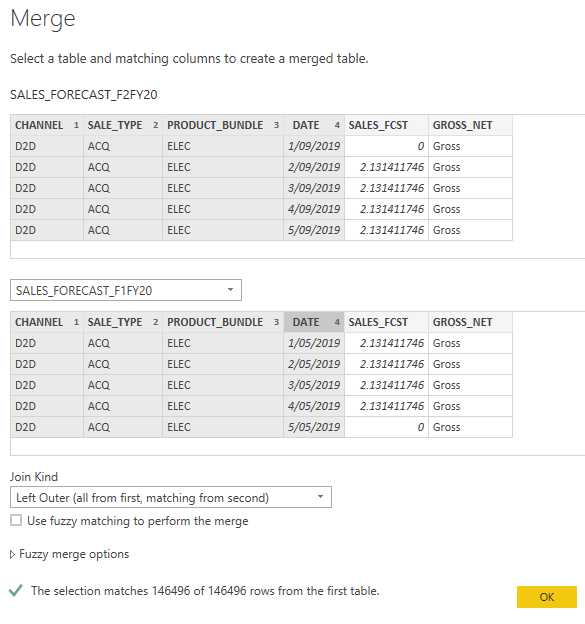
Helpful resources

FabCon & SQLCon – Barcelona 2026
Join us in Barcelona for FabCon and SQLCon, the Fabric, Power BI, SQL, and AI community event. Save €200 with code FABCMTY200.

Data Days 2026
Join Data Days 2026: 60 days of free live/on-demand sessions, challenges, study groups, and certification opportunities.

Power BI DataViz World Championships - June 2026
A new Power BI DataViz World Championship is coming this June! Don't miss out on submitting your entry.

| User | Count |
|---|---|
| 29 | |
| 27 | |
| 26 | |
| 24 | |
| 16 |


| User | Count |
|---|---|
| 53 | |
| 47 | |
| 38 | |
| 30 | |
| 21 |


