Share feedback directly with Fabric product managers, participate in targeted research studies and influence the Fabric roadmap.
Sign up nowGet Fabric certified for FREE! Don't miss your chance! Learn more
Hi all,
Part time BI-er here, feel like I have to relearn the basics everytime I dip my toes in! Hoping one of you can help.
I have 2 tables, I need to look up a nearest value based on two values from table 1, I need an exact match of 'Name' and the nearest value to 'Start' (either higher or lower)
Table1
| Name | Start |
ABC | 9.1044 |
| ABC | 9.0900 |
| DEF | 9.146 |
| DEF | 9.1414 |
Table 2
| Name | Start | RiseValue |
| ABC | 9.0875 | 51.6 |
| ABC | 9.1 | 51.7 |
| ABC | 9.1125 | 51.3 |
| ABC | 9.125 | 51.4 |
| DEF | 9.1375 | 51.95 |
| DEF | 9.15 | 51.8 |
| DEF | 9.1625 | 51.9 |
Is it best to add a column to table 1 or use a measure?
Either way, my desired result would be
| Name | Start | RiseValue result |
ABC | 9.1044 | 51.7 |
| ABC | 9.0900 | 51.6 |
| DEF | 9.146 | 51.8 |
| DEF | 9.1414 | 51.95 |
Any suggestions?
Solved! Go to Solution.
Hi @IanT ,
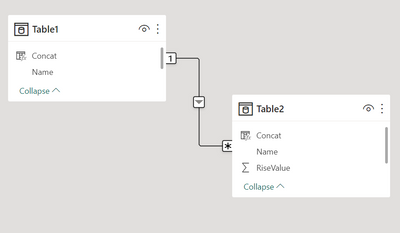
1. Create a concatenated column in both the tables as shown below
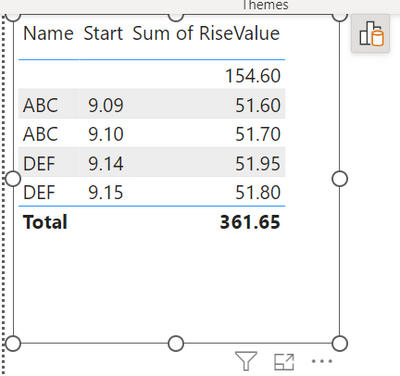
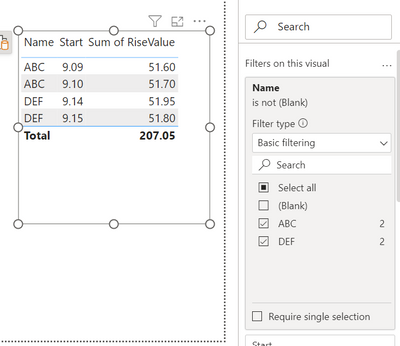
5. Restrict the Blanks using Visual Filter in Name. The Output should look as below
Regards,
Hi @IanT ,
1. Create a concatenated column in both the tables as shown below
5. Restrict the Blanks using Visual Filter in Name. The Output should look as below
Regards,
Thanks @Thejeswar , that is so simple and was not the direction my mind was heading in!!
I've adapted it slightly as my table 2 goes up in increments of 0.0125 so I've added a column to table 1 using
Concat = CONCATENATE(Table1[Name], MROUND(Table1[Start],0.0125))
For Table 2 I just merged the columns in Power Query.
Many thanks.
If you love stickers, then you will definitely want to check out our Community Sticker Challenge!
Check out the January 2026 Power BI update to learn about new features.
| User | Count |
|---|---|
| 64 | |
| 63 | |
| 48 | |
| 21 | |
| 18 |
| User | Count |
|---|---|
| 118 | |
| 117 | |
| 38 | |
| 36 | |
| 27 |