Don't miss your chance to take the Fabric Data Engineer (DP-700) exam on us!
Learn moreThe FabCon + SQLCon recap series starts April 14th at 8am Pacific. If you’re tracking where AI is going inside Fabric, this first session is a can't miss. Register now
Hi All,
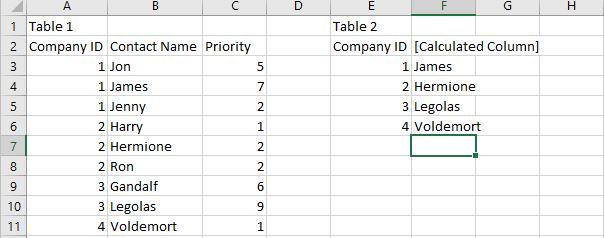
I am trying to create a column that shows the highest priority contact from another table. If there's a tie for highest priority, I would like to get the first one. Here's what my data looks like, and what I'm hoping for:
Please help!!!
Solved! Go to Solution.
Hi @Anonymous ,
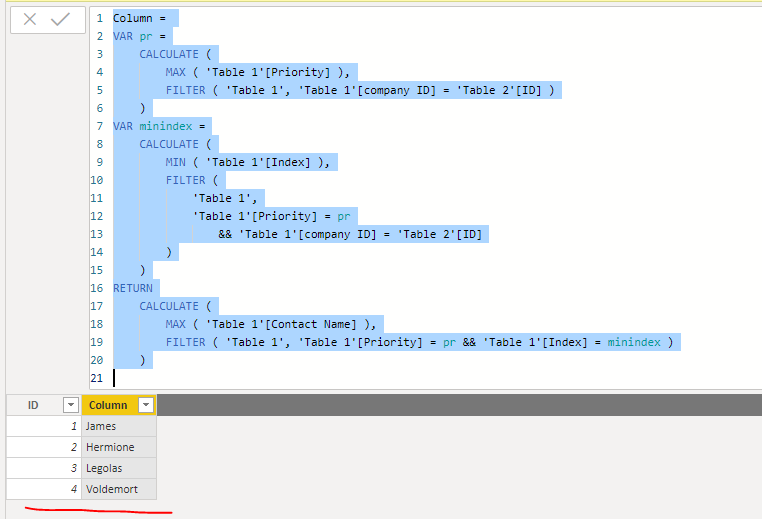
We can insert an index column in power query in table 1. Then we can create a calculated column as below.
Column =
VAR pr =
CALCULATE (
MAX ( 'Table 1'[Priority] ),
FILTER ( 'Table 1', 'Table 1'[company ID] = 'Table 2'[ID] )
)
VAR minindex =
CALCULATE (
MIN ( 'Table 1'[Index] ),
FILTER (
'Table 1',
'Table 1'[Priority] = pr
&& 'Table 1'[company ID] = 'Table 2'[ID]
)
)
RETURN
CALCULATE (
MAX ( 'Table 1'[Contact Name] ),
FILTER ( 'Table 1', 'Table 1'[Priority] = pr && 'Table 1'[Index] = minindex )
)
Pbix as attached.
Hi @Anonymous ,
We can insert an index column in power query in table 1. Then we can create a calculated column as below.
Column =
VAR pr =
CALCULATE (
MAX ( 'Table 1'[Priority] ),
FILTER ( 'Table 1', 'Table 1'[company ID] = 'Table 2'[ID] )
)
VAR minindex =
CALCULATE (
MIN ( 'Table 1'[Index] ),
FILTER (
'Table 1',
'Table 1'[Priority] = pr
&& 'Table 1'[company ID] = 'Table 2'[ID]
)
)
RETURN
CALCULATE (
MAX ( 'Table 1'[Contact Name] ),
FILTER ( 'Table 1', 'Table 1'[Priority] = pr && 'Table 1'[Index] = minindex )
)
Pbix as attached.
@Anonymous add following measure
Contact = CALCULATE( MIN( Contact[Contact Name] ), TOPN(1, Contact, Contact[Priority], DESC ) )
Subscribe to the @PowerBIHowTo YT channel for an upcoming video on List and Record functions in Power Query!!
Learn Power BI and Fabric - subscribe to our YT channel - Click here: @PowerBIHowTo
If my solution proved useful, I'd be delighted to receive Kudos. When you put effort into asking a question, it's equally thoughtful to acknowledge and give Kudos to the individual who helped you solve the problem. It's a small gesture that shows appreciation and encouragement! ❤
Did I answer your question? Mark my post as a solution. Proud to be a Super User! Appreciate your Kudos 🙂
Feel free to email me with any of your BI needs.
When you say the "first one" on ties, do you mean in alphabetical order? Or do you mean Hermione because she literally comes first in the way the table is currently ordered?
You can use TOPN to get the result you're looking for. I created this as a measure instead of a calculated column. You can read more on why here. If you desperately need this as a calculated column instead, you'll have to FILTER the 'Table 1' parameter in the TOPN function to only include those in the current company.
PriorityPerson =
CALCULATE(
SELECTEDVALUE( 'Table 1'[Contact Name]),
TOPN(
1, 'Table 1',
[Priority], DESC,
[Contact Name], ASC)
)If you want the secondary priority ordering to be based on the table as it currently stands, you'll need to add an index to the table original table when it's in the order you want, and use that instead of [Contact Name] in the TOPN function.
If you have recently started exploring Fabric, we'd love to hear how it's going. Your feedback can help with product improvements.
A new Power BI DataViz World Championship is coming this June! Don't miss out on submitting your entry.
Share feedback directly with Fabric product managers, participate in targeted research studies and influence the Fabric roadmap.
| User | Count |
|---|---|
| 53 | |
| 40 | |
| 38 | |
| 19 | |
| 18 |
| User | Count |
|---|---|
| 70 | |
| 69 | |
| 34 | |
| 33 | |
| 30 |