cancel
Showing results for 
Search instead for 
Did you mean: 

The Power BI Data Visualization World Championships is back! Get ahead of the game and start preparing now! Learn more

Reply
tecumseh
Helper V
Helper V

Lookup A Value from Another Table All In One DAX With Many VAR

Hi,

I have several VAR's in one DAX Statement.
I checked each one as I created so they are all fine.
I'm trying to add a new step to add a column from one table to another table, but th tables do not show in intellisense inside the LOOKUP.

Can I do it or do I need to break it up into a few Calc Table for the LOOKUP to work?

I had all of this working, But then a customer popped up with a 2nd recovery date (More than 12 months with no revenue)
So I had to start adding Row_Nbr's and filtering for 1 now try LOOKUP but that doesnt seem to offer up any of the tables inside the DAX statement.

Any ideas?
Thx
w

RecoveredCustomers = 


/*

* Step01 Filter Customer_Table for just records flagged as recovered ===================================================

*/


VAR Step01 =

FILTER(

    Customer_Table,

    Customer_Table[Recovered Customer] = "Recovered"

)


/*

* Step02 Add a row_nbr to the filtered records in Step01 ===================================================

*/

VAR Step02 =

    ADDCOLUMNS(

        Step01,

        "Row_Nbr",

        ROWNUMBER(

            Step01,

            ORDERBY(

                [Customer ID], ASC,

                [Begin Quarter Date], ASC

            ),

            PARTITIONBY(

                [Customer ID]

            )

        )

    )


/*

* Step03 Filter records in Step01 for just Row_Nbr = 1 ===================================================

*/


VAR Step03 = 

    Filter(

        Step02,

        [Row_Nbr] = 1

    )


/*

* Step04 Add a row nbr to Customers_Recovered ===================================================

*/

VAR Step04 =

    ADDCOLUMNS(

        Customers_Recovered,

        "Row_Nbr",

        ROWNUMBER(

            Customers_Recovered,

            ORDERBY(

                Customers_Recovered[Customer ID], ASC,

                Customers_Recovered[Recovered Date], ASC

            ),

            PARTITIONBY(

                Customers_Recovered[Customer ID]

            )

        )

    )


/*

* Step05 Filter the table in Step04 for just row_nbr = 1 ===================================================

*/

VAR Step05 = 

    FILTER(

        Step04,

        [Row_Nbr] = 1

    )


/*

* Add the revovery date from Step05 to the table in Step03 ===================================================

*/

 VAR Step06 = 

    ADDCOLUMNS(

        Step03,

        "Recovered Date",

LOOKUP() <-- This is where I am stuck


1 ACCEPTED SOLUTION
Anonymous
Not applicable

Hi @tecumseh ,


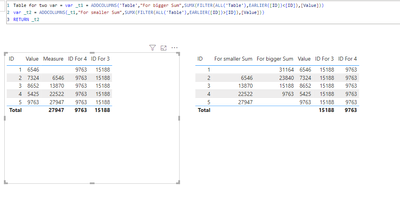
There is no need to split into multiple calculation tables, just in the same calculation table. Using Lookup is table based, your VAR uses multiple ADDCOLUMNS but doesn't retrun it at the end, implying that it wasn't actually created, just an intermediate process. So you just split it into two DAX expressions.
vtianyichmsft_0-1702017054117.png

Table for two var = var _t1 = ADDCOLUMNS('Table',"For bigger Sum",SUMX(FILTER(ALL('Table'),EARLIER([ID])<[ID]),[Value]))
var _t2 = ADDCOLUMNS(_t1,"For smaller Sum",SUMX(FILTER(ALL('Table'),EARLIER([ID])>[ID]),[Value]))
RETURN _t2

ID For 3 = LOOKUPVALUE('Table for two var'[For bigger Sum],[ID],3)

ID For 4 = LOOKUPVALUE('Table for two var'[For bigger Sum],[ID],4)


An attachment for your reference. Hope it helps!


Best regards,
Community Support Team_ Scott Chang


If this post helps then please consider Accept it as the solution to help the other members find it more quickly.

View solution in original post

1 REPLY 1
Anonymous
Not applicable

Hi @tecumseh ,


There is no need to split into multiple calculation tables, just in the same calculation table. Using Lookup is table based, your VAR uses multiple ADDCOLUMNS but doesn't retrun it at the end, implying that it wasn't actually created, just an intermediate process. So you just split it into two DAX expressions.

vtianyichmsft_0-1702017054117.png

Table for two var = var _t1 = ADDCOLUMNS('Table',"For bigger Sum",SUMX(FILTER(ALL('Table'),EARLIER([ID])<[ID]),[Value]))
var _t2 = ADDCOLUMNS(_t1,"For smaller Sum",SUMX(FILTER(ALL('Table'),EARLIER([ID])>[ID]),[Value]))
RETURN _t2

ID For 3 = LOOKUPVALUE('Table for two var'[For bigger Sum],[ID],3)

ID For 4 = LOOKUPVALUE('Table for two var'[For bigger Sum],[ID],4)


An attachment for your reference. Hope it helps!


Best regards,
Community Support Team_ Scott Chang


If this post helps then please consider Accept it as the solution to help the other members find it more quickly.

Helpful resources

Announcements
Power BI DataViz World Championships

Power BI Dataviz World Championships

The Power BI Data Visualization World Championships is back! Get ahead of the game and start preparing now!

December 2025 Power BI Update Carousel

Power BI Monthly Update - December 2025

Check out the December 2025 Power BI Holiday Recap!

FabCon Atlanta 2026 carousel

FabCon Atlanta 2026

Join us at FabCon Atlanta, March 16-20, for the ultimate Fabric, Power BI, AI and SQL community-led event. Save $200 with code FABCOMM.