
Join us at FabCon Atlanta from March 16 - 20, 2026, for the ultimate Fabric, Power BI, AI and SQL community-led event. Save $200 with code FABCOMM.
Register now!Get Fabric Certified for FREE during Fabric Data Days. Don't miss your chance! Request now
I have the following percentage values from a measurement called:
'AAN Local'[% AAN Sent]
The values are percentages.
I wish to rank the percentages and group ties together. Example, all 0% values are rank 1, all higher percentage groups are higher ranks, etc etc.
Can anyone help me with this ?
Thx
'
I'd like to restate my problem. I feel I didn't explain it well initially.
I want to present my Top-N data in a matrix table, with the following heirarchy:
Rows:
'Local'[Division]
'Local'[Assignment]
Values:
'Local'[% Sent]
I need to display ONLY the bottom-3 'Local'[% Sent] (percentage values) for 'Local'[Assignment] within each 'Local'[Division]
Hi,
The RANK() function should work. To receive specific help, share some data to work with and show the expected result.
Hi @m_roussakis ,
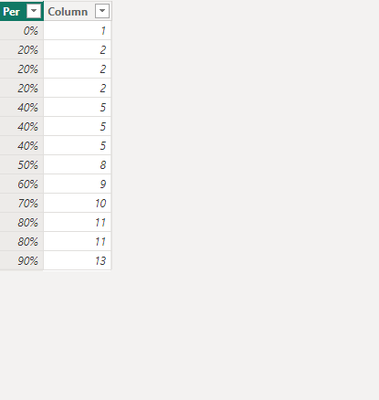
Below is my table:
The following DAX might work for you:
Column =
RANKX('Table','Table'[Per],,1)
The final output is shown in the following figure:
Best Regards,
Xianda Tang
If this post helps, then please consider Accept it as the solution to help the other members find it more quickly.
Check out the November 2025 Power BI update to learn about new features.
Advance your Data & AI career with 50 days of live learning, contests, hands-on challenges, study groups & certifications and more!