cancel
Showing results for 
Search instead for 
Did you mean: 

The Power BI Data Visualization World Championships is back! Get ahead of the game and start preparing now! Learn more

Reply
blopez11
Super User
Super User

Look and feel of filter (slicer) different between desktop and once published in service

Not sure if this should be posted in the desktop forum or service, ...


I have a filter (slicer) in a report I've created in the power bi desktop whose look and feel seems to have changed once published in the service

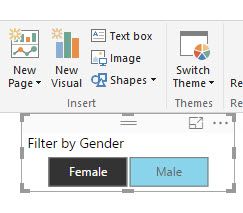
The filter, when an item is selected, has the look in screenshot 1, where you can noticeably tell which item has been selected

This is what it looks like in power bi desktop now, and what it used to look like in the service

But now it looks like screenshot 2 in the service, where it is hard to tell what item is selected

I hadn't published the report for at least a couple weeks, and just happened to look at it yesterday in the service

The definition for the slicer is in screenshot 3


Any thoughts?

Thanks,


5-25-2017 9-19-29 AM.jpg


5-25-2017 9-20-28 AM.jpg


5-25-2017 9-19-07 AM.jpg

1 ACCEPTED SOLUTION
blopez11
Super User
Super User

1 REPLY 1
blopez11
Super User
Super User

Helpful resources

Announcements
November Power BI Update Carousel

Power BI Monthly Update - November 2025

Check out the November 2025 Power BI update to learn about new features.

Fabric Data Days Carousel

Fabric Data Days

Advance your Data & AI career with 50 days of live learning, contests, hands-on challenges, study groups & certifications and more!

FabCon Atlanta 2026 carousel

FabCon Atlanta 2026

Join us at FabCon Atlanta, March 16-20, for the ultimate Fabric, Power BI, AI and SQL community-led event. Save $200 with code FABCOMM.

Top Solution Authors
Top Kudoed Authors