Join us at FabCon Atlanta from March 16 - 20, 2026, for the ultimate Fabric, Power BI, AI and SQL community-led event. Save $200 with code FABCOMM.
Register now!The Power BI Data Visualization World Championships is back! It's time to submit your entry. Live now!
Hi Folks,
I have 2 fields: Manager Name & Employee Type in which I need to use as criteria for a formula. What I want to do is create a measure or calculated column in a table visual that looks at the Manager name and then looks at employee type to return whether the manager is managing just employees, contractors or employees & contractors. I'm working on a manager reconciliation exercise. Employee Type only has two options: Employee and Contractor
So for example, the output would look like this in a table visual:
Manager ID Manager Name Managing?
11112 Frog, Kermit Employees Only
12231 Blue, Gonzo Contractors Only
12334 Piggy, MIss Employees & Contractors
Raw data looks like this:
| EE ID# | Employee Name | Employee Type | Manager ID | Manager Name |
| 5445645 | asdqweqeqw, B | Contractor | 50038 | Blue, Gonzo |
| 8787484 | Addlk, Akow | Employee | 142275 | Dog, Rowlf |
| 158455 | asdad, A | Employee | 142475 | Frog, Kermit |
| 45654 | Awdaekeqw, Asdas | Contractor | 32195 | Piggy, Miss |
| 564564 | Aoiureewiruwireu, asdkja | Employee | 32195 | Piggy, Miss |
I tried a few different logic scenarios but I can't seem to get it right. Any help would be great please. Thanks!
Hi @Anonymous,
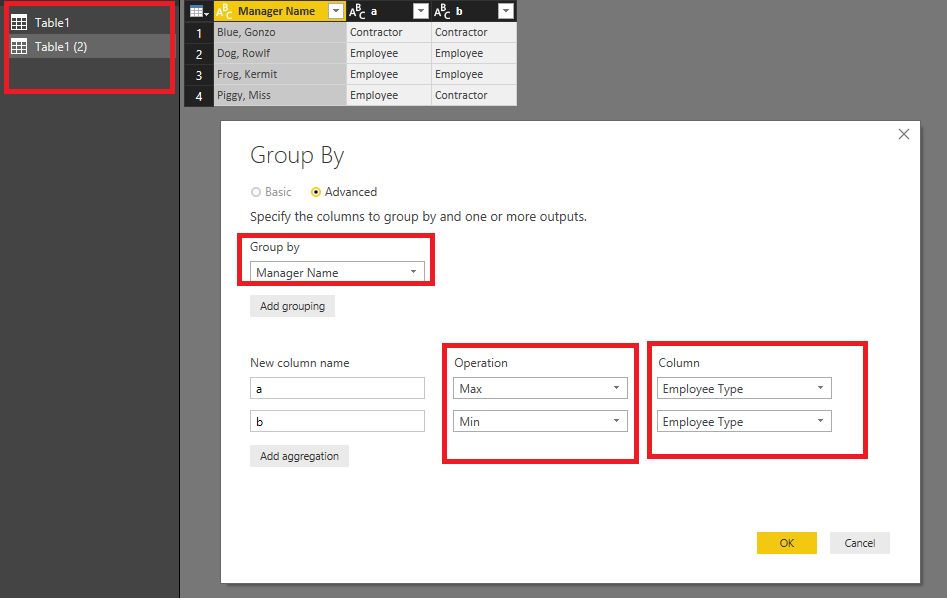
Based on my test, you could refer to below steps:
Copy your row table and use the group by function.
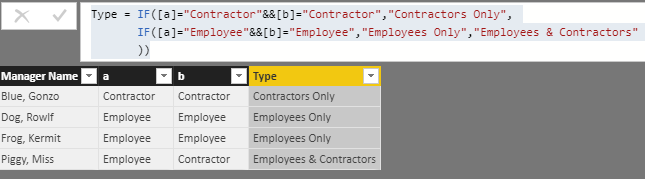
Apply it and create a calculated column.
Type = IF([a]="Contractor"&&[b]="Contractor","Contractors Only", IF([a]="Employee"&&[b]="Employee","Employees Only","Employees & Contractors" ))
Now you can see the result.
You can also download the PBIX file to have a view.
Regards,
Daniel He
Hi @v-danhe-msft,
Thank you for this. Unfortunately, I cannot seem to do that as "Employee Type" is a group I used to roll the 7 different types of people into two buckets. I tried doing it as a calculated column, but wouldn't show up on field list.
Is there an alternate way?
Added example raw data for context.
Bump. Anyone please?
The Power BI Data Visualization World Championships is back! It's time to submit your entry.
Check out the January 2026 Power BI update to learn about new features.
| User | Count |
|---|---|
| 65 | |
| 44 | |
| 31 | |
| 25 | |
| 23 |
| User | Count |
|---|---|
| 136 | |
| 115 | |
| 58 | |
| 39 | |
| 35 |