cancel
Showing results for 
Search instead for 
Did you mean: 

Learn from the best! Meet the four finalists headed to the FINALS of the Power BI Dataviz World Championships! Register now

Reply
Anonymous
Not applicable

Lock table size while drilling down

Hello.


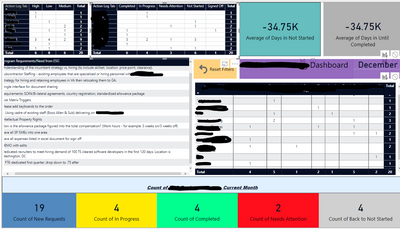
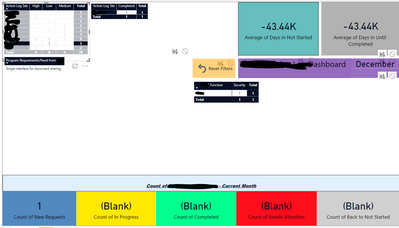
I have 4 matrix tables for a dashboard.  When the user clicks on a value, the tables act as intended and drill down the information.  The size of the tables changes/collaspes dues to not having data to display in that field.  Is it possible to have the table set/locked even though there is no data to display (like the left picture below)?


BeforeBeforeAfterAfterThe collasped view is hideous.


Thank you in advance!

1 ACCEPTED SOLUTION
Anonymous
Not applicable

Hello.  Thank you for the response.  I created the other table but could not establish the relationship like you suggested...i am not given the option   Not sure what I am doing wrong.


Would you be able to provide a little more detail?


Thank you again!

View solution in original post

2 REPLIES 2
v-chuncz-msft
Community Support
Community Support

@Anonymous,


Add a separate table that contains column headers in the matrix and create relationship on the column, then drag the column from this table to Columns and select Show items with no data.

Community Support Team _ Sam Zha
If this post helps, then please consider Accept it as the solution to help the other members find it more quickly.
Anonymous
Not applicable

Hello.  Thank you for the response.  I created the other table but could not establish the relationship like you suggested...i am not given the option   Not sure what I am doing wrong.


Would you be able to provide a little more detail?


Thank you again!

Helpful resources

Announcements
Join our Fabric User Panel

Join our Fabric User Panel

Share feedback directly with Fabric product managers, participate in targeted research studies and influence the Fabric roadmap.

February Power BI Update Carousel

Power BI Monthly Update - February 2026

Check out the February 2026 Power BI update to learn about new features.