Join us at FabCon Atlanta from March 16 - 20, 2026, for the ultimate Fabric, Power BI, AI and SQL community-led event. Save $200 with code FABCOMM.
Register now!The Power BI Data Visualization World Championships is back! Get ahead of the game and start preparing now! Learn more
I want to apply RLS on my report based on location of logged in user , that is user should see the data that belongs to his location only.
I am using location =Lookup(tbl[location], tbl[email], USERPRINCIPALNAME())
But when I do "view as Roles", no data is visible.
Hi @MathurAnjali ,
Please check the relationship of your data model.
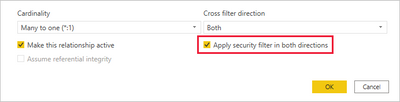
By default, row-level security filtering uses single-directional filters, whether the relationships are set to single direction or bi-directional. You can manually enable bi-directional cross-filtering with row-level security by selecting the relationship and checking the Apply security filter in both directions checkbox. Note that if a table takes part in multiple bi-directional relationships you can only select this option for one of those relationships. Select this option when you've also implemented dynamic row-level security at the server level, where row-level security is based on username or login ID.
For more details, please refer to:
Row-level security (RLS) with Power BI - Power BI | Microsoft Learn
Row-level security (RLS) guidance in Power BI Desktop - Power BI | Microsoft Learn
Best Regards,
Jianbo Li
If this post helps, then please consider Accept it as the solution to help the other members find it more quickly.
Check out the November 2025 Power BI update to learn about new features.
Advance your Data & AI career with 50 days of live learning, contests, hands-on challenges, study groups & certifications and more!
| User | Count |
|---|---|
| 58 | |
| 45 | |
| 40 | |
| 21 | |
| 18 |