Learn from the best! Meet the four finalists headed to the FINALS of the Power BI Dataviz World Championships! Register now
I want to apply RLS on my report based on location of logged in user , that is user should see the data that belongs to his location only.
I am using location =Lookup(tbl[location], tbl[email], USERPRINCIPALNAME())
But when I do "view as Roles", no data is visible.
Hi @MathurAnjali ,
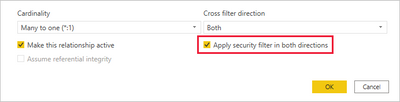
Please check the relationship of your data model.
By default, row-level security filtering uses single-directional filters, whether the relationships are set to single direction or bi-directional. You can manually enable bi-directional cross-filtering with row-level security by selecting the relationship and checking the Apply security filter in both directions checkbox. Note that if a table takes part in multiple bi-directional relationships you can only select this option for one of those relationships. Select this option when you've also implemented dynamic row-level security at the server level, where row-level security is based on username or login ID.
For more details, please refer to:
Row-level security (RLS) with Power BI - Power BI | Microsoft Learn
Row-level security (RLS) guidance in Power BI Desktop - Power BI | Microsoft Learn
Best Regards,
Jianbo Li
If this post helps, then please consider Accept it as the solution to help the other members find it more quickly.
| User | Count |
|---|---|
| 58 | |
| 44 | |
| 32 | |
| 16 | |
| 14 |
| User | Count |
|---|---|
| 82 | |
| 66 | |
| 42 | |
| 27 | |
| 25 |