Don't miss your chance to take the Fabric Data Engineer (DP-700) exam on us!
Learn moreWe've captured the moments from FabCon & SQLCon that everyone is talking about, and we are bringing them to the community, live and on-demand. Starts on April 14th. Register now
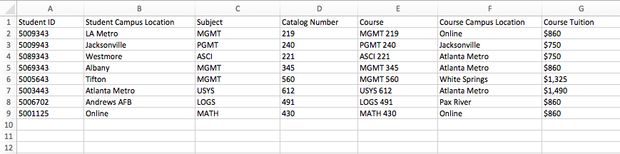
So in the attached image I have a sample from a spreadsheet. Each student has a "Student Campus Location" that is considered their home location. They can take courses at another location and it would always be reflected in the column "Course Campus Location". What I am trying to do is when the "Student Campus Location" is the same as "Course Campus Location" Calculate the tuition and assign it to that campus location. But when the "Student Campus Location" is not equal to the "Course Campus Location" then I want to calculate and assign the tuition to the "Course Campus Location". How would I do this?
For your sample data, could add a column manually which show your expected result? So that we can make further analysis. Besides, please provide the sample data as a file instead of a image, so that we can make further analysis.
Regards,
Charlie Liao
What mechanism are you proposing for assigning it to a course campus location?
For the first part of your question, you can get the campus course location total by the following:
Column = IF([Student Campus Location] = [Course Campus Location],[Course Tuiton],0)
The total of that column would give you the total for the student's tuiton at their campus location. Now, you could create similar columns, one for each course location and fill them with similar formulas.
I am not certain I understand the question about mechanism.
If you have recently started exploring Fabric, we'd love to hear how it's going. Your feedback can help with product improvements.
A new Power BI DataViz World Championship is coming this June! Don't miss out on submitting your entry.
Share feedback directly with Fabric product managers, participate in targeted research studies and influence the Fabric roadmap.
| User | Count |
|---|---|
| 53 | |
| 37 | |
| 35 | |
| 19 | |
| 17 |
| User | Count |
|---|---|
| 74 | |
| 69 | |
| 39 | |
| 35 | |
| 23 |