cancel
Showing results for 
Search instead for 
Did you mean: 

Join the FabCon + SQLCon recap series. Up next: Power BI, Real-Time Intelligence, IQ and AI, and Data Factory take center stage. All sessions are available on-demand after the live show. Register now

Reply
Anonymous
Not applicable

Locale

Below is my scenario:


- My Windows OS is in US

- My Power BI Global is in US

- My Current File Locale is in US (Power BI)

- The Source Excel File is in US


Now, I am trying to simulate what I am learning and need the dates in dd-mm-yy format. I tried using locale but it does not work.


Note: ** I do not want to change my OS settings and neither my Excel File**


Please advise. Thank You! 

1 ACCEPTED SOLUTION
Fowmy
Super User
Super User

@Anonymous 

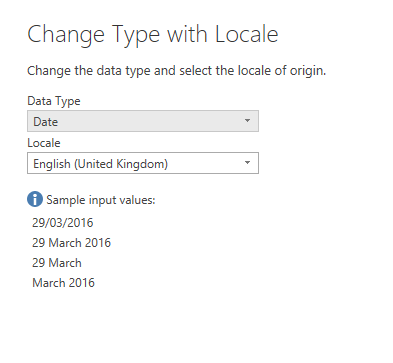
In Power Query, you can choose change type and use locale then pick the English (United Kingdom)

Fowmy_0-1632643011454.png

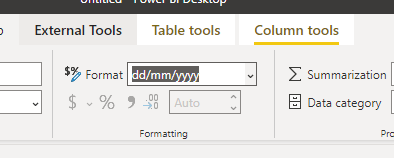
You can change it in the model by selecting the column and directly entering the format as follows

Fowmy_1-1632643160449.png


You can also check the new features added to the FORAMT function in the September 2021 release
https://powerbi.microsoft.com/en-us/blog/power-bi-september-2021-feature-summary/#post-17174-_Toc81908310

Did I answer your question? Mark my post as a solution! and hit thumbs up


Subscribe and learn Power BI from these videos

Website LinkedIn PBI User Group

View solution in original post

1 REPLY 1
Fowmy
Super User
Super User

@Anonymous 

In Power Query, you can choose change type and use locale then pick the English (United Kingdom)

Fowmy_0-1632643011454.png

You can change it in the model by selecting the column and directly entering the format as follows

Fowmy_1-1632643160449.png


You can also check the new features added to the FORAMT function in the September 2021 release
https://powerbi.microsoft.com/en-us/blog/power-bi-september-2021-feature-summary/#post-17174-_Toc81908310

Did I answer your question? Mark my post as a solution! and hit thumbs up


Subscribe and learn Power BI from these videos

Website LinkedIn PBI User Group

Helpful resources

Announcements
April Power BI Update Carousel

Power BI Monthly Update - April 2026

Check out the April 2026 Power BI update to learn about new features.

New to Fabric survey Carousel

New to Fabric Survey

If you have recently started exploring Fabric, we'd love to hear how it's going. Your feedback can help with product improvements.

Power BI DataViz World Championships carousel

Power BI DataViz World Championships - June 2026

A new Power BI DataViz World Championship is coming this June! Don't miss out on submitting your entry.

FabCon and SQLCon Highlights Carousel

FabCon &SQLCon Highlights

Experience the highlights from FabCon & SQLCon, available live and on-demand starting April 14th.