Join us at FabCon Atlanta from March 16 - 20, 2026, for the ultimate Fabric, Power BI, AI and SQL community-led event. Save $200 with code FABCOMM.
Register now!The Power BI Data Visualization World Championships is back! Get ahead of the game and start preparing now! Learn more
I have nearly 2000 csvs in one folder. I want to load them all into my PowerBI desktop and:
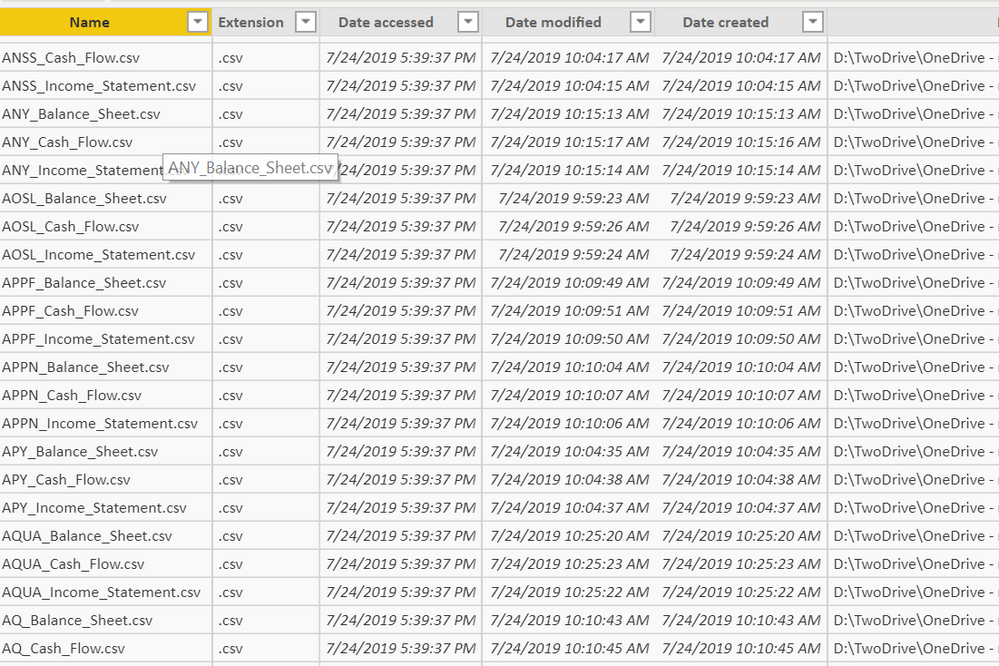
However when I clicked the load from folder button, it gave me the following:
looks like it doesn't actually load the csv at all. Any way to force the software to load them all as 1k plus tables or can I just add a column which stores the real csv data and access the "nested column" inside this newly created column?
Solved! Go to Solution.
Hi @AbelNewton
You can do it in three loads.
For each type of file, filter your table with (example Balance_Sheet), next click on two arrows in Content Column, this will expand all the files in to one table.
Repit this for all the file types.
@Mariusz To be honest, there are three kinds of structres: balance sheet, income statement and cash flow. I just want load them in bulk and deal with all of these later. Writing programs if needed is not a big issue for me.
Hi @AbelNewton
You can do it in three loads.
For each type of file, filter your table with (example Balance_Sheet), next click on two arrows in Content Column, this will expand all the files in to one table.
Repit this for all the file types.
The Power BI Data Visualization World Championships is back! Get ahead of the game and start preparing now!
| User | Count |
|---|---|
| 41 | |
| 39 | |
| 37 | |
| 29 | |
| 24 |
| User | Count |
|---|---|
| 122 | |
| 110 | |
| 83 | |
| 69 | |
| 68 |