cancel
Showing results for 
Search instead for 
Did you mean: 

The Power BI Data Visualization World Championships is back! Get ahead of the game and start preparing now! Learn more

Reply
AndreTru
New Member

Load data via load script

Hi All


i am new to POwer BI. In QlikView you could load a value in a data table for Example the data table was: Name. But inside the Data table there was Chris, John and Peter. But he load script would make lets say Chris display as Manager and John as Head Of Department. So the script would look something like this:

if(Name = 'Chris', 'Manager',
if(Name = 'John', 'head of Department')) as Name.


Any help would be great.


1 ACCEPTED SOLUTION
v-frfei-msft
Community Support
Community Support

Hi @AndreTru,


Based on my test, we can add a calculate column to meet your requirement.


header = IF('name'[Name]= "Chris","Manager",IF('name'[Name]="John","head of Department"))


The result as below.


1.png


For more details, please check the pbix as attached.


https://www.dropbox.com/s/dkpz3awbrdbw5wp/Load%20data%20via%20load%20script.pbix?dl=0


Regards,
Frank

Community Support Team _ Frank
If this post helps, then please consider Accept it as the solution to help the others find it more quickly.

View solution in original post

4 REPLIES 4
v-frfei-msft
Community Support
Community Support

Hi @AndreTru,


Based on my test, we can add a calculate column to meet your requirement.


header = IF('name'[Name]= "Chris","Manager",IF('name'[Name]="John","head of Department"))


The result as below.


1.png


For more details, please check the pbix as attached.


https://www.dropbox.com/s/dkpz3awbrdbw5wp/Load%20data%20via%20load%20script.pbix?dl=0


Regards,
Frank

Community Support Team _ Frank
If this post helps, then please consider Accept it as the solution to help the others find it more quickly.

Hello


Thanks for the reply, but I don't even know where to start with this!!!


Can you help?


TIA


regards

Andre

Hi @AndreTru,


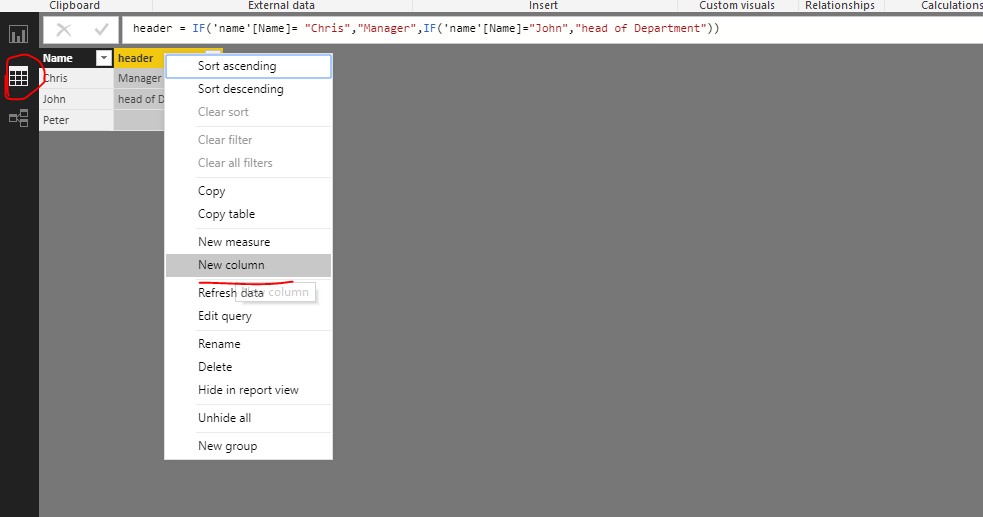
Just click the Data icon, then you will get this page. And right click any column to create a new column.

 123.png


Regards,

Frank

Community Support Team _ Frank
If this post helps, then please consider Accept it as the solution to help the others find it more quickly.

Hi @AndreTru,


Does that make sense? If so , kindly mark the answer as a solution to close the case, thanks in advance.


Regards,
Frank

Community Support Team _ Frank
If this post helps, then please consider Accept it as the solution to help the others find it more quickly.

Helpful resources

Announcements
Power BI DataViz World Championships

Power BI Dataviz World Championships

The Power BI Data Visualization World Championships is back! Get ahead of the game and start preparing now!

December 2025 Power BI Update Carousel

Power BI Monthly Update - December 2025

Check out the December 2025 Power BI Holiday Recap!

FabCon Atlanta 2026 carousel

FabCon Atlanta 2026

Join us at FabCon Atlanta, March 16-20, for the ultimate Fabric, Power BI, AI and SQL community-led event. Save $200 with code FABCOMM.