cancel
Showing results for 
Search instead for 
Did you mean: 

The Power BI Data Visualization World Championships is back! Get ahead of the game and start preparing now! Learn more

Reply
IanCockcroft
Post Patron
Post Patron

List records with no entries in related table

Hi guys,

we have an employee table and related to this is an access control table with a one to many relationship.

I have a table that shows all the employees that accessed the building by date. count by month.

I need to show in this table, anyone who didnt access the building in that month(worked from home).

e.g

Employee  
emploeeIDnamebu
1JoeFron Office
2RossBanking
3MonicaTreasury
4RachelBanking
5PhodeaTreasury
6ChandlerBanking


access control 
emploeeIDEvent date
12021-10-01
12021-10-02
12021-10-03
12021-10-04
12021-10-05
12021-10-06
22021-10-01
22021-10-02
22021-10-03
22021-10-04
22021-10-05
22021-10-06
32021-10-03
32021-10-04
32021-10-05
32021-10-06
52021-10-01
52021-10-02
52021-10-03
52021-10-04
52021-10-05
52021-10-06
52021-10-07
62021-10-05
62021-10-06


the result should be:

1JoeFron Office6
2RossBanking6
3MonicaTreasury4
4RachelBanking0
5PhodeaTreasury7
6ChandlerBanking2


Although Rachel never accessd the building and has no records in the access control table, i need to report the fact.

i have tried  few things, some DAX. trying to change the table relationships etc

any idea?

thanks a mil guys

1 ACCEPTED SOLUTION
VahidDM
Super User
Super User

Hi @IanCockcroft 


Try this code to add a column to the Employee table:

Column =
VAR _A =
    CALCULATE(
        COUNTROWS( 'access control' ),
        'access control'[emploeeID] = EARLIER( Employee[emploeeID] )
    )
RETURN
    IF( ISBLANK( _A ), 0, _A )


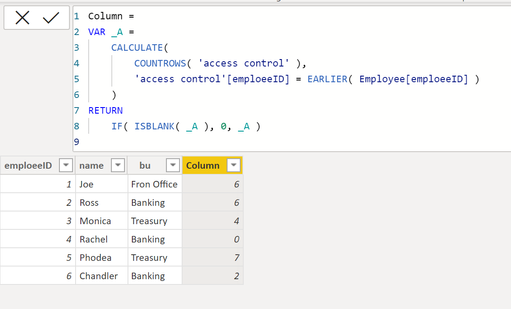
the output:

VahidDM_0-1635937570605.png


If this post helps, please consider accepting it as the solution to help the other members find it more quickly.

Appreciate your Kudos!!


View solution in original post

3 REPLIES 3
VahidDM
Super User
Super User

Hi @IanCockcroft 


Try this code to add a column to the Employee table:

Column =
VAR _A =
    CALCULATE(
        COUNTROWS( 'access control' ),
        'access control'[emploeeID] = EARLIER( Employee[emploeeID] )
    )
RETURN
    IF( ISBLANK( _A ), 0, _A )


the output:

VahidDM_0-1635937570605.png


If this post helps, please consider accepting it as the solution to help the other members find it more quickly.

Appreciate your Kudos!!


Thanks @VahidDM 

the DAX is 

               # of Office Access MTD =
               VAR _A =
               CALCULATE(
                 COUNTROWS( 'ACE Grouped'),
                    'ACE Grouped'[EmployeeID] = max( 'Employee Details'[RMB Employee Number])
                    )
              RETURN
             IF( ISBLANK( _A ), 0, _A )
 
I need to do another measure that does a SUM of the number of employees that  didnt access the office at least 4 times by Business Unit.
Any idea?

Thanks Vahid,

seems to be heading in the right direction.

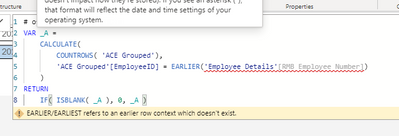
I do get an issue with EARIER()

IanCockcroft_0-1635939354262.png

any idea why?

thanks a mil  again

ps: it needs to   be dynamic depending on month selected, think thats why i get the error.

Helpful resources

Announcements
Power BI DataViz World Championships

Power BI Dataviz World Championships

The Power BI Data Visualization World Championships is back! Get ahead of the game and start preparing now!

December 2025 Power BI Update Carousel

Power BI Monthly Update - December 2025

Check out the December 2025 Power BI Holiday Recap!

FabCon Atlanta 2026 carousel

FabCon Atlanta 2026

Join us at FabCon Atlanta, March 16-20, for the ultimate Fabric, Power BI, AI and SQL community-led event. Save $200 with code FABCOMM.

Users online (8,324)