Join us at FabCon Atlanta from March 16 - 20, 2026, for the ultimate Fabric, Power BI, AI and SQL community-led event. Save $200 with code FABCOMM.
Register now!Get Fabric Certified for FREE during Fabric Data Days. Don't miss your chance! Request now
I'm trying to use a fill map to map the values EMEA, APAC, NA, and LAM.
It surprisingly difficult to find what expected values Power BI is expecting.
I see states are ok with Acronyms but I can't figure out what values I can use to represent this Region codes.
Thank You.
Solved! Go to Solution.
@Anonymous,
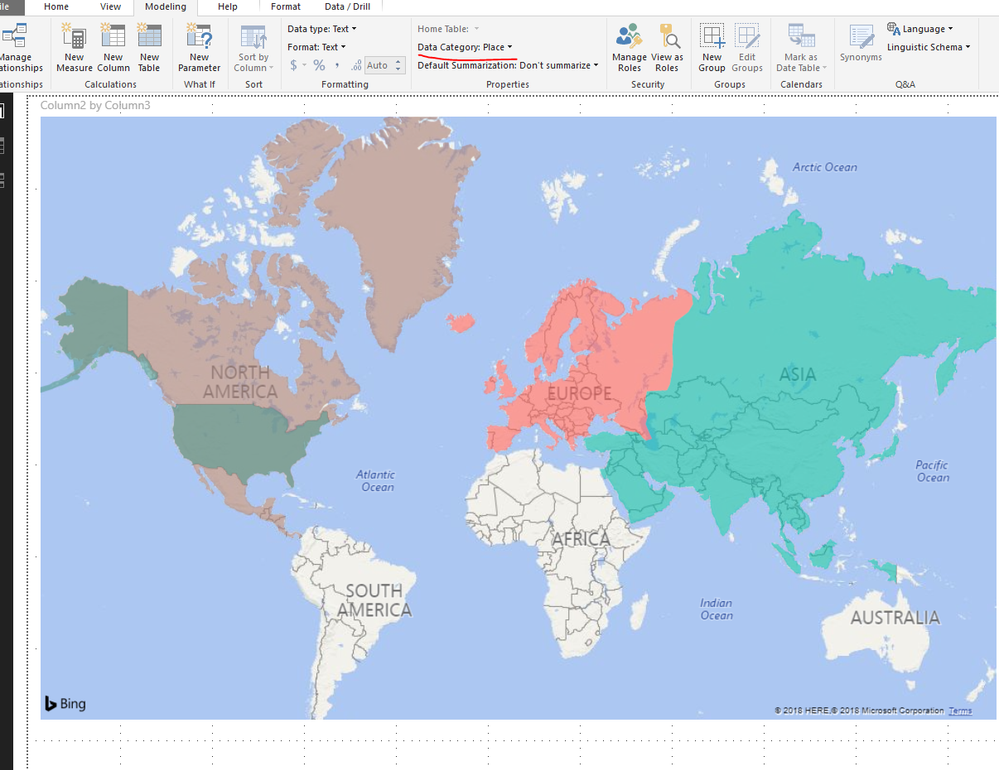
Power BI's filled map uses the Bing Maps API to get geocoded locations and outlines. It is not enough for filled map to recognize the regions using Acronyms. Please use full name of these regions, and set data category to Continent or Place in filled map.
Regards,
Lydia
Where can I get the specific lists of country names?
I am having the same question. How can I having performance presented by sub-continent like South East Asia, North Asia etc?
@Anonymous,
Power BI's filled map uses the Bing Maps API to get geocoded locations and outlines. It is not enough for filled map to recognize the regions using Acronyms. Please use full name of these regions, and set data category to Continent or Place in filled map.
Regards,
Lydia
Your image does not show the proper areas for Latin America and North America, so I'm wondering if those are the correct terms.
Does anyone know the correct terms and if they even work?
I'm getting Canada for North America on the bubble map. Central America shows up in the US, similar to the Latin America in @Anonymous answer below.
A year on and I see the same thing. Latin America highlights USA and North America is Mexico, Canada and Greenland.
Clarification please, MS team?
Check out the November 2025 Power BI update to learn about new features.
Advance your Data & AI career with 50 days of live learning, contests, hands-on challenges, study groups & certifications and more!