cancel
Showing results for 
Search instead for 
Did you mean: 

Next up in the FabCon + SQLCon recap series: The roadmap for Microsoft SQL and Maximizing Developer experiences in Fabric. All sessions are available on-demand after the live show. Register now

Reply
Anonymous
Not applicable

List of Connected data sources

How we can have table in power query with all data sources details like 


File NAme and File date


Please help

1 ACCEPTED SOLUTION
edhans
Community Champion
Community Champion

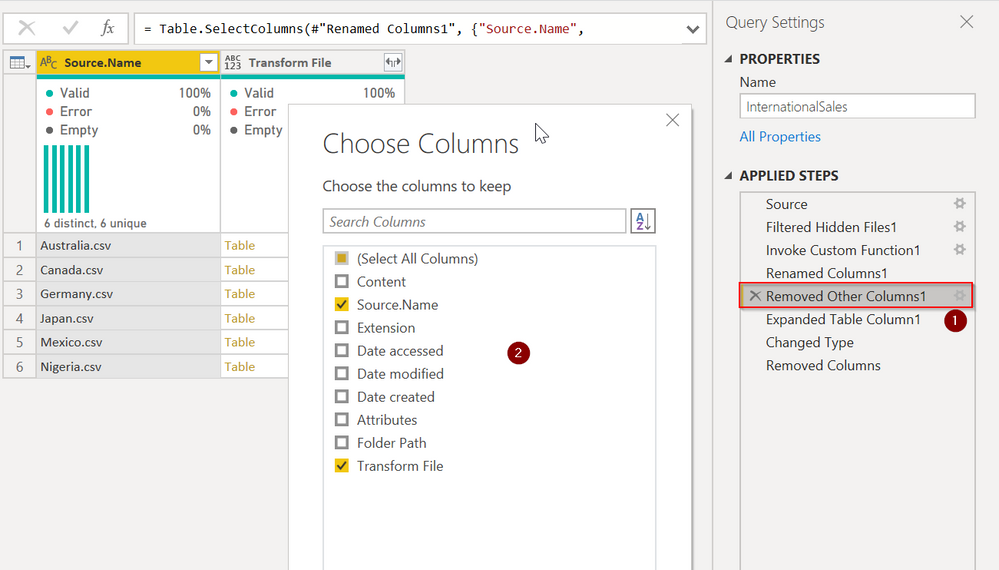
If you got your data by the File|Combine operation in Power Query, go to the "Removed Other Columns1" step that the combine opreation did.

  1. Press the gear icon
  2. Check the Source.Name and Date Modified fields.

edhans_0-1601600183263.png

If you are getting your data some other way though you cannot do that within Power Query itelf. The queries don't know properties about themselves.

You might see if Monkey Tools can help. It is a 3rd party app that does some cool stuff with Power Query, but don't know if it can extract that type of info and put into the data model for you.


Did I answer your question? Mark my post as a solution!
Did my answers help arrive at a solution? Give it a kudos by clicking the Thumbs Up!

DAX is for Analysis. Power Query is for Data Modeling


Proud to be a Super User!

MCSA: BI Reporting

View solution in original post

2 REPLIES 2
edhans
Community Champion
Community Champion

If you got your data by the File|Combine operation in Power Query, go to the "Removed Other Columns1" step that the combine opreation did.

  1. Press the gear icon
  2. Check the Source.Name and Date Modified fields.

edhans_0-1601600183263.png

If you are getting your data some other way though you cannot do that within Power Query itelf. The queries don't know properties about themselves.

You might see if Monkey Tools can help. It is a 3rd party app that does some cool stuff with Power Query, but don't know if it can extract that type of info and put into the data model for you.


Did I answer your question? Mark my post as a solution!
Did my answers help arrive at a solution? Give it a kudos by clicking the Thumbs Up!

DAX is for Analysis. Power Query is for Data Modeling


Proud to be a Super User!

MCSA: BI Reporting
amitchandak
Super User
Super User

@Anonymous , refer if these can help

https://www.sqlservercentral.com/blogs/include-file-name-in-content-using-power-query

https://www.youtube.com/watch?v=MlAGK90EKL8

Share with Power BI Enthusiasts: Full Power BI Video (20 Hours) YouTube
Microsoft Fabric Series 60+ Videos YouTube
Microsoft Fabric Hindi End to End YouTube

Helpful resources

Announcements
New to Fabric survey Carousel

New to Fabric Survey

If you have recently started exploring Fabric, we'd love to hear how it's going. Your feedback can help with product improvements.

Power BI DataViz World Championships carousel

Power BI DataViz World Championships - June 2026

A new Power BI DataViz World Championship is coming this June! Don't miss out on submitting your entry.

FabCon and SQLCon Highlights Carousel

FabCon &SQLCon Highlights

Experience the highlights from FabCon & SQLCon, available live and on-demand starting April 14th.

March Power BI Update Carousel

Power BI Community Update - March 2026

Check out the March 2026 Power BI update to learn about new features.