Get Fabric or SQL Certified for Free.
Get certified for free when you join Fabric Data Days 2026 and dive into Fabric, Power BI, SQL, AI, and other essential data skills.
Join now- Power BI forums
- Get Help with Power BI
- Desktop
- Service
- Report Server
- Power Query
- Mobile Apps
- Developer
- DAX Commands and Tips
- Custom Visuals Development Discussion
- Health and Life Sciences
- Power BI Spanish forums
- Translated Spanish Desktop
- Training and Consulting
- Instructor Led Training
- Dashboard in a Day for Women, by Women
- Galleries
- Data Stories Gallery
- Themes Gallery
- Contests Gallery
- QuickViz Gallery
- Quick Measures Gallery
- Visual Calculations Gallery
- Fabric Apps Gallery
- Notebook Gallery
- Translytical Task Flow Gallery
- TMDL Gallery
- R Script Showcase
- Webinars and Video Gallery
- Ideas
- Custom Visuals Ideas (read-only)
- Issues
- Issues
- Events
- Upcoming Events
July 7 - July 17 | Round 2 of the Power BI Dataviz World Championships. Don't miss your chance! Learn more
- Power BI forums
- Forums
- Get Help with Power BI
- Desktop
- Re: Linking Visuals
- Subscribe to RSS Feed
- Mark Topic as New
- Mark Topic as Read
- Float this Topic for Current User
- Bookmark
- Subscribe
- Printer Friendly Page


- Mark as New
- Bookmark
- Subscribe
- Mute
- Subscribe to RSS Feed
- Permalink
- Report Inappropriate Content
Linking Visuals
Hi All,
I have created a simple dashboard with 4 visuals on A - B - C - D, I have managed to get some of them to link across but stuck with 1 panel which changes when I try click on it. Maybe I'm attempting something that won;t work but I just can't figure it out.
So A is a date slicer fpr our support tickets which then links to B which shows customer divsions within the support tickets, B then links to C which shows the top N customers for that divsion which I then want to link to D which is the individuals from that company. The problem I have is when I click a customer in panel C the data correctly shows in D but the bar chart in C changes as if the filter back in B has reset to show all customers and not just the division selected customers.
I hope this makes sense?
Anyone got any ideas a) if this is possible and if it is b) what I've done wrong?
Thanks
Mick
Solved! Go to Solution.


- Mark as New
- Bookmark
- Subscribe
- Mute
- Subscribe to RSS Feed
- Permalink
- Report Inappropriate Content
- Mark as New
- Bookmark
- Subscribe
- Mute
- Subscribe to RSS Feed
- Permalink
- Report Inappropriate Content
I'm publishing to 'My Workspace' and I still need to press CNTRL on the webpage to hold the selection in C.


- Mark as New
- Bookmark
- Subscribe
- Mute
- Subscribe to RSS Feed
- Permalink
- Report Inappropriate Content
Hi !
Can you share a snapshot of your report. I need to see which visual you are using.
Regards,
- Mark as New
- Bookmark
- Subscribe
- Mute
- Subscribe to RSS Feed
- Permalink
- Report Inappropriate Content
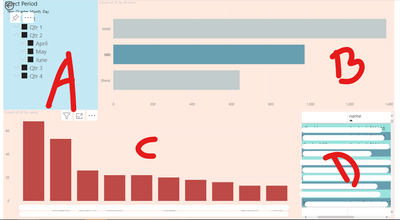
Using CNTRL + Click on C keeps the columns intact, not using it makes the view change.
- Mark as New
- Bookmark
- Subscribe
- Mute
- Subscribe to RSS Feed
- Permalink
- Report Inappropriate Content
Hi !
You can use Edit interactions for this. You can click on Visual C, click on Format Tab, click Edit Interactions, now apply None to Visual A & Viusal B. This will ensure any selection changes on Visual C will not impact visual A & B.
Regards,
- Mark as New
- Bookmark
- Subscribe
- Mute
- Subscribe to RSS Feed
- Permalink
- Report Inappropriate Content
Unfortunately that makes no difference, its visual C that changes when you select one of the bars. The bars are linked to the data table D which work as I want its just selecting itthe bars in C seem to reset its view as if nothing had been selected in section B
- Mark as New
- Bookmark
- Subscribe
- Mute
- Subscribe to RSS Feed
- Permalink
- Report Inappropriate Content
Hi !
Try checking Edit Interaction by clicking on the visual & then selecting the bahvior either you want to filter another visual or apply no filter based on your requirement criteria.
Regards,
Hasham
- Mark as New
- Bookmark
- Subscribe
- Mute
- Subscribe to RSS Feed
- Permalink
- Report Inappropriate Content
- Mark as New
- Bookmark
- Subscribe
- Mute
- Subscribe to RSS Feed
- Permalink
- Report Inappropriate Content
Yes this works thank you.
Can this be done without the CNTRL key?
- Mark as New
- Bookmark
- Subscribe
- Mute
- Subscribe to RSS Feed
- Permalink
- Report Inappropriate Content
Hi !
When you publish your Report into Power BI Service [app.powerbi.com] you don't need to press [Ctrl +] to make it work.
Regards,
Hasham

Helpful resources

FabCon & SQLCon – Barcelona 2026
Join us in Barcelona for FabCon and SQLCon, the Fabric, Power BI, SQL, and AI community event. Save €200 with code FABCMTY200.

Power BI Monthly Update - July 2026
Check out the July 2026 Power BI update to learn about new features.

Data Days 2026
Join Data Days 2026: 60 days of free live/on-demand sessions, challenges, study groups, and certification opportunities.

Power BI DataViz World Championships - June 2026
A new Power BI DataViz World Championship is coming this June! Don't miss out on submitting your entry.

| User | Count |
|---|---|
| 30 | |
| 25 | |
| 25 | |
| 23 | |
| 16 |


| User | Count |
|---|---|
| 54 | |
| 35 | |
| 27 | |
| 24 | |
| 20 |


