cancel
Showing results for 
Search instead for 
Did you mean: 

Join the FabCon + SQLCon recap series. Up next: Power BI, Real-Time Intelligence, IQ and AI, and Data Factory take center stage. All sessions are available on-demand after the live show. Register now

Reply
Anonymous
Not applicable

Linking 2 Tables

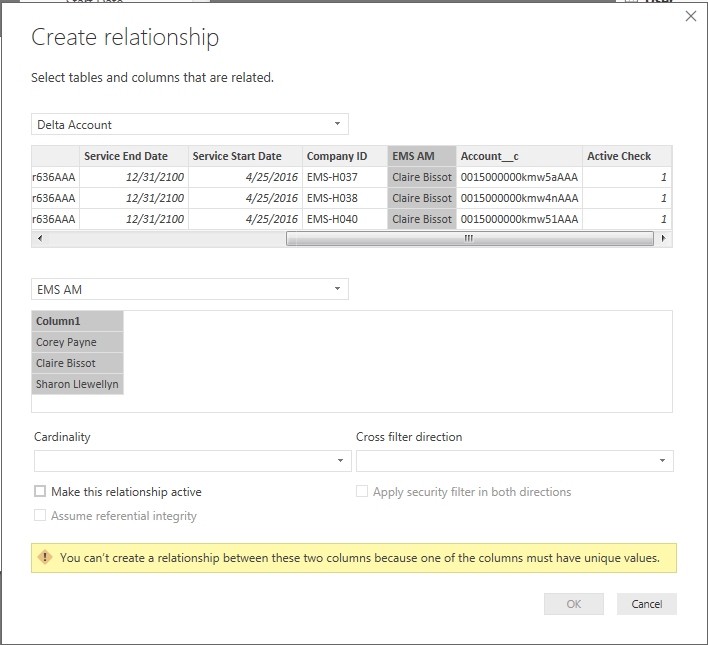
I have 2 tables I'm attempting to link together through a middle table with unique values which are people's names. I took the names from both tables, appended the tables, and removed duplicates so they only appear once. Now I am attmepting to establish a relationship from either table to this link table I've created and I'm still unable to. How can I connect two tables that have mulitple names multiple times? The bottom table only has each name appear once so I don't know what else the issue could be:

1.PNG

1 ACCEPTED SOLUTION

Well, first thing to do is to check if this is the problem. Create two measures and display them in card visuals:


Measure 7 = COUNT('Table10'[Text])

Measure 8 = DISTINCTCOUNT('Table10'[Text])

If you get different values, you have an issue.


Then, typically what you do is to go into Power Query and do a Trim and Clean before your remove duplicates. It is often handy to sort the column in the model and visually inspect.


You can figure out what values are duplicated by doing this:


Table = SUMMARIZE(Table10,Table10[Text],"Count",COUNTROWS(Table10))


Follow on LinkedIn
@ me in replies or I'll lose your thread!!!
Instead of a Kudo, please vote for this idea
Become an expert!: Enterprise DNA
External Tools: MSHGQM
YouTube Channel!: Microsoft Hates Greg
Latest book!:
DAX For Humans

DAX is easy, CALCULATE makes DAX hard...

View solution in original post

4 REPLIES 4
Greg_Deckler
Community Champion
Community Champion

Generally this is a matter of what M considers a duplicate and what DAX considers a duplicate. Often there are trailing spaces, capitalization issues, etc. that M doesn't consider duplicates but DAX does.


Follow on LinkedIn
@ me in replies or I'll lose your thread!!!
Instead of a Kudo, please vote for this idea
Become an expert!: Enterprise DNA
External Tools: MSHGQM
YouTube Channel!: Microsoft Hates Greg
Latest book!:
DAX For Humans

DAX is easy, CALCULATE makes DAX hard...
Anonymous
Not applicable

@Greg_Deckler Is there any way to check for this to see where the discrepanices may be?

Well, first thing to do is to check if this is the problem. Create two measures and display them in card visuals:


Measure 7 = COUNT('Table10'[Text])

Measure 8 = DISTINCTCOUNT('Table10'[Text])

If you get different values, you have an issue.


Then, typically what you do is to go into Power Query and do a Trim and Clean before your remove duplicates. It is often handy to sort the column in the model and visually inspect.


You can figure out what values are duplicated by doing this:


Table = SUMMARIZE(Table10,Table10[Text],"Count",COUNTROWS(Table10))


Follow on LinkedIn
@ me in replies or I'll lose your thread!!!
Instead of a Kudo, please vote for this idea
Become an expert!: Enterprise DNA
External Tools: MSHGQM
YouTube Channel!: Microsoft Hates Greg
Latest book!:
DAX For Humans

DAX is easy, CALCULATE makes DAX hard...
Anonymous
Not applicable

@Greg_Deckler Worked perfectly! Setting up the cards showed a count of 29 and distinct count of 30. The culprit was a null value in the count of 30. Once I removed that null value in the editor, all was good. Thanks again!

Helpful resources

Announcements
April Power BI Update Carousel

Power BI Monthly Update - April 2026

Check out the April 2026 Power BI update to learn about new features.

New to Fabric survey Carousel

New to Fabric Survey

If you have recently started exploring Fabric, we'd love to hear how it's going. Your feedback can help with product improvements.

Power BI DataViz World Championships carousel

Power BI DataViz World Championships - June 2026

A new Power BI DataViz World Championship is coming this June! Don't miss out on submitting your entry.

FabCon and SQLCon Highlights Carousel

FabCon &SQLCon Highlights

Experience the highlights from FabCon & SQLCon, available live and on-demand starting April 14th.