- Power BI forums
- Get Help with Power BI
- Desktop
- Service
- Report Server
- Power Query
- Mobile Apps
- Developer
- DAX Commands and Tips
- Custom Visuals Development Discussion
- Health and Life Sciences
- Power BI Spanish forums
- Translated Spanish Desktop
- Training and Consulting
- Instructor Led Training
- Dashboard in a Day for Women, by Women
- Galleries
- Data Stories Gallery
- Themes Gallery
- Contests Gallery
- QuickViz Gallery
- Quick Measures Gallery
- Visual Calculations Gallery
- Notebook Gallery
- Translytical Task Flow Gallery
- TMDL Gallery
- R Script Showcase
- Webinars and Video Gallery
- Ideas
- Custom Visuals Ideas (read-only)
- Issues
- Issues
- Events
- Upcoming Events
Learn from the best! Meet the four finalists headed to the FINALS of the Power BI Dataviz World Championships! Register now
- Power BI forums
- Forums
- Get Help with Power BI
- Desktop
- Re: Link multiple value column
- Subscribe to RSS Feed
- Mark Topic as New
- Mark Topic as Read
- Float this Topic for Current User
- Bookmark
- Subscribe
- Printer Friendly Page

- Mark as New
- Bookmark
- Subscribe
- Mute
- Subscribe to RSS Feed
- Permalink
- Report Inappropriate Content
Link multiple value column
Hi ,
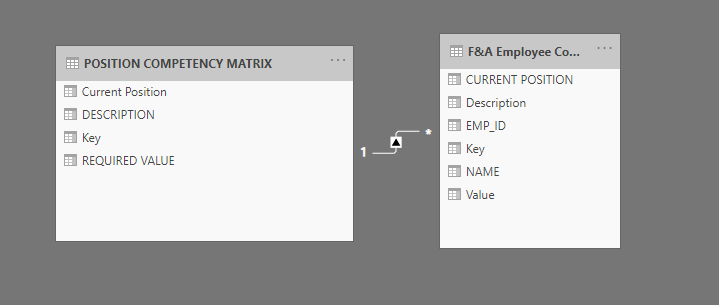
I've a issue here. I am trying to create a relationship between two tables as shown in the picture. I am looking to have one table that filters Minimum requirement, actual skills , Description, current positions based on the name that i have in slicer. For some reasons I am getting the duplicate values in my table and i couldn't able to figure it out where it is coming from.
Any help would be greatly appreciated.
Thanks,

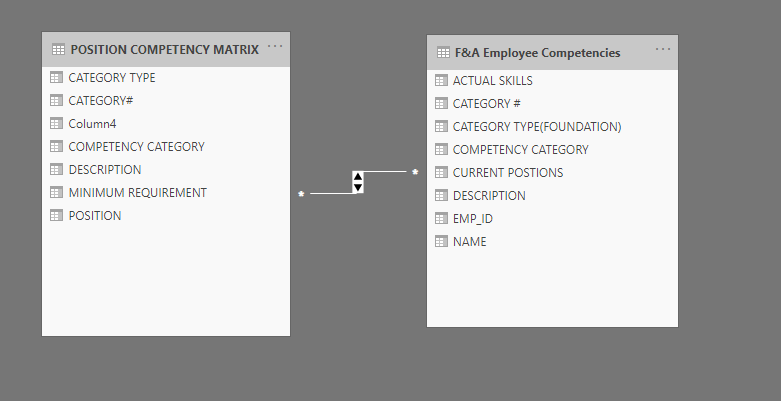
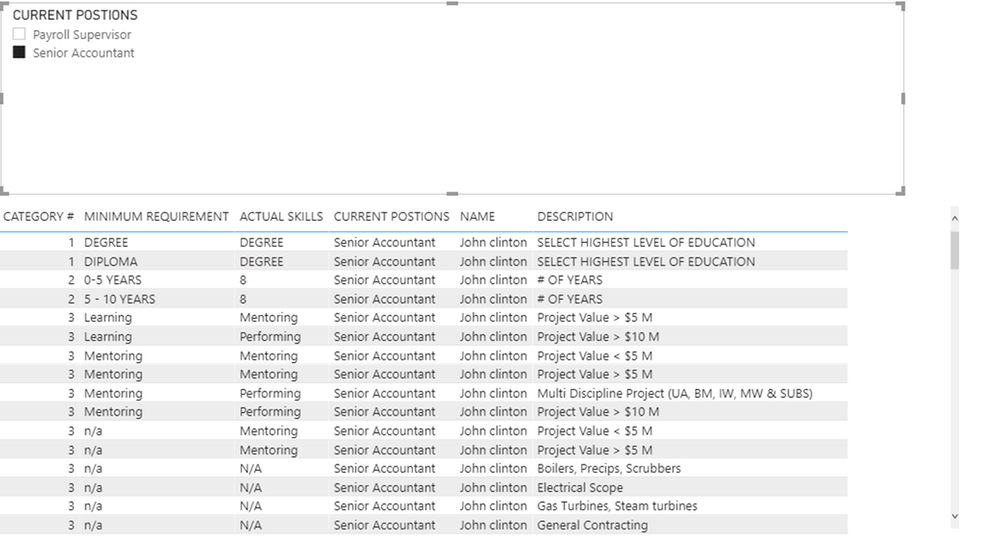
Solved! Go to Solution.


- Mark as New
- Bookmark
- Subscribe
- Mute
- Subscribe to RSS Feed
- Permalink
- Report Inappropriate Content
Hi @Gowtham30 ,
Click the visual>go to field>right click the column(not showing all the data)>"show item with no data":

Check whether this way will present all the data.
Kelly


- Mark as New
- Bookmark
- Subscribe
- Mute
- Subscribe to RSS Feed
- Permalink
- Report Inappropriate Content
@Gowtham30 , You can create a concatenated column and use that as key
key = [col1] &"-" & [col2] &"-"& [col3]
- Mark as New
- Bookmark
- Subscribe
- Mute
- Subscribe to RSS Feed
- Permalink
- Report Inappropriate Content
Hi Amit,
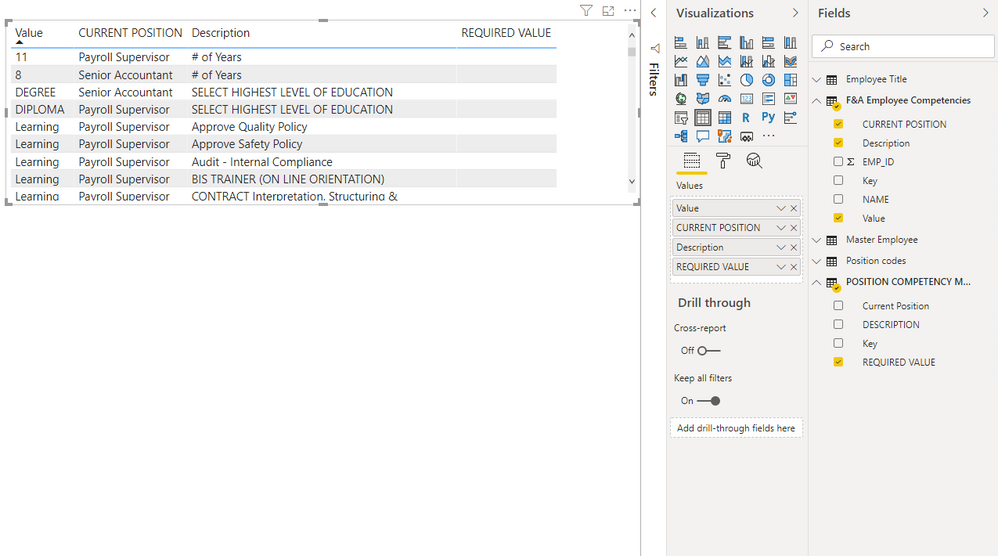
Thanks for your reply, I tried merging two columns in both tables and used as a key. When i was trying to plot the tables the output looked liked this. The required value columns comes empty. I am still missing some connections i guess. Thanks,
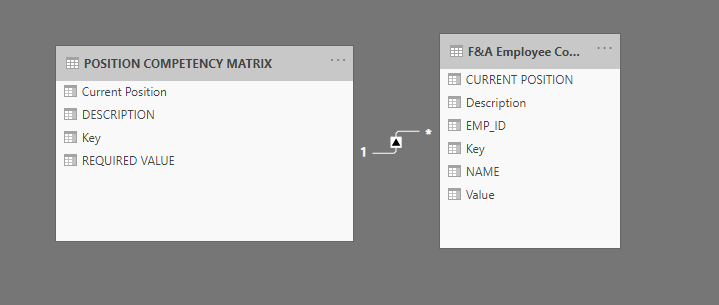
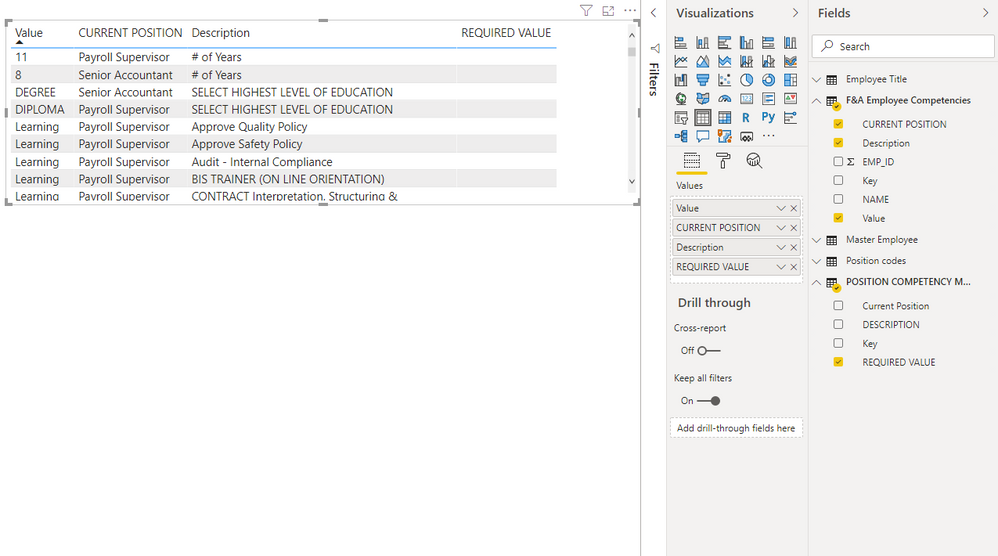
- Mark as New
- Bookmark
- Subscribe
- Mute
- Subscribe to RSS Feed
- Permalink
- Report Inappropriate Content
Hi @Gowtham30 ,
In your oringinal post,as the relationship between the 2 tables are many to many and you dont have a unique key,that's why you have duplicate values.
And in the last reply,as the direction in the relationship is single,so it may filter out some value,pls try to change the direction from single to both,see below:

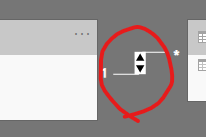
Kelly
- Mark as New
- Bookmark
- Subscribe
- Mute
- Subscribe to RSS Feed
- Permalink
- Report Inappropriate Content
Hi, @v-kelly-msft @amitchandak
I did change the filtering to both ways but my model still not pulling any values in the required value column.
Please advise.
Thanks,


- Mark as New
- Bookmark
- Subscribe
- Mute
- Subscribe to RSS Feed
- Permalink
- Report Inappropriate Content
Hi @Gowtham30 ,
Click the visual>go to field>right click the column(not showing all the data)>"show item with no data":
Check whether this way will present all the data.
Kelly
- Mark as New
- Bookmark
- Subscribe
- Mute
- Subscribe to RSS Feed
- Permalink
- Report Inappropriate Content
Somebody help, Please.
Thanks !!
- Mark as New
- Bookmark
- Subscribe
- Mute
- Subscribe to RSS Feed
- Permalink
- Report Inappropriate Content
Hi Amit,
Thanks for your reply, I tried merging two columns in both tables and used as a key. When i was trying to plot the tables the output looked liked this. The required value columns comes empty. I am still missing some connections i guess. Thanks,

Helpful resources

New to Fabric Survey
If you have recently started exploring Fabric, we'd love to hear how it's going. Your feedback can help with product improvements.

Power BI DataViz World Championships - June 2026
A new Power BI DataViz World Championship is coming this June! Don't miss out on submitting your entry.

Join our Fabric User Panel
Share feedback directly with Fabric product managers, participate in targeted research studies and influence the Fabric roadmap.

Power BI Community Update - March 2026
Check out the March 2026 Power BI update to learn about new features.

| User | Count |
|---|---|
| 57 | |
| 34 | |
| 33 | |
| 18 | |
| 16 |


| User | Count |
|---|---|
| 67 | |
| 65 | |
| 44 | |
| 30 | |
| 28 |


