cancel
Showing results for 
Search instead for 
Did you mean: 

Did you hear? There's a new SQL AI Developer certification (DP-800). Start preparing now and be one of the first to get certified. Register now

Reply
Anonymous
Not applicable

Link Table

Hi All,


I need Help.!

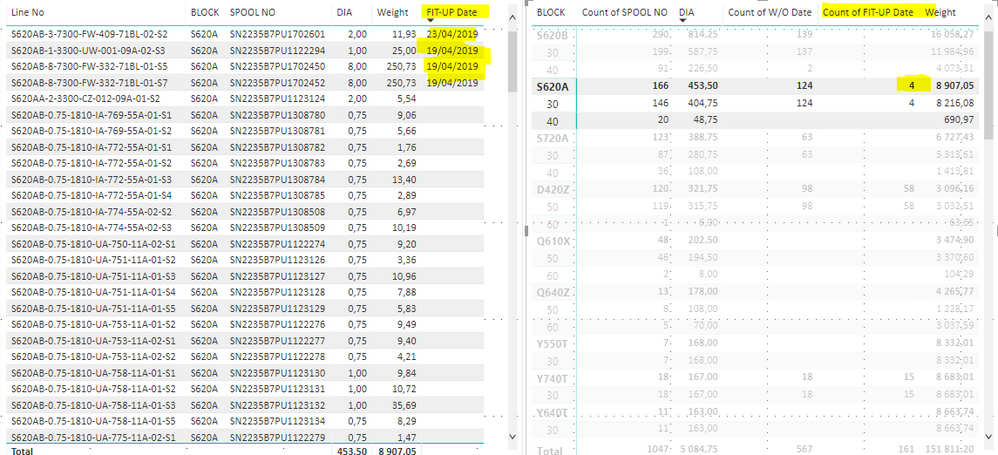
These are 2 tables that i have. The part i can't make as i want is Fit-up Date.

When i click 4 on right table, I want to see only 4 lines which have fit-up Dates on left table.

Do you have any ideas? or is it impossible?


thanks,

fit-up2.PNG

3 REPLIES 3
d_gosbell
Super User
Super User

Could you just add a filter to the left table to exclude blank Fit-up dates from that table?

Anonymous
Not applicable

Sorry i don't understand what you mean?

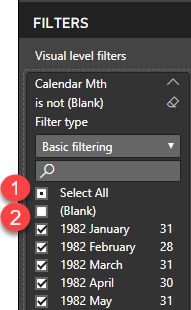
So click on the left table, then in the visualizations tab under the filter section find the Fit-up Date field then click "Select All" then untick "(Blank)"

eg.
201905 filter blanks.png

Helpful resources

Announcements
April Power BI Update Carousel

Power BI Monthly Update - April 2026

Check out the April 2026 Power BI update to learn about new features.

Fabric SQL PBI Data Days

Data Days 2026 coming soon!

Sign up to receive a private message when registration opens and key events begin.

New to Fabric survey Carousel

New to Fabric Survey

If you have recently started exploring Fabric, we'd love to hear how it's going. Your feedback can help with product improvements.

Power BI DataViz World Championships carousel

Power BI DataViz World Championships - June 2026

A new Power BI DataViz World Championship is coming this June! Don't miss out on submitting your entry.