Join us at FabCon Atlanta from March 16 - 20, 2026, for the ultimate Fabric, Power BI, AI and SQL community-led event. Save $200 with code FABCOMM.
Register now!The Power BI Data Visualization World Championships is back! Get ahead of the game and start preparing now! Learn more
Hi All,
I need Help.!
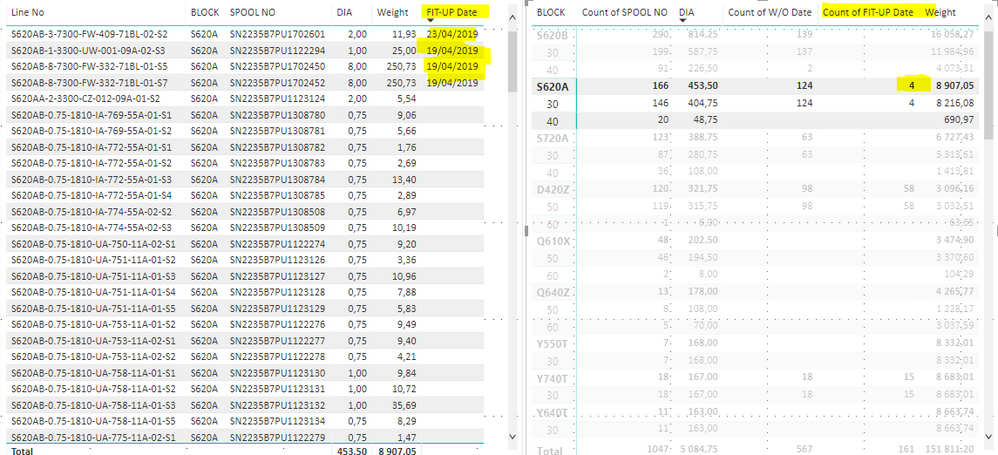
These are 2 tables that i have. The part i can't make as i want is Fit-up Date.
When i click 4 on right table, I want to see only 4 lines which have fit-up Dates on left table.
Do you have any ideas? or is it impossible?
thanks,
Could you just add a filter to the left table to exclude blank Fit-up dates from that table?
Sorry i don't understand what you mean?
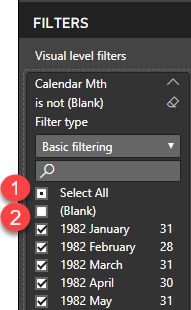
So click on the left table, then in the visualizations tab under the filter section find the Fit-up Date field then click "Select All" then untick "(Blank)"
eg.
The Power BI Data Visualization World Championships is back! Get ahead of the game and start preparing now!
| User | Count |
|---|---|
| 40 | |
| 35 | |
| 34 | |
| 31 | |
| 27 |
| User | Count |
|---|---|
| 135 | |
| 102 | |
| 67 | |
| 65 | |
| 56 |