Join us at FabCon Atlanta from March 16 - 20, 2026, for the ultimate Fabric, Power BI, AI and SQL community-led event. Save $200 with code FABCOMM.
Register now!Get Fabric Certified for FREE during Fabric Data Days. Don't miss your chance! Request now
Hello,
I have a report which uses a measure to display a '7-day moving average' as a line over some other data on a line and stacked column chart. The x-axis is the date. This works well; however, when published to Power BI web service the report won't load the visual if the slicer is selecting more than 3 weeks of data as 'This visual has exceeded the available resources' (the dataset is quite large).
As a workaround, I thought that I could show the chart as normal, but set the line for the moving average to begin 3 weeks prior to todays date. I think this would allow the line to display (staying within the resource limit).
Does anyone have experience with this? I am happy to create a measure to define the start date, but I'm unsure if I'm able to specify the line to start at a specific point on the x-axis instead of showing on the whole range of dates.
Hi @Anonymous ,
You can use filter to change your x axis.
Best Regards,
Eads
If this post helps, then please consider Accept it as the solution to help the other members find it more quickly.
Hi Eads,
Thanks for your response.
I'm sorry if I wasnt clear in my original post. If possible, I'd like to have a particular measure show as a line for only the most recent data to work around the resource limit.
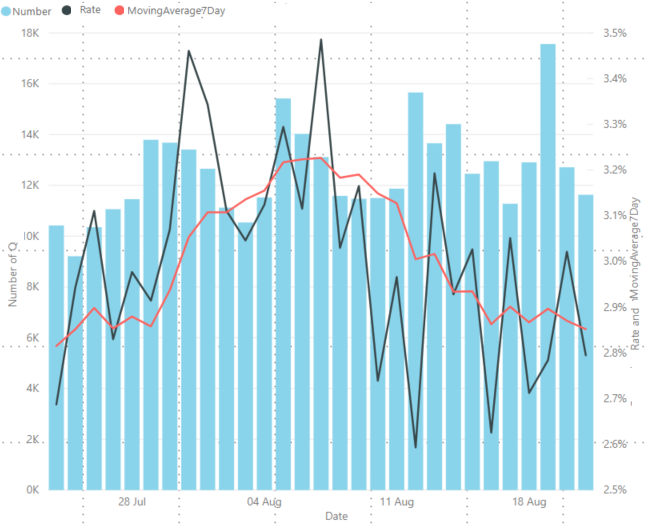
At the moment, the chart displays like this in Desktop:
However this won't display in Power BI Online due to the resource limit being reached (max that can be displayed is 3 weeks).
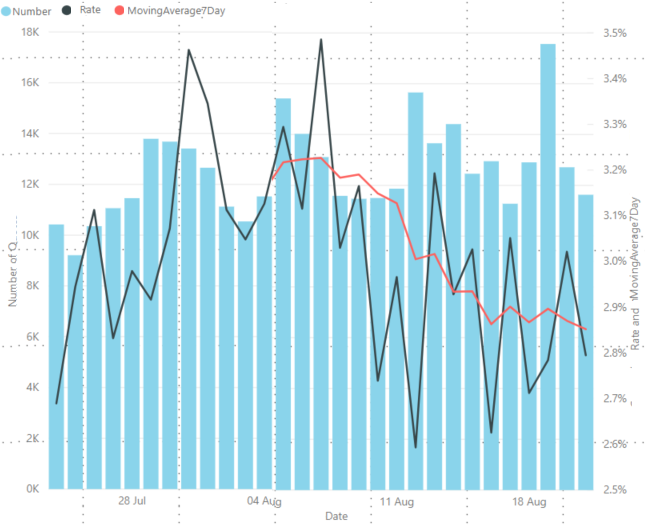
So I was wondering if I could have it display like this, with the measure only displaying from the date three weeks prior to todays date:
Check out the November 2025 Power BI update to learn about new features.
Advance your Data & AI career with 50 days of live learning, contests, hands-on challenges, study groups & certifications and more!