
Get certified for free when you join Fabric Data Days 2026 and dive into Fabric, Power BI, SQL, AI, and other essential data skills.
Join nowData Days is here! Join us now for 60+ days of learning, challenges, and connection. Learn more
Hi all,
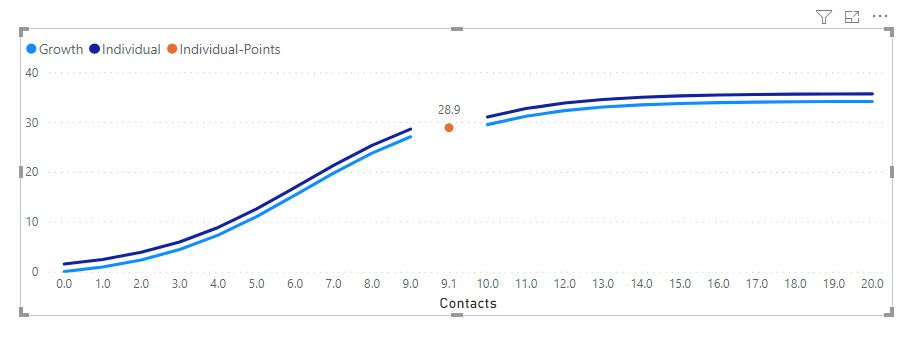
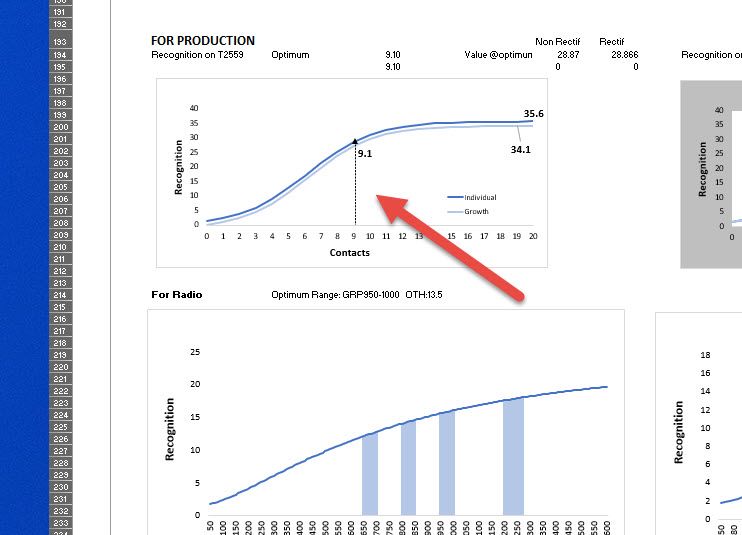
I have a line chart with 3 metrics.
Two metrics (Growth and Individual) represent a curve
The Individual point is an indication of a specific moment that occurs at 9.1 contacts.
My question is:
Below is my data used
Many thanks in advance
D.
| Contacts | Individual | Growth | Individual-Points |
| 0 | 1.528716301 | 0 | |
| 1 | 2.451718549 | 0.923002247 | |
| 2 | 3.868910809 | 2.340194508 | |
| 3 | 5.958488009 | 4.429771707 | |
| 4 | 8.862417829 | 7.333701527 | |
| 5 | 12.58284838 | 11.05413208 | |
| 6 | 16.88261508 | 15.35389878 | |
| 7 | 21.29800479 | 19.76928849 | |
| 8 | 25.31467164 | 23.78595534 | |
| 9 | 28.58532245 | 27.05660615 | |
| 9.1 | 28.86574326 | ||
| 10 | 31.01651328 | 29.48779698 | |
| 11 | 32.70400268 | 31.17528638 | |
| 12 | 33.82032617 | 32.29160987 | |
| 13 | 34.53551258 | 33.00679628 | |
| 14 | 34.98433996 | 33.45562365 | |
| 15 | 35.26236832 | 33.73365202 | |
| 16 | 35.43320852 | 33.90449222 | |
| 17 | 35.53766411 | 34.00894781 | |
| 18 | 35.60133658 | 34.07262028 | |
| 19 | 35.64007712 | 34.11136082 | |
| 20 | 35.66362159 | 34.13490529 |
Solved! Go to Solution.
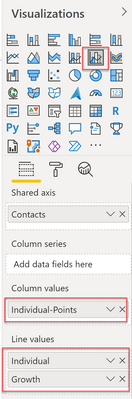
@ADP007 yes you can achieve bar, use Line and Clustered column chart
Learn about conditional formatting at Microsoft Reactor
My latest blog post The Power of Using Calculation Groups with Inactive Relationships (Part 1) (perytus.com) I would ❤ Kudos if my solution helped. 👉 If you can spend time posting the question, you can also make efforts to give Kudos to whoever helped to solve your problem. It is a token of appreciation!
⚡ Visit us at https://perytus.com, your one-stop-shop for Power BI-related projects/training/consultancy.
Subscribe to the @PowerBIHowTo YT channel for an upcoming video on List and Record functions in Power Query!!
Learn Power BI and Fabric - subscribe to our YT channel - Click here: @PowerBIHowTo
If my solution proved useful, I'd be delighted to receive Kudos. When you put effort into asking a question, it's equally thoughtful to acknowledge and give Kudos to the individual who helped you solve the problem. It's a small gesture that shows appreciation and encouragement! ❤
Did I answer your question? Mark my post as a solution. Proud to be a Super User! Appreciate your Kudos 🙂
Feel free to email me with any of your BI needs.
@ADP007 yes you can achieve bar, use Line and Clustered column chart
Learn about conditional formatting at Microsoft Reactor
My latest blog post The Power of Using Calculation Groups with Inactive Relationships (Part 1) (perytus.com) I would ❤ Kudos if my solution helped. 👉 If you can spend time posting the question, you can also make efforts to give Kudos to whoever helped to solve your problem. It is a token of appreciation!
⚡ Visit us at https://perytus.com, your one-stop-shop for Power BI-related projects/training/consultancy.
Subscribe to the @PowerBIHowTo YT channel for an upcoming video on List and Record functions in Power Query!!
Learn Power BI and Fabric - subscribe to our YT channel - Click here: @PowerBIHowTo
If my solution proved useful, I'd be delighted to receive Kudos. When you put effort into asking a question, it's equally thoughtful to acknowledge and give Kudos to the individual who helped you solve the problem. It's a small gesture that shows appreciation and encouragement! ❤
Did I answer your question? Mark my post as a solution. Proud to be a Super User! Appreciate your Kudos 🙂
Feel free to email me with any of your BI needs.
Hi @amitchandak
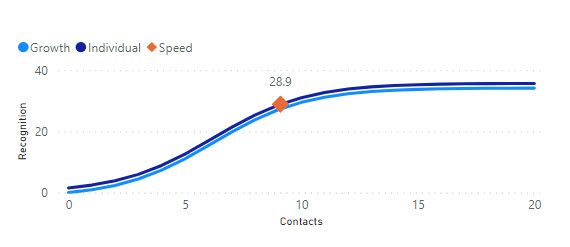
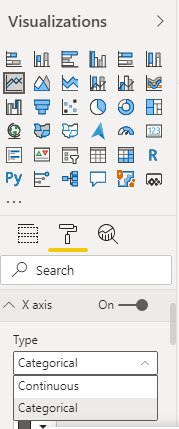
Yes it does work thanks. Just a pity I can't see all the X values 0,1,2,3 instead of 0,5,10 etc...
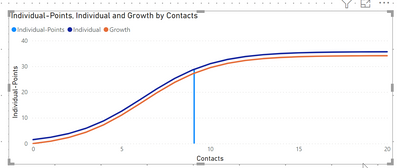
Do you think it's possible somehow to have a vertical line at 28.9? Like the image below (see red arrow)
Thanks
D.
Don't miss out on Data Days, June 15 through August 7. Learn Fabric, Power BI, SQL, AI and more.
Check out the May 2026 Power BI update to learn about new features.
| User | Count |
|---|---|
| 23 | |
| 21 | |
| 20 | |
| 18 | |
| 13 |
| User | Count |
|---|---|
| 58 | |
| 50 | |
| 38 | |
| 31 | |
| 27 |