Join us at FabCon Atlanta from March 16 - 20, 2026, for the ultimate Fabric, Power BI, AI and SQL community-led event. Save $200 with code FABCOMM.
Register now!Get Fabric Certified for FREE during Fabric Data Days. Don't miss your chance! Request now
Hi
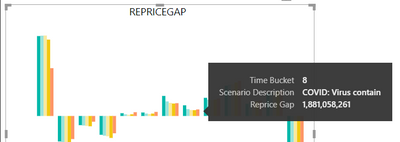
Did anyone know why in line chart the tooltips doesn't show the column name like what it does in bar chart? Example here I only can see 8 in the line chart, I expected it show the column name also so its became "Time Bucket 8" like what show in bar chart tooltips.
Solved! Go to Solution.
@AN2021 seem like standard tooltip feature.
You can create a custom one use tooltip page https://docs.microsoft.com/en-us/power-bi/desktop-tooltips
Log an idea -https://ideas.powerbi.com/ideas/
I have submitted an idea to dev team. Please vote here -
https://community.fabric.microsoft.com/t5/Fabric-Ideas/Line-chart-tooltips-doesn-t-show-column-name/...
Thanks,
Deepak Kumar
Hi @AN2021 ,
Did amitchandak's suggestions help with your scenario? if that is the case, you can consider Kudo or accept his suggestions to help others who faced similar requirements.
If these also don't help, please share more detailed information to help us clarify your scenario to test.
How to Get Your Question Answered Quickly
Regards,
Xiaoxin Sheng
@AN2021 seem like standard tooltip feature.
You can create a custom one use tooltip page https://docs.microsoft.com/en-us/power-bi/desktop-tooltips
Log an idea -https://ideas.powerbi.com/ideas/
Check out the November 2025 Power BI update to learn about new features.
Advance your Data & AI career with 50 days of live learning, contests, hands-on challenges, study groups & certifications and more!