cancel
Showing results for 
Search instead for 
Did you mean: 

Get Fabric Certified for FREE during Fabric Data Days. Don't miss your chance! Request now

Reply
lddiaz
Frequent Visitor

Line chart - showing two different years of data with 1 line

Hi all,
Part of a report I am creating for my manager requires a line chart with a single line showing 12 months of data. The data dates back to 2017, so it should show 12 months of data, up to the most recent month and year. 


Right now, the line chart looks like this:
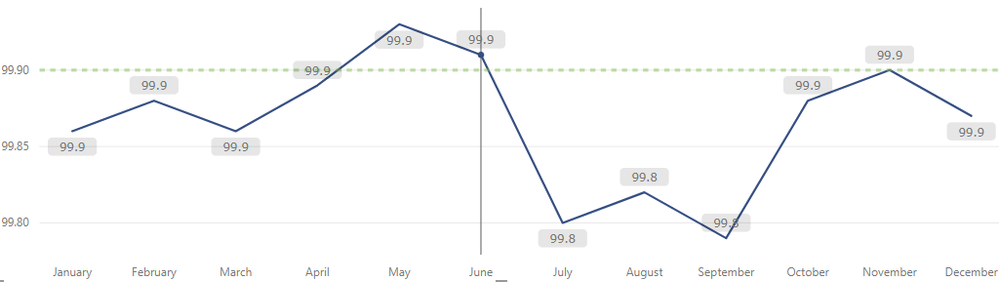
actual-linechart.PNG

 It needs to look something like this:
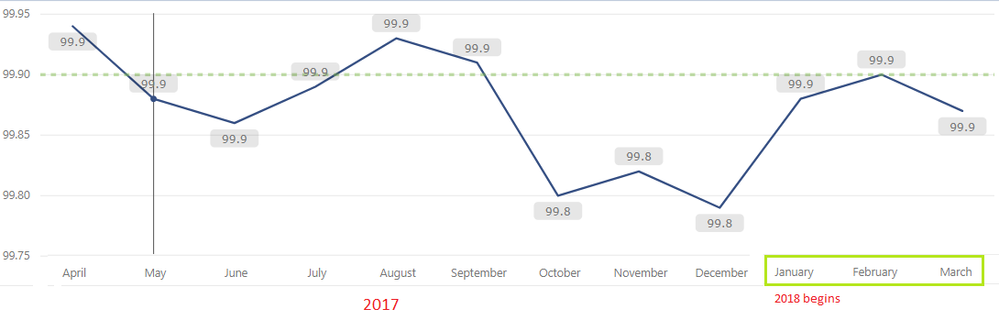


want-linechart.PNG


Every time we reach a new month in 2018, the month to the left (April 2017), should disappear so we can make room for April 2018 on the right.


I’m having a difficult time creating this in Power BI. I have tried a few things: creating a single date column in Excel with both 2017 and 2018 months (Power BI treats them all as one year instead of 2 different ones), creating two columns named month and year and concatenating them within Power BI with their corresponding data (Power BI still treats them all as one year instead of 2 different ones).


A concern here is that Power BI likes to organize the months in chronological order, when in my desired visual, I don’t want chronological order by month name; I want order by year.


Is my desired visual possible in Power BI? I would appreciate any guidance/suggestions on this. 

Thanks!


1 ACCEPTED SOLUTION
Vvelarde
Community Champion
Community Champion

@lddiaz


Hi, To had separate years-month in the visual


Axis Concatenate Year-Month.gif


Regards


Victor

Lima - Peru


Lima - Peru

View solution in original post

2 REPLIES 2
Vvelarde
Community Champion
Community Champion

@lddiaz


Hi, To had separate years-month in the visual


Axis Concatenate Year-Month.gif


Regards


Victor

Lima - Peru


Lima - Peru

Ahh! Thank you. What a simple fix. 🙂

Helpful resources

Announcements
November Power BI Update Carousel

Power BI Monthly Update - November 2025

Check out the November 2025 Power BI update to learn about new features.

Fabric Data Days Carousel

Fabric Data Days

Advance your Data & AI career with 50 days of live learning, contests, hands-on challenges, study groups & certifications and more!

FabCon Atlanta 2026 carousel

FabCon Atlanta 2026

Join us at FabCon Atlanta, March 16-20, for the ultimate Fabric, Power BI, AI and SQL community-led event. Save $200 with code FABCOMM.

Top Solution Authors
Top Kudoed Authors