cancel
Showing results for 
Search instead for 
Did you mean: 

The Power BI Data Visualization World Championships is back! Get ahead of the game and start preparing now! Learn more

Reply
efanta
Frequent Visitor

Line chart´s problem

Hi all,


I generated a line chart where its shown a KPI measured in three different ways:


Monthly (Cyan one)= Monthly measurement of the KPI

Accumulated (Black one) = measured from the beginning of a year to a specific month of the same year (should restart each January)

12 Month Moving Average (Red one) = Represents the running total of a 12 month period


For each ways, I used the following formulas:


Monthly:


KPI CAP Monthly= 1-SUM('DB'[cli*t*g ap])/([Total costumers]*[days])


Accumulatd:


KPI CAP Accumulated=
CALCULATE (
1-SUM('DB'[cli*t*g ap])/([Total costumers]*[days]),
FILTER (
ALLSELECTED('DB'[date]),
'DB'[date] <= MAX ( 'DB'[date] )


12-Month:


KPI CAP MM =
CALCULATE (
1-SUM('DB'[cli*t*g ap])/([Total costumers]*[days]),ALL('DB'[year),
DATESINPERIOD('DB'[date],LASTDATE('DB'[date]),"-11",MONTH))


I set 1 slicer in the report: Year (DB[year]) and contains 2 years: 2015 and 2016.


When I analyze the values for each year separately, the formulas works great. But when I see the whole line chart (2015 AND 2016) the Accumulated presents errors.


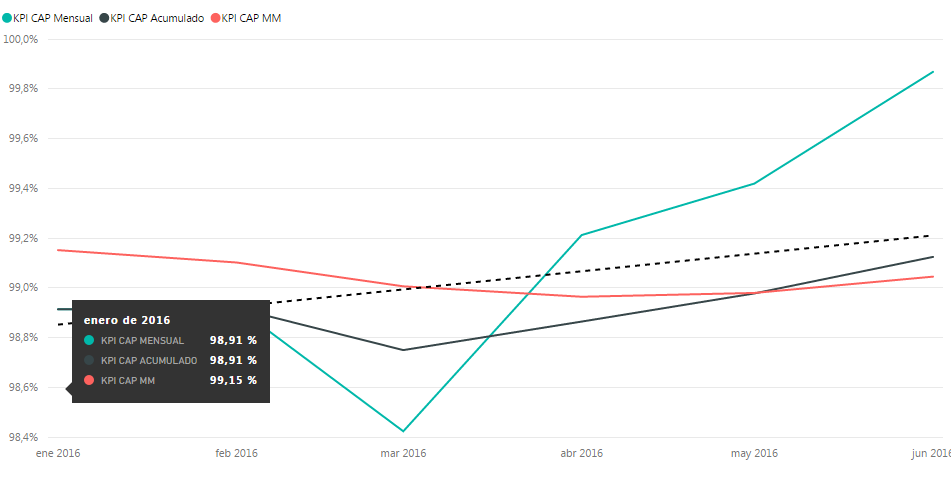
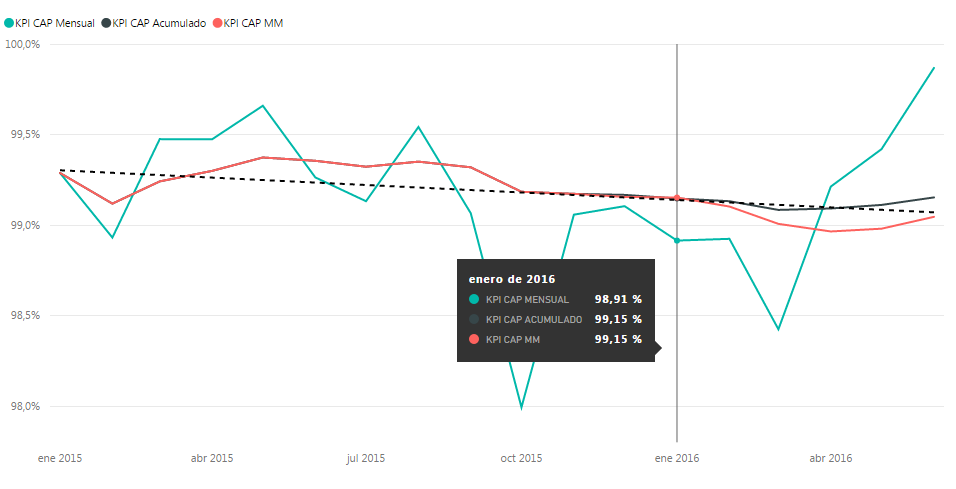
As you can see in the following pictures, the acummulated kpi in 2015 finish different at the monthly kpi (Thats correct) and restart in 2016 (same value as Janury's monthly KPI in 2016). The first chart is with 2015 slicer activated and the second one is with 2016 slicer activated. When I select Both years (to analyze the whole values) the accumulated KPI changes and does not restart with the year. In addition, selecting both years, the Accumulated KPI´s values change for the whole dates!


I'm trying to get the same values for this kpi independent of the selection of years. I would appreciate someone could help me!


20152015201620162015 and 20162015 and 2016

1 ACCEPTED SOLUTION
v-sihou-msft
Microsoft Employee
Microsoft Employee

@efanta


In this scenario, you didn't specify filters on Year level. So when you select both years, it only takes all dates as context for calculation without respecting current year. Your formula can be like:


KPI CAP Accumulated=
CALCULATE (
1-SUM('DB'[cli*t*g ap])/([Total costumers]*[days]),
FILTER (
ALL('DB'[date]),
'DB'[Year] = MAX ( 'DB'[Year] ) &&
'DB'[date] <= MAX ( 'DB'[date] )
)

For more information, please refer to: Time Patterns.


Regards,

View solution in original post

2 REPLIES 2
v-sihou-msft
Microsoft Employee
Microsoft Employee

@efanta


In this scenario, you didn't specify filters on Year level. So when you select both years, it only takes all dates as context for calculation without respecting current year. Your formula can be like:


KPI CAP Accumulated=
CALCULATE (
1-SUM('DB'[cli*t*g ap])/([Total costumers]*[days]),
FILTER (
ALL('DB'[date]),
'DB'[Year] = MAX ( 'DB'[Year] ) &&
'DB'[date] <= MAX ( 'DB'[date] )
)

For more information, please refer to: Time Patterns.


Regards,

It works! Thanks!

Helpful resources

Announcements
Power BI DataViz World Championships

Power BI Dataviz World Championships

The Power BI Data Visualization World Championships is back! Get ahead of the game and start preparing now!

December 2025 Power BI Update Carousel

Power BI Monthly Update - December 2025

Check out the December 2025 Power BI Holiday Recap!

FabCon Atlanta 2026 carousel

FabCon Atlanta 2026

Join us at FabCon Atlanta, March 16-20, for the ultimate Fabric, Power BI, AI and SQL community-led event. Save $200 with code FABCOMM.