Hello all,
I have the following data structure
| Date | ProductID | Stock | MinimumStock |
| 01/01/2020 | Product1 | 125 | 30 |
| 02/01/2020 | Product1 | 75 | 30 |
| 03/01/2020 | Product1 | 15 | 30 |
| 04/01/2020 | Product1 | 65 | 30 |
| 01/01/2020 | Product2 | 100 | 150 |
| 02/01/2020 | Product2 | 200 | 150 |
| 03/01/2020 | Product2 | 160 | 150 |
| 04/01/2020 | Product2 | 160 | 150 |
Stock is the number of items of that product I had in my storage on that given day
MinimumStock is the minimum number of that item to trigger the order
Date in my example table is dd/mm/yyyy, just to clarify.
The real table I'm using has about 300k rows, and more than 1k products.
I would like to get something like this:
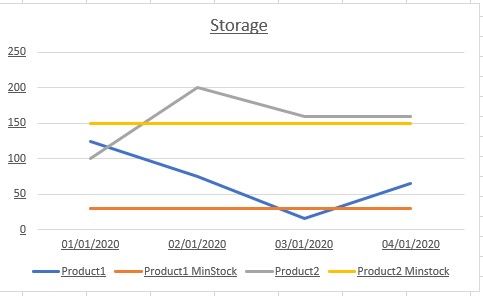
In this way, when i filter for a single product, I get his storage movements and his minimum stock, and I can compare them.
In PowerBI, I got a line chart with
Axis: Data
Legend: ProductID
Value: Stock
If I try to add MinimumStock to Y2, nothing happens. Like I drag the column over the Y2 box, it gets dashed, I drop it and nothing, it does not get added to the Y2 box or the chart.
If I just check the column name, it goes into the tooltips, but that's not what I want.
Any suggestion? Even if I manually add this simple example data to my PowerBI model, it behaves in the same way.
Thank you very much!
Fabio


