Hi, guys
I have developed this DAX formula to calculate some performance indicators for my help desk agents.
Formula:
AgentCard =
VAR xOpen = CALCULATE(COUNTROWS(zendesk), zendesk[status] = "Open")
VAR xSolved = CALCULATE(COUNTROWS(zendesk), zendesk[status] = "Solved")
VAR xOnhold = CALCULATE(COUNTROWS(zendesk), zendesk[status] = "On-hold")
VAR xScaled = CALCULATE(COUNTROWS(zendesk), zendesk[status] = "Scaled")
VAR xPending = CALCULATE(COUNTROWS(zendesk), zendesk[status] = "Pending")
VAR FRESTBMC =
    MAXX(
        SUMMARIZE(zendesk, zendesk[First resolution time brackets], "Count", COUNT(zendesk[First resolution time brackets])),
        [Count]
    )
VAR FRESTBMR =
    MAXX(
        FILTER(
            SUMMARIZE(zendesk, zendesk[First resolution time brackets], "Count", COUNT(zendesk[First resolution time brackets])),
            [Count] = FRESTBMC
        ),
        zendesk[First resolution time brackets]
    )
VAR FRTBMC =
    MAXX(
        SUMMARIZE(zendesk, zendesk[First reply time brackets], "Count", COUNT(zendesk[First reply time brackets])),
        [Count]
    )
VAR FRTBMR =
    MAXX(
        FILTER(
            SUMMARIZE(zendesk, zendesk[First reply time brackets], "Count", COUNT(zendesk[First reply time brackets])),
            [Count] = FRTBMC
        ),
        zendesk[First reply time brackets]
    )
VAR FRTBUMC =
    MAXX(
        SUMMARIZE(zendesk, zendesk[Full resolution time brackets (Unsorted)], "Count", COUNT(zendesk[Full resolution time brackets (Unsorted)])),
        [Count]
    )
VAR FRTBUMR =
    MAXX(
        FILTER(
            SUMMARIZE(zendesk, zendesk[Full resolution time brackets (Unsorted)], "Count", COUNT(zendesk[Full resolution time brackets (Unsorted)])),
            [Count] = FRTBUMC
        ),
        zendesk[Full resolution time brackets (Unsorted)]
    )
RETURN
    "Open: " & IF(xOpen > 0, xOpen, 0)  & UNICHAR(10) &
    "Solved: " & IF(xSolved > 0, xSolved, 0) & UNICHAR(13) & UNICHAR(10) &
    "On-hold: " & IF(xOnhold > 0, xOnhold, 0) & UNICHAR(13) & UNICHAR(10) &
    "Scaled: " & IF(xScaled > 0, xScaled, 0) & UNICHAR(13) & UNICHAR(10) &
    "Pending: " & IF(xPending > 0, xPending, 0) & UNICHAR(13) & UNICHAR(10) &
    "First reply time brackets: " & FRTBMR & " | " & IF(FRTBMC>0,FRTBMC,0) & UNICHAR(13) & UNICHAR(10) &
    "Full resolution time brackets: " & FRTBUMR & " | " & IF(FRTBUMC>0,FRTBUMC,0) & UNICHAR(13) & UNICHAR(10) &
    "First resolution time brackets: " & FRESTBMR & " | " & IF(FRESTBMC>0,FRESTBMC,0)
I have placed it on a card and it works without problems but I can not align the data to the left since this visualization does not have that property.
I have found another visualization called Advance Card that if it gives me what I am looking for but for some reason the line break does not work.
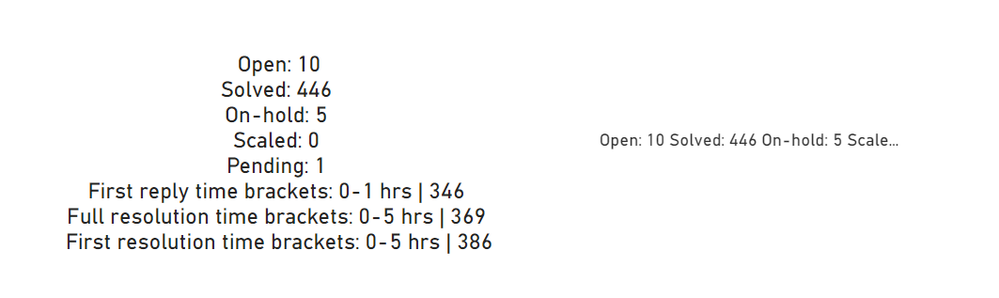
I would like to know what you think about it and how you think I can solve this challenge.
Thanks a lot


