cancel
Showing results for 
Search instead for 
Did you mean: 

July 7 - July 17 | Round 2 of the Power BI Dataviz World Championships. Don't miss your chance! Learn more

Reply
Umaxy
Frequent Visitor

Line/Stacked Column Chart, Orginization between seperate data sets and identifying matching cases.


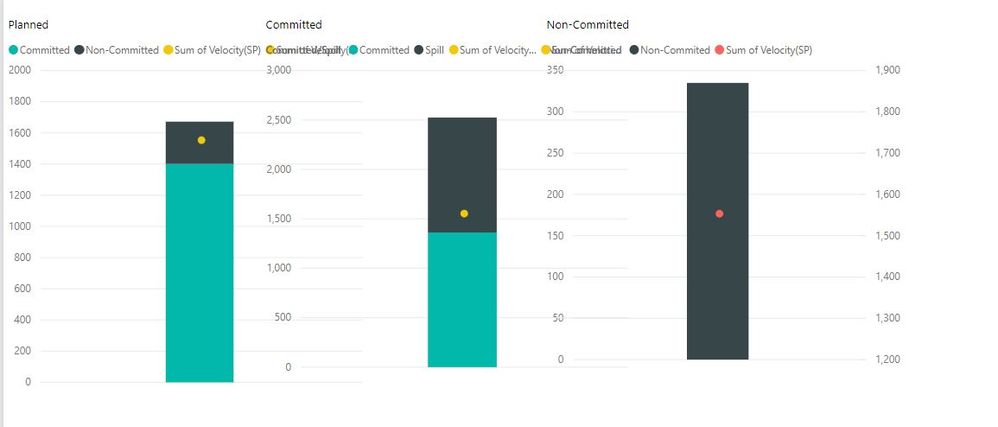
Ok, so this is as far as I could get. Individually, these are the 3 visualizations I am hoping to combine. 

Capture.JPG                            

One column is planned, committed, non-committed, with a line across indicating capacity(currently a dot).


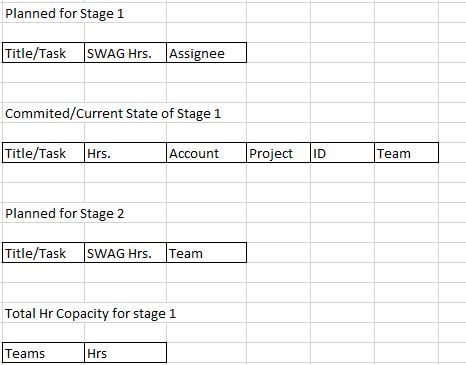
3 datasets are being used.
 

1.JPG


What I have tried:


So I first started with determining what was still in Stage 1 from the Planning Phase, Added to Stage 1 that was not from the planning phase and lastly what was moved to stage 2. I used this


From Stage 1 Planning Phase = CALCULATE( COUNTROWS('Planned'), FILTER( 'Planned', 'Planned'[Title] = EARLIER('Committed/Actual'[Title]))) > 0


followed by in the next column 


Committed/Non-Committed = IF('Planned'[From Stage 1 Planning Phase] = True, "Committed", "Non-Committed")


This showed me simply what made it from planned and what pushed to stage 2. 

I then followed the same process with Committed/Actual data set to determine what was added to stage 1.


This is more or less how I created the graphs above using the sum of hours.


Now how do I combine these visualizations? 

So I started with attempting to combine all the data into one query then using an if statement to assign its status(Planned, Committed, Added, Not Committed). I had issues with merging the data as the data sets are not all the same. In the future, that will change but for now, it is where I'm at. 

Also when making one query I would only be able to assign committed, not committed and added. Plus I would miss out on the detail of where what came from. 


Any tips are greatly appreciated. I don't know how else I should attack this. 


Thank You

6 REPLIES 6
Umaxy
Frequent Visitor

So i was able to sort this out. My issue was in how the data was managed.


I added a column defining each data set as committed, planned, non-committed. This I used for my shared axis.

I then appended the data into one list.


I then followed instructions form this source:


https://www.excelguru.ca/blog/2015/12/09/identify-duplicates-using-power-query/


This allowed me to make a case for each situation.


I then added a custom column with this if statement:


=if [Literal] = "Planned"
then "Planned"
else if [Literal] = "Committed" and [Match] = 1
then "Committed"
else if [Literal] = "Committed" and [Match] = 0
then "Spill"
else if [Literal] = "Non-Committed" and [Match] = 1
then "Non-Committed"
else "Do not include"

This was used as my Column Series.


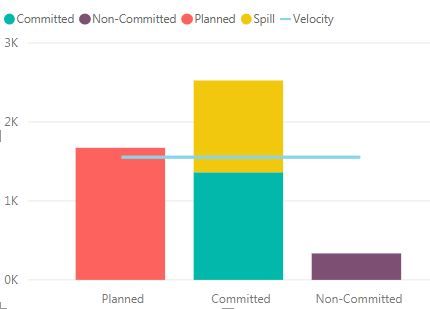
Which produced the graph i was looking for.


Lastly, I have 2 more items i hope to tackle.


When entering in a line value it does not go across the entirety of the visual?

And how i could go about also splitting the planned column with "Non-Committed' and "Committed"?


Capture.JPG

Anonymous
Not applicable

HI @Umaxy,


I'd like to suggest you add column to group your status(Non-Committed and Committed), then use this column as legend field.


Regards,

Xiaoxin Sheng

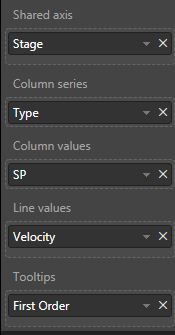
So these are my options:


Capture.JPG


I am not able to add any other columns to "Column Series" or "Column Values".


Stage is how i sort between Planned, Committed and Noon-Committed.


Type is how I sort between committed, non-committed, spill, and planned.


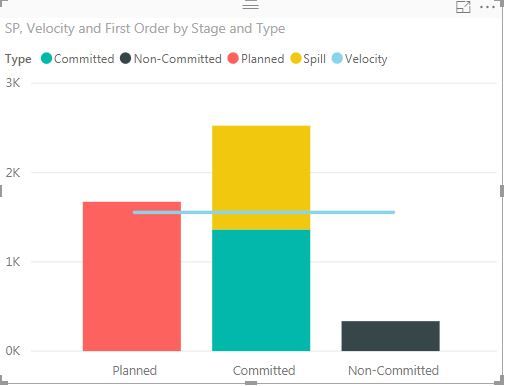
Here is the visual again for referance.


1.JPG

Umaxy
Frequent Visitor

So i performed the above example twice.


First to find the Items that were part of planned that made it into committed and non committed.

I then aggregated everything into one table to find the items for the other 2 columns.


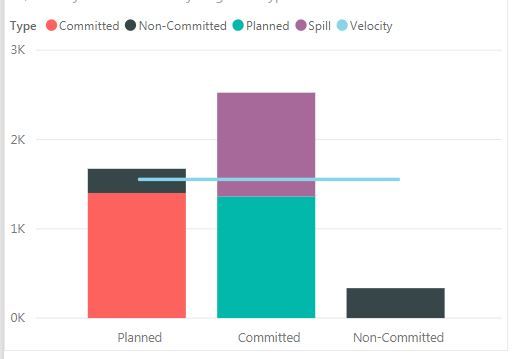
Final Graph:

Capture.JPG


Lastly just need to figure out how to get the velocity line all the way across?

Anonymous
Not applicable

Hi @Umaxy,


You can use below measure to instead velocity column.


Measure =
CALCULATE ( SUM ( table[velocity] ), VALUE ( table[stage] ) )


Regards,

Xiaoxin Sheng

I’ll give it a shot

Thanks

Helpful resources

Announcements
FabCon and SQLCon Barcelona 2026

FabCon & SQLCon – Barcelona 2026

Join us in Barcelona for FabCon and SQLCon, the Fabric, Power BI, SQL, and AI community event. Save €200 with code FABCMTY200.

60 days of Data Days Carousel

Data Days 2026

Join Fabric Data Days 2026: 60 days of free live/on-demand sessions, challenges, study groups, and certification opportunities.

Power BI DataViz World Championships carousel

Power BI DataViz World Championships - June 2026

A new Power BI DataViz World Championship is coming this June! Don't miss out on submitting your entry.