

Join us at FabCon Atlanta from March 16 - 20, 2026, for the ultimate Fabric, Power BI, AI and SQL community-led event. Save $200 with code FABCOMM.
Register now!Vote for your favorite vizzies from the Power BI Dataviz World Championship submissions. Vote now!
Hi,
I need to create a line that shows the weekly Email Open rate
Example of Original Data:
I have email id, email name, activity date(when an email was sent and opened), SentCount, Open Count, week and month
Assumption:
1. An email is sent only on 1 Date
2. Email can be opened on multiple days
3. OpenWeek is Sent Date - Open Date in Weeks
How can I create a line chart in Power Bi that would show the weekly open rate
Example if I create a Rate Table:
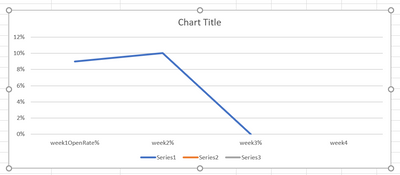
I want to create a line graph that would should the Weekly Open rates:
@amitchandak
Sorry, I could not follow.
I have an Activity date that has the date of when an activity was done either sent or opened.
Now I need to calculate the open rate in weeks [1, 2 , 3...... 52 weeks] after an email was sent.
And show the open rates in weeks in a line graphs
@Anonymous , Not very clear.
But the measure
Ratio = divide(sum(Table[Open Count]), sum(Table[SentCount]))
Is the one should give %. Then move Week Date(Activity Date), Month and Month week number to Date/week table and create a week Rank column
Week Rank = RANKX(all('Date'),'Date'[Week date],,ASC,Dense)
You can visualize with week of you can create measure to compare
Then measures
measures
This Week = CALCULATE([Ratio], FILTER(ALL('Date'),'Date'[Week Rank]=max('Date'[Week Rank])))
Last Week = CALCULATE[Ratio], FILTER(ALL('Date'),'Date'[Week Rank]=max('Date'[Week Rank])-1))
Power BI — Week on Week and WTD
https://medium.com/@amitchandak.1978/power-bi-wtd-questions-time-intelligence-4-5-98c30fab69d3
https://community.powerbi.com/t5/Community-Blog/Week-Is-Not-So-Weak-WTD-Last-WTD-and-This-Week-vs-Last-Week/ba-p/1051123
https://www.youtube.com/watch?v=pnAesWxYgJ8
Vote for your favorite vizzies from the Power BI World Championship submissions!
If you love stickers, then you will definitely want to check out our Community Sticker Challenge!
Check out the January 2026 Power BI update to learn about new features.
| User | Count |
|---|---|
| 64 | |
| 51 | |
| 46 | |
| 23 | |
| 19 |
| User | Count |
|---|---|
| 135 | |
| 110 | |
| 50 | |
| 31 | |
| 29 |