cancel
Showing results for 
Search instead for 
Did you mean: 

Vote for your favorite vizzies from the Power BI Dataviz World Championship submissions. Vote now!

Reply
Anonymous
Not applicable

Line Graph Showing Data Nothing Selected

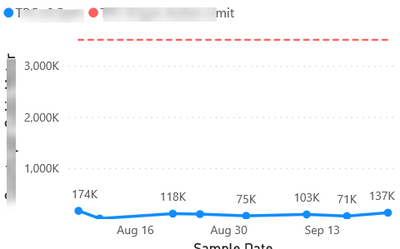
I have these line graphs that are built with measures. When I select a filter, they display as expected.

samplegraphWithFilter.png

However, when I clear the filter, I have lots of data showing on the graph(picture below). I would like nothing showing on the graph when nothing is selected. 

sampleGraphNoFilter.png

My Dax for the measures is something like this:

Action limit = 
VAR level= SELECTEDVALUE('Database'[Level])
RETURN
IF(level= BLANK(),BLANK(),
    SWITCH (
        level,
        "level 1",3520 ,
        "level 2", 3520,
        "level 3", 3520,
        "level 4",  352000,
        "level 5",  3520000,
        "level 6",  3520000 )
)
1 ACCEPTED SOLUTION
Pragati11
Super User
Super User

Hi @Anonymous ,


You will have create a measure to drive your slicer selection based display on your chart.

Check out following blog on how you can achieve this:

https://community.powerbi.com/t5/Community-Blog/Display-Custom-Message-in-the-Visual-Until-a-Selection-is-Made/ba-p/1438721


You can either display a custom message when nothing is selected in the slicer or leave the chart blank without any custom message.


Thanks,

Pragati

Best Regards,

Pragati Jain


MVP logo


LinkedIn | Twitter | Blog YouTube 

Did I answer your question? Mark my post as a solution! This will help others on the forum!

Appreciate your Kudos!!

Proud to be a Super User!!

View solution in original post

1 REPLY 1
Pragati11
Super User
Super User

Hi @Anonymous ,


You will have create a measure to drive your slicer selection based display on your chart.

Check out following blog on how you can achieve this:

https://community.powerbi.com/t5/Community-Blog/Display-Custom-Message-in-the-Visual-Until-a-Selection-is-Made/ba-p/1438721


You can either display a custom message when nothing is selected in the slicer or leave the chart blank without any custom message.


Thanks,

Pragati

Best Regards,

Pragati Jain


MVP logo


LinkedIn | Twitter | Blog YouTube 

Did I answer your question? Mark my post as a solution! This will help others on the forum!

Appreciate your Kudos!!

Proud to be a Super User!!

Helpful resources

Announcements
Power BI DataViz World Championships

Power BI Dataviz World Championships

Vote for your favorite vizzies from the Power BI World Championship submissions!

Sticker Challenge 2026 Carousel

Join our Community Sticker Challenge 2026

If you love stickers, then you will definitely want to check out our Community Sticker Challenge!

January Power BI Update Carousel

Power BI Monthly Update - January 2026

Check out the January 2026 Power BI update to learn about new features.

FabCon Atlanta 2026 carousel

FabCon Atlanta 2026

Join us at FabCon Atlanta, March 16-20, for the ultimate Fabric, Power BI, AI and SQL community-led event. Save $200 with code FABCOMM.