Join us at FabCon Atlanta from March 16 - 20, 2026, for the ultimate Fabric, Power BI, AI and SQL community-led event. Save $200 with code FABCOMM.
Register now!The Power BI Data Visualization World Championships is back! Get ahead of the game and start preparing now! Learn more
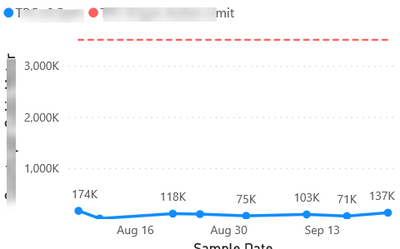
I have these line graphs that are built with measures. When I select a filter, they display as expected.
However, when I clear the filter, I have lots of data showing on the graph(picture below). I would like nothing showing on the graph when nothing is selected.
My Dax for the measures is something like this:
Action limit =
VAR level= SELECTEDVALUE('Database'[Level])
RETURN
IF(level= BLANK(),BLANK(),
SWITCH (
level,
"level 1",3520 ,
"level 2", 3520,
"level 3", 3520,
"level 4", 352000,
"level 5", 3520000,
"level 6", 3520000 )
)
Solved! Go to Solution.
Hi @Anonymous ,
You will have create a measure to drive your slicer selection based display on your chart.
Check out following blog on how you can achieve this:
You can either display a custom message when nothing is selected in the slicer or leave the chart blank without any custom message.
Thanks,
Pragati
Hi @Anonymous ,
You will have create a measure to drive your slicer selection based display on your chart.
Check out following blog on how you can achieve this:
You can either display a custom message when nothing is selected in the slicer or leave the chart blank without any custom message.
Thanks,
Pragati
The Power BI Data Visualization World Championships is back! Get ahead of the game and start preparing now!
| User | Count |
|---|---|
| 40 | |
| 35 | |
| 34 | |
| 31 | |
| 28 |
| User | Count |
|---|---|
| 137 | |
| 102 | |
| 68 | |
| 66 | |
| 64 |