We've captured the moments from FabCon & SQLCon that everyone is talking about, and we are bringing them to the community, live and on-demand. Starts on April 14th. Register now
Good Morning
I have a calulated column, for Training Status(
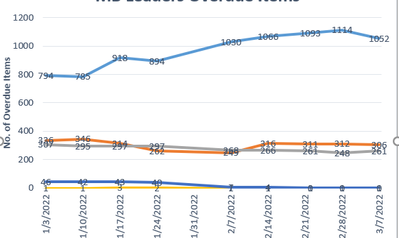
When producted in Power BI it takes into account the actual overdue date instead of the weekly summary. Is there a different dax calulation required?
Solved! Go to Solution.
HI @Anonymous,
Did you mean to create a dynamic line chart that grouped the records based on the current date? If that is the case, you can use the calendar date as the axis, and create a new table with all category types to use on the legend field of the chart.
After these steps, you can create a measure to check the current calendar date and fact table records to assign them to the different segments and do aggregated based on the current segment and group.
Dynamic segmentation – DAX Patterns
Regards,
Xiaoxin Sheng
HI @Anonymous,
Did you mean to create a dynamic line chart that grouped the records based on the current date? If that is the case, you can use the calendar date as the axis, and create a new table with all category types to use on the legend field of the chart.
After these steps, you can create a measure to check the current calendar date and fact table records to assign them to the different segments and do aggregated based on the current segment and group.
Dynamic segmentation – DAX Patterns
Regards,
Xiaoxin Sheng
If you have recently started exploring Fabric, we'd love to hear how it's going. Your feedback can help with product improvements.
A new Power BI DataViz World Championship is coming this June! Don't miss out on submitting your entry.
Share feedback directly with Fabric product managers, participate in targeted research studies and influence the Fabric roadmap.
| User | Count |
|---|---|
| 53 | |
| 38 | |
| 33 | |
| 17 | |
| 17 |
| User | Count |
|---|---|
| 67 | |
| 62 | |
| 38 | |
| 34 | |
| 22 |