Join us at FabCon Atlanta from March 16 - 20, 2026, for the ultimate Fabric, Power BI, AI and SQL community-led event. Save $200 with code FABCOMM.
Register now!Vote for your favorite vizzies from the Power BI Dataviz World Championship submissions. Vote now!
Hi, I'm trying to display 2 lines of values based on different dates. The data is as shown as below.
| StartDate | EndDate | StartValue | EndValue |
| 01 Jan 2021 | 15 Jan 2021 | 5 | 6 |
| 01 May 2021 | 25 Jun 2021 | 15 | 21 |
| 01 Aug 2021 | 01 Sep2021 | 24 | 26 |
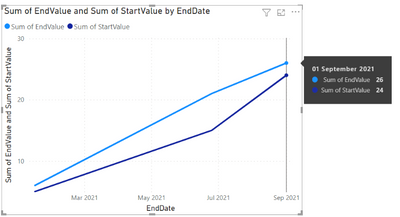
now I want to put in the same line chart both lines. However, if I use StartDate in the X Axis, the EndValue won't be correctly displayed and the same will happend with the Start Value. For example, in the image below the 01/Sep/2021 it is displaying 24 and 26 when it should be only 26. Image below for reference.
I'm getting this
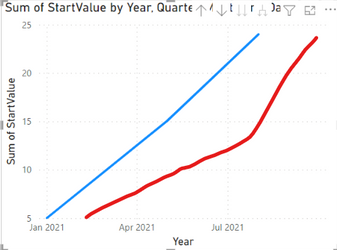
and I want to get something like this
I believe I need a DateTable from the dates I am interested in and make a relationship with my dates table but I've tried relationship with Start and End Date and It doesn't work.
Any idea is more than welcome
Thanks!
Solved! Go to Solution.
Hi, @derekma19
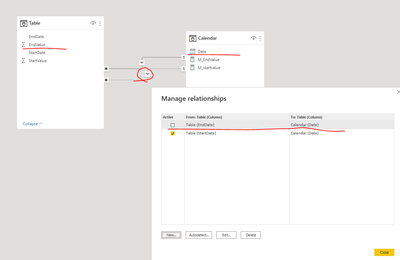
If you have a calendar table, you can try add another inactive relationship between ‘Table’[EndDate] and 'Calendar'[Date].
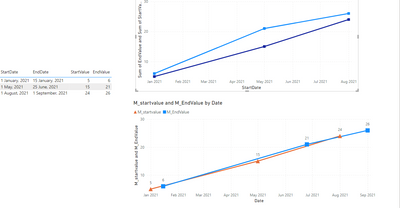
Then put 'Calendar'[Date] to the x-axis of line chart , and put the following two measure to the y-axis of line chart.
M_startvalue = SUM('Table'[StartValue])M_EndValue = CALCULATE(SUM('Table'[EndValue]),USERELATIONSHIP('Table'[EndDate],'Calendar'[Date]))
Please check attached pbix for more details.
Best Regards,
Community Support Team _ Eason
Hi, @derekma19
If you have a calendar table, you can try add another inactive relationship between ‘Table’[EndDate] and 'Calendar'[Date].
Then put 'Calendar'[Date] to the x-axis of line chart , and put the following two measure to the y-axis of line chart.
M_startvalue = SUM('Table'[StartValue])M_EndValue = CALCULATE(SUM('Table'[EndValue]),USERELATIONSHIP('Table'[EndDate],'Calendar'[Date]))
Please check attached pbix for more details.
Best Regards,
Community Support Team _ Eason
@derekma19 , refer if these approaches can help
Measure way
Power BI Dax Measure- Allocate data between Range: https://youtu.be/O653vwLTUzM
https://community.powerbi.com/t5/Community-Blog/How-to-divide-distribute-values-between-start-date-o...
Tables way
https://amitchandak.medium.com/dax-get-all-dates-between-the-start-and-end-date-8f3dac4ff90b
https://amitchandak.medium.com/power-query-get-all-dates-between-the-start-and-end-date-9ad6a84cf5f2
Vote for your favorite vizzies from the Power BI World Championship submissions!
If you love stickers, then you will definitely want to check out our Community Sticker Challenge!
Check out the January 2026 Power BI update to learn about new features.
| User | Count |
|---|---|
| 58 | |
| 53 | |
| 40 | |
| 17 | |
| 16 |
| User | Count |
|---|---|
| 114 | |
| 107 | |
| 41 | |
| 34 | |
| 25 |