Join the FabCon + SQLCon recap series. Up next: Power BI, Real-Time Intelligence, IQ and AI, and Data Factory take center stage. All sessions are available on-demand after the live show. Register now
Does anyone know of a visualization that can display data with 5 variable fields? I'd like to display all the data in one chart and allow the user to use slicers to decide what data they would like to see.
Here is a simplified dataset. I'd like to be able to see all the lines at one time and then use slicers to adjust as necessary.
Thank you in advance!
| Location | Radius | Date | Occupation | Employees |
| Dallas | 10 Miles | 2020Q1 | Clerk | 8 |
| Seattle | 10 Miles | 2020Q1 | Clerk | 4 |
| Miami | 10 Miles | 2020Q1 | Clerk | 8 |
| Dallas | 10 Miles | 2020Q2 | Clerk | 3 |
| Seattle | 10 Miles | 2020Q2 | Clerk | 24 |
| Miami | 10 Miles | 2020Q2 | Clerk | 33 |
| Dallas | 20 Miles | 2020Q1 | Clerk | 47 |
| Seattle | 20 Miles | 2020Q1 | Clerk | 14 |
| Miami | 20 Miles | 2020Q1 | Clerk | 22 |
| Dallas | 20 Miles | 2020Q2 | Clerk | 36 |
| Seattle | 20 Miles | 2020Q2 | Clerk | 44 |
| Miami | 20 Miles | 2020Q2 | Clerk | 23 |
| Dallas | 10 Miles | 2020Q1 | Stocker | 12 |
| Seattle | 10 Miles | 2020Q1 | Stocker | 32 |
| Miami | 10 Miles | 2020Q1 | Stocker | 53 |
| Dallas | 10 Miles | 2020Q2 | Stocker | 52 |
| Seattle | 10 Miles | 2020Q2 | Stocker | 64 |
| Miami | 10 Miles | 2020Q2 | Stocker | 52 |
| Dallas | 20 Miles | 2020Q1 | Stocker | 41 |
| Seattle | 20 Miles | 2020Q1 | Stocker | 19 |
| Miami | 20 Miles | 2020Q1 | Stocker | 17 |
| Dallas | 20 Miles | 2020Q2 | Stocker | 11 |
| Seattle | 20 Miles | 2020Q2 | Stocker | 16 |
| Miami | 20 Miles | 2020Q2 | Stocker | 31 |
Hi, @Anonymous
It’s my pleasure to answer for you.
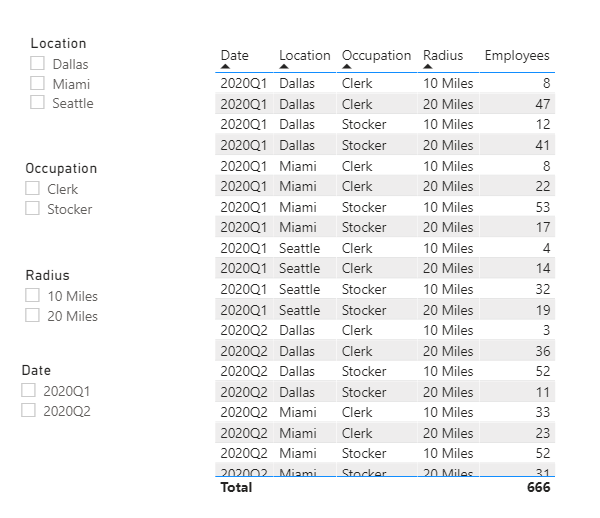
According to your description,I think you can use a table visual and four slicer to display and filter data.
Like this:
If it doesn’t solve your problem, please feel free to ask me.
Best Regards
Janey Guo
If this post helps, then please consider Accept it as the solution to help the other members find it more quickly.
Thank you Janey. That's what I have now, so the user can view how they want. I'd just like to have one graphic to portray it. Appreciate the help as I know it's not an easy question.
Hi @Anonymous
Have you considered a radar plot?
https://appsource.microsoft.com/en-us/product/power-bi-visuals/WA104380771
Phil
Proud to be a Super User!
Thank you Phil, I'll try it today and see how it comes out.
Check out the April 2026 Power BI update to learn about new features.
If you have recently started exploring Fabric, we'd love to hear how it's going. Your feedback can help with product improvements.
A new Power BI DataViz World Championship is coming this June! Don't miss out on submitting your entry.
| User | Count |
|---|---|
| 42 | |
| 37 | |
| 35 | |
| 22 | |
| 15 |
| User | Count |
|---|---|
| 67 | |
| 58 | |
| 29 | |
| 27 | |
| 25 |