Join us at FabCon Atlanta from March 16 - 20, 2026, for the ultimate Fabric, Power BI, AI and SQL community-led event. Save $200 with code FABCOMM.
Register now!Learn from the best! Meet the four finalists headed to the FINALS of the Power BI Dataviz World Championships! Register now
Hello,
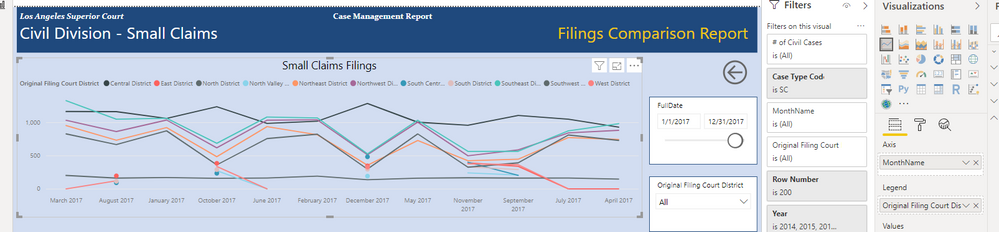
I have a Line Chart posted below. And the sort of the chart is not correct for some reason. In my Date slicer I have 1/1/2017 - 12-31/17 to get all of 2017. However in the Chart it is displaying in order of March, August, January, October, June, February ...... and so on. Perhaps it is because in the Date Slicer I am using a field called FullDate and in the chart Axis I am using a field called MonthName, maybe the different fields are causing this? Any ideas what I can try.... Thanks!
Solved! Go to Solution.
Hi.
I dont know what your calendar table looks like, but if you use a separate date dimension or calendar table try this:
To create a YearMonth-column if you dont have one you can add a custom calculated column in your date dimension table. A good format for such a column is "YYYYMM". This format will allways sort in the correct order. After adding this column you can choose it as a "Sort By Column" as per instructions above.
Hi.
I dont know what your calendar table looks like, but if you use a separate date dimension or calendar table try this:
To create a YearMonth-column if you dont have one you can add a custom calculated column in your date dimension table. A good format for such a column is "YYYYMM". This format will allways sort in the correct order. After adding this column you can choose it as a "Sort By Column" as per instructions above.
Share feedback directly with Fabric product managers, participate in targeted research studies and influence the Fabric roadmap.
Check out the February 2026 Power BI update to learn about new features.
| User | Count |
|---|---|
| 63 | |
| 55 | |
| 41 | |
| 16 | |
| 14 |
| User | Count |
|---|---|
| 98 | |
| 80 | |
| 35 | |
| 29 | |
| 25 |