This time we’re going bigger than ever. Fabric, Power BI, SQL, AI and more. We're covering it all. You won't want to miss it.
Learn moreDid you hear? There's a new SQL AI Developer certification (DP-800). Start preparing now and be one of the first to get certified. Register now
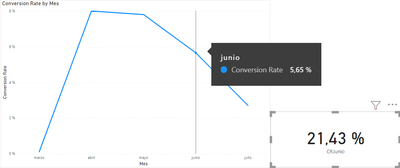
Hi, I have a problem with a line chart where I want to show a percentaje (calculated as a DIVIDE), and the values doesn't match. I have this measure:
Thanks!
Hi, @juan_cel
Perhaps because of the context, the way of using .Month seems to sometimes not get the correct value.
In addition, in the conversion rate measure, [NumLead] is all counted, so in the measure CRJunio, it should also be all counted.
try this:
CRjunio =
VAR _a =
CALCULATE (
COUNT ( Ventas[Venta] ),
FILTER ( Ventas, 'Ventas'[Venta] = "Venta" ),
FILTER ( Ventas, FORMAT ( 'Ventas'[Conversa ion Vrea ed A], "MMMM" ) = "Junio" )
)
VAR _b =
COUNT ( 'Callbell_04-06'[NumLead] )
VAR _divide =
DIVIDE ( _a, _b, 0 )
RETURN
_divide
this works well for my sample data.
Hope this helps.
Best Regards,
Community Support Team _ Zeon Zheng
If this post helps, then please consider Accept it as the solution to help the other members find it more quickly.
is 'Callbell_04-06'[Conversa ion Crea ed A ].[Mes] the actual field on your X axis?
Check out the April 2026 Power BI update to learn about new features.
If you have recently started exploring Fabric, we'd love to hear how it's going. Your feedback can help with product improvements.
A new Power BI DataViz World Championship is coming this June! Don't miss out on submitting your entry.
| User | Count |
|---|---|
| 38 | |
| 38 | |
| 31 | |
| 22 | |
| 15 |
| User | Count |
|---|---|
| 74 | |
| 61 | |
| 31 | |
| 31 | |
| 23 |