Join us in Barcelona for FabCon and SQLCon, September 28 - October 1, 2026.
This is best Fabric, Power BI, SQL and AI community event. How do we know? The last event sold out! Save €200 with code FABCMTY200.
Register now- Power BI forums
- Get Help with Power BI
- Desktop
- Service
- Report Server
- Power Query
- Mobile Apps
- Developer
- DAX Commands and Tips
- Custom Visuals Development Discussion
- Health and Life Sciences
- Power BI Spanish forums
- Translated Spanish Desktop
- Training and Consulting
- Instructor Led Training
- Dashboard in a Day for Women, by Women
- Galleries
- Data Stories Gallery
- Themes Gallery
- Contests Gallery
- QuickViz Gallery
- Quick Measures Gallery
- Visual Calculations Gallery
- Fabric Apps Gallery
- Notebook Gallery
- Translytical Task Flow Gallery
- TMDL Gallery
- R Script Showcase
- Webinars and Video Gallery
- Ideas
- Custom Visuals Ideas (read-only)
- Issues
- Issues
- Events
- Upcoming Events
July 28 - August 9 | Final Round of the Power BI Dataviz World Championships. This is your chance. Learn more
- Power BI forums
- Forums
- Get Help with Power BI
- Desktop
- Re: Line Chart Visualization Error
- Subscribe to RSS Feed
- Mark Topic as New
- Mark Topic as Read
- Float this Topic for Current User
- Bookmark
- Subscribe
- Printer Friendly Page

- Mark as New
- Bookmark
- Subscribe
- Mute
- Subscribe to RSS Feed
- Permalink
- Report Inappropriate Content
Line Chart Visualization Error
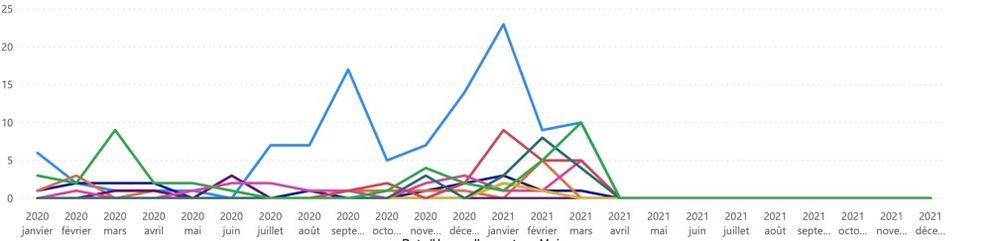
Im struggling with a line chart report , my target is to display the result between march 2020 and march 2021 , I used this request :
LA = CALCULATE([ID INCIDENT(No Blank)],DATESINPERIOD(ExportSM9[ConvertDATEOUVE],DATE(2020,3,1),13,MONTH))
But I still have the results between Jan2020 and December 2021
My result is :
Thnak you


- Mark as New
- Bookmark
- Subscribe
- Mute
- Subscribe to RSS Feed
- Permalink
- Report Inappropriate Content
Hello
Can you try again? I can't insert it here directly, I changed the permissions
Thank you
owe
- Mark as New
- Bookmark
- Subscribe
- Mute
- Subscribe to RSS Feed
- Permalink
- Report Inappropriate Content
Hello
Can you try again? I can't insert it here directly, I changed the permissions
Thank you
owe
- Mark as New
- Bookmark
- Subscribe
- Mute
- Subscribe to RSS Feed
- Permalink
- Report Inappropriate Content
Hello
Can you try again? I can't insert it here directly, I changed the permissions
Thank you
owe
- Mark as New
- Bookmark
- Subscribe
- Mute
- Subscribe to RSS Feed
- Permalink
- Report Inappropriate Content
- Mark as New
- Bookmark
- Subscribe
- Mute
- Subscribe to RSS Feed
- Permalink
- Report Inappropriate Content
Hello
Can you try again? I can't insert it here directly, I changed the permissions
Thank you
Should
- Mark as New
- Bookmark
- Subscribe
- Mute
- Subscribe to RSS Feed
- Permalink
- Report Inappropriate Content
hello,
can you try again? I can't insert it here directly , I changed the permissions
Thank you
Rim

- Mark as New
- Bookmark
- Subscribe
- Mute
- Subscribe to RSS Feed
- Permalink
- Report Inappropriate Content
HI @RIMMIMI
It looks like either your DAX query doing zero handling because of measure you have created or your dataset having entry for the same.
In new page just drag this measure in table visual with all required column and check if data is coming till december 2021 or not . If it is coming with 0 value then measure need to be corrected.
Thanks
- Mark as New
- Bookmark
- Subscribe
- Mute
- Subscribe to RSS Feed
- Permalink
- Report Inappropriate Content
Hello ,
I had a matrix before transforming it to a chart line , indeed the values after march are 0, because my data stop at march 2021, I dont understand why it continues until december 2021


- Mark as New
- Bookmark
- Subscribe
- Mute
- Subscribe to RSS Feed
- Permalink
- Report Inappropriate Content
Hi, @RIMMIMI
If it is OK with you, please share your sample pbix file, then I can try to have a look and come up with a desirable solution.
Thank you.
Hi, My name is Jihwan Kim.
If this post helps, then please consider accept it as the solution to help other members find it faster.
If this post helps, then please consider accepting it as the solution to help other members find it faster, and give a big thumbs up.
Click here to visit my LinkedIn page
- Mark as New
- Bookmark
- Subscribe
- Mute
- Subscribe to RSS Feed
- Permalink
- Report Inappropriate Content
Hello
I shared with you but It seems that you didn't see it thank you

- Mark as New
- Bookmark
- Subscribe
- Mute
- Subscribe to RSS Feed
- Permalink
- Report Inappropriate Content
@RIMMIMI , does this measure uses +0 or handle is blank
[ID INCIDENT(No Blank)]
refer, +0 in the first var can give all dates. So I handled that remove dates again
0 between range
Measure = var _1= SUM(Opportunity[Opportunity count]) +0
var _min = minx(ALLSELECTED('Calendar'), 'Calendar'[Date])
var _max = maxx(ALLSELECTED('Calendar'), 'Calendar'[Date])
return
CALCULATE(if(max('Calendar'[Date]) <_min || max('Calendar'[Date]) >_max , BLANK(), _1))
- Mark as New
- Bookmark
- Subscribe
- Mute
- Subscribe to RSS Feed
- Permalink
- Report Inappropriate Content
thank you for your reply , but it didn't work , should I create a unique DAX or create the VARs and make the Calculate Fonction alone ? thank you
- Mark as New
- Bookmark
- Subscribe
- Mute
- Subscribe to RSS Feed
- Permalink
- Report Inappropriate Content
Hello ,
Thank you , I dont know how to send you my pbix tell me how plz
Helpful resources

FabCon & SQLCon – Barcelona 2026
Join us in Barcelona for FabCon and SQLCon, the Fabric, Power BI, SQL, and AI community event. Save €200 with code FABCMTY200.

Power BI Monthly Update - July 2026
Check out the July 2026 Power BI update to learn about new features.

Power BI DataViz World Championships - June 2026
A new Power BI DataViz World Championship is coming this June! Don't miss out on submitting your entry.

| User | Count |
|---|---|
| 25 | |
| 23 | |
| 20 | |
| 18 | |
| 14 |


| User | Count |
|---|---|
| 22 | |
| 20 | |
| 20 | |
| 20 | |
| 20 |


