cancel
Showing results for 
Search instead for 
Did you mean: 

Next up in the FabCon + SQLCon recap series: The roadmap for Microsoft SQL and Maximizing Developer experiences in Fabric. All sessions are available on-demand after the live show. Register now

Reply
Trudgeon
Helper III
Helper III

Line Chart Tooltips Issue

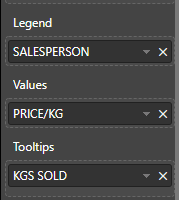
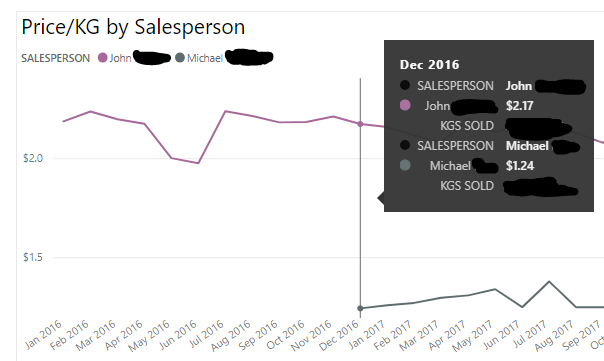
I'm getting redundant details on the tooltips of my line chart.  The salesperson name is showing up twice.  Once associated with the legend and once associated with the value.  Why is it doing this?  Is there a way to remove the "SALESPERSON" item from my tooltip?  It looks bad to have the person's name show up twice the way it does.


Thanks!


Format.PNG


Tooltips.PNG

1 ACCEPTED SOLUTION
v-juanli-msft
Community Support
Community Support

Hi @Trudgeon

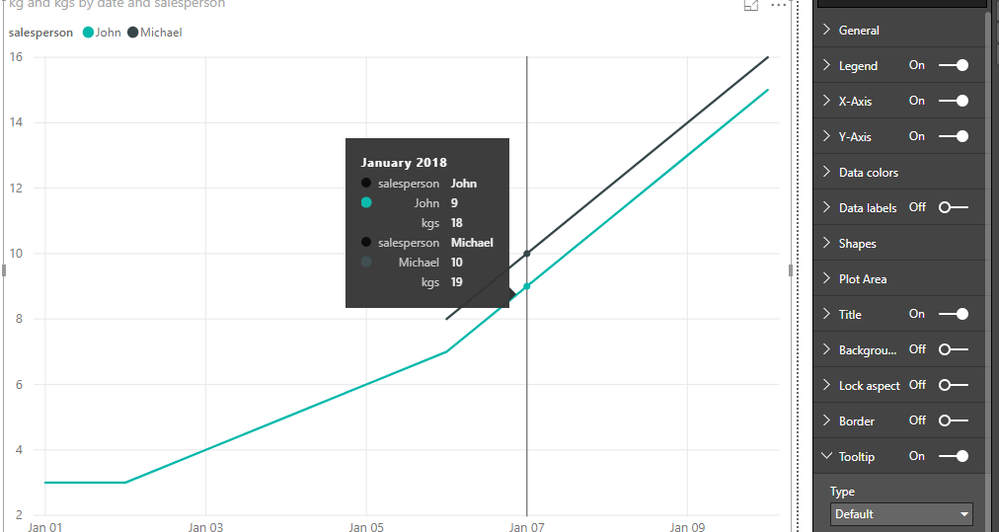
When i add columns and measures to "Value" and "Tooltips" field and set the "Tooltip" as "Default", it shows the same as you.
1.png


As tested and reseraching, i'm afraid it is the default design in Power BI currently.

you may add your idea here to let more people know and vate for your idea, finally it may be accepted by Product team.


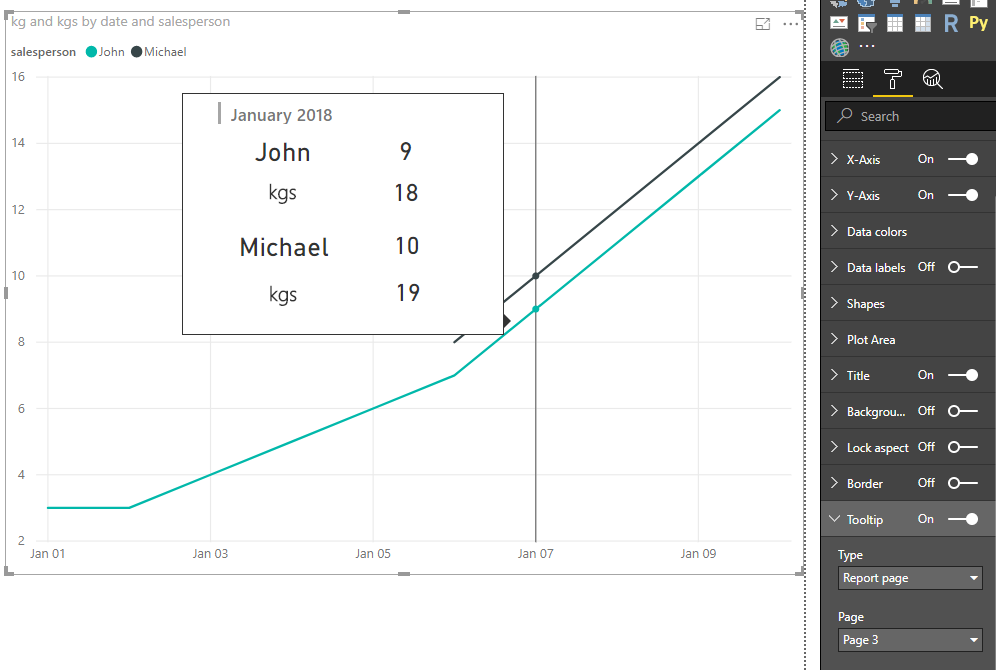
As a workaround, i change the Tooltip setting  from "Default" to "Report Page".

I try two methods.

One is to use Card visual and Text Box, also create new measures to show each person's value.


create measures

Michael = "Michael"

value-John = CALCULATE(SUM(Sheet6[kg]),FILTER(Sheet6,[salesperson]="John"))
tootip-John = CALCULATE([kgs],FILTER(Sheet6,[salesperson]="John"))

value-Michael = IF(CALCULATE(SUM(Sheet6[kg]),FILTER(Sheet6,[salesperson]="Michael"))<>BLANK(),
CALCULATE(SUM(Sheet6[kg]),FILTER(Sheet6,[salesperson]="Michael")),0)

tootip-Michael = IF([value-Michael]=0,0,CALCULATE([kgs],FILTER(Sheet6,[salesperson]="Michael")))

in another page, called Page3, add [date] column, these measures in the Card visual, also create two Text Box and write "KGS SOLD" in it.

Then set this page as "Tooltip" by turning on "tooltip" button under the Page information and selecting "tooltip" under Page size.

for the Line chart, select "Report Page"-> Page3.
 

2.png


The second method please see my pbix->Page2

Reference: Report tooltip


Best Regards

Maggie


View solution in original post

3 REPLIES 3
v-juanli-msft
Community Support
Community Support

Hi @Trudgeon

When i add columns and measures to "Value" and "Tooltips" field and set the "Tooltip" as "Default", it shows the same as you.

1.png


As tested and reseraching, i'm afraid it is the default design in Power BI currently.

you may add your idea here to let more people know and vate for your idea, finally it may be accepted by Product team.


As a workaround, i change the Tooltip setting  from "Default" to "Report Page".

I try two methods.

One is to use Card visual and Text Box, also create new measures to show each person's value.


create measures

Michael = "Michael"

value-John = CALCULATE(SUM(Sheet6[kg]),FILTER(Sheet6,[salesperson]="John"))
tootip-John = CALCULATE([kgs],FILTER(Sheet6,[salesperson]="John"))

value-Michael = IF(CALCULATE(SUM(Sheet6[kg]),FILTER(Sheet6,[salesperson]="Michael"))<>BLANK(),
CALCULATE(SUM(Sheet6[kg]),FILTER(Sheet6,[salesperson]="Michael")),0)

tootip-Michael = IF([value-Michael]=0,0,CALCULATE([kgs],FILTER(Sheet6,[salesperson]="Michael")))

in another page, called Page3, add [date] column, these measures in the Card visual, also create two Text Box and write "KGS SOLD" in it.

Then set this page as "Tooltip" by turning on "tooltip" button under the Page information and selecting "tooltip" under Page size.

for the Line chart, select "Report Page"-> Page3.


2.png


The second method please see my pbix->Page2

Reference: Report tooltip


Best Regards

Maggie


Hi @v-juanli-msft , is it possible to send to the tooltip info which item is hovered on the line chart? For example, if I hover on the first line (Michael), is it possible to display info related to Michael only?

Thank you for the workarounds, @v-juanli-msft

Helpful resources

Announcements
New to Fabric survey Carousel

New to Fabric Survey

If you have recently started exploring Fabric, we'd love to hear how it's going. Your feedback can help with product improvements.

Power BI DataViz World Championships carousel

Power BI DataViz World Championships - June 2026

A new Power BI DataViz World Championship is coming this June! Don't miss out on submitting your entry.

Join our Fabric User Panel

Join our Fabric User Panel

Share feedback directly with Fabric product managers, participate in targeted research studies and influence the Fabric roadmap.

March Power BI Update Carousel

Power BI Community Update - March 2026

Check out the March 2026 Power BI update to learn about new features.