Get certified for free when you join Fabric Data Days 2026 and dive into Fabric, Power BI, SQL, AI, and other essential data skills.
Join nowData Days is here! Join us now for 60+ days of learning, challenges, and connection. Learn more
Hi,
I have my dataset in below format.
| Year | Month | Value |
| 2016 | Q1 | 158 |
| 2016 | Q2 | 180 |
| 2016 | Q3 | 139 |
| 2016 | Q4 | 198 |
| 2017 | Q1 | 116 |
| 2017 | Q2 | 147 |
| 2017 | Q3 | 151 |
| 2017 | Q4 | 178 |
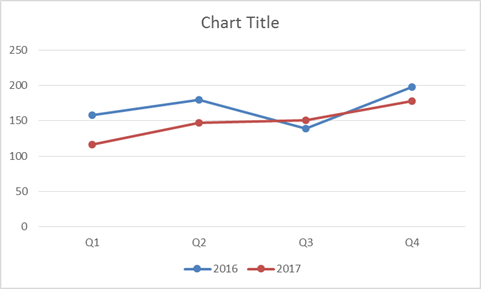
Can this be used to create below line chart? I need both the year in same chart. Now what happening is either BI is aggregating both the year or I have to use filter to select individual year.
Solved! Go to Solution.
Yes, please configure as in the screen below:
Thanks,
Prakash
Don't miss out on Data Days, June 15 through August 7. Learn Fabric, Power BI, SQL, AI and more.
Check out the May 2026 Power BI update to learn about new features.
| User | Count |
|---|---|
| 23 | |
| 23 | |
| 21 | |
| 17 | |
| 13 |
| User | Count |
|---|---|
| 58 | |
| 50 | |
| 37 | |
| 29 | |
| 24 |