Join us at FabCon Atlanta from March 16 - 20, 2026, for the ultimate Fabric, Power BI, AI and SQL community-led event. Save $200 with code FABCOMM.
Register now!The Power BI Data Visualization World Championships is back! Get ahead of the game and start preparing now! Learn more
G'day!
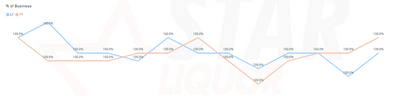
I've created a chart, that shows % of total for a filter. My issue is that when no filter is active and all values are 100%, the line should display as flat. As can be seen from the visual below, whilst the label values are correct at 100%, the line is all over the place.
Can anyone point me to possible causes? My SearchFu has failed thus far.
Thanks in advance!
Humphf
Solved! Go to Solution.
add more decimals numbers, see if theres decimals rounded up to the 100% and them the axis its a auto scaled.
Proud to be a Super User!
add more decimals numbers, see if theres decimals rounded up to the 100% and them the axis its a auto scaled.
Proud to be a Super User!
Thanks very much! Smacking my head now, such a simple solution!
I rounded the calculation off and boom, flat lined the way it should be.
Cheers!
H
The Power BI Data Visualization World Championships is back! Get ahead of the game and start preparing now!
| User | Count |
|---|---|
| 39 | |
| 37 | |
| 35 | |
| 34 | |
| 27 |
| User | Count |
|---|---|
| 137 | |
| 97 | |
| 74 | |
| 66 | |
| 65 |