This time we’re going bigger than ever. Fabric, Power BI, SQL, AI and more. We're covering it all. You won't want to miss it.
Learn moreDid you hear? There's a new SQL AI Developer certification (DP-800). Start preparing now and be one of the first to get certified. Register now
G'day!
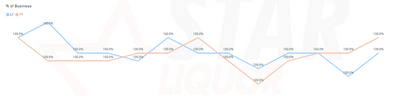
I've created a chart, that shows % of total for a filter. My issue is that when no filter is active and all values are 100%, the line should display as flat. As can be seen from the visual below, whilst the label values are correct at 100%, the line is all over the place.
Can anyone point me to possible causes? My SearchFu has failed thus far.
Thanks in advance!
Humphf
Solved! Go to Solution.
add more decimals numbers, see if theres decimals rounded up to the 100% and them the axis its a auto scaled.
Proud to be a Super User!
add more decimals numbers, see if theres decimals rounded up to the 100% and them the axis its a auto scaled.
Proud to be a Super User!
Thanks very much! Smacking my head now, such a simple solution!
I rounded the calculation off and boom, flat lined the way it should be.
Cheers!
H
Check out the April 2026 Power BI update to learn about new features.
Sign up to receive a private message when registration opens and key events begin.
If you have recently started exploring Fabric, we'd love to hear how it's going. Your feedback can help with product improvements.
| User | Count |
|---|---|
| 35 | |
| 32 | |
| 25 | |
| 23 | |
| 16 |
| User | Count |
|---|---|
| 65 | |
| 50 | |
| 30 | |
| 24 | |
| 23 |