Don't miss your chance to take the Fabric Data Engineer (DP-600) exam for FREE! Find out how by watching the DP-600 session on-demand now through April 28th.
Learn moreJoin the FabCon + SQLCon recap series. Up next: Power BI, Real-Time Intelligence, IQ and AI, and Data Factory take center stage. All sessions are available on-demand after the live show. Register now
Hello,
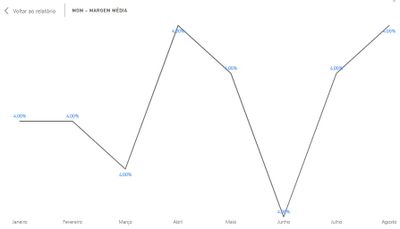
I have a Line Chart that makes a simple division by 2 numbers to calculate a certain value along the months. The issue occours when the value is fixed in all months, we should expect a straight line but this is what i got:
The issue only occours on Line Chart, Column Charts plot properly. Anyone got a hint on this?
Tks!
Solved! Go to Solution.
Looks like a precision issue on the calculation. The scale of the chart makes it look like there are big differences but the results will be 4.000000001 or 4.000000003
You can alter the scale of the axis OR round the number to fewer decimal places
Looks like a precision issue on the calculation. The scale of the chart makes it look like there are big differences but the results will be 4.000000001 or 4.000000003
You can alter the scale of the axis OR round the number to fewer decimal places
I thought that setting decimals on modelling should have done, but using ROUND made it for me, thank you.
Check out the April 2026 Power BI update to learn about new features.
If you have recently started exploring Fabric, we'd love to hear how it's going. Your feedback can help with product improvements.
A new Power BI DataViz World Championship is coming this June! Don't miss out on submitting your entry.
| User | Count |
|---|---|
| 41 | |
| 37 | |
| 34 | |
| 21 | |
| 16 |
| User | Count |
|---|---|
| 64 | |
| 58 | |
| 31 | |
| 25 | |
| 25 |