cancel
Showing results for 
Search instead for 
Did you mean: 

The Power BI Data Visualization World Championships is back! Get ahead of the game and start preparing now! Learn more

Reply
Anonymous
Not applicable

Limitations about connecting a SSAS multidimensional model

Hi,

I'm searching an official article that talks about limitiations when a SSAS multidimensional model is connected to PBI.

This paper doesn't seem complete:

https://docs.microsoft.com/en-us/power-bi/desktop-ssas-multidimensional#considerations-and-limitatio...


F.e., it isn't possible to add a new measure or a new column.


Any help to me, please? Thanks


1 ACCEPTED SOLUTION
Anonymous
Not applicable

@Anonymous,

Besides the above limitations, there are also the following points.

1.Data view and relationship view are not available in Power BI Desktop, that is to say, it is impossible to manage relationship in Desktop. And we are limited to connect to a single  SSAS database of a single server.
2. It is not possible to change data type /format of fields.
3. It is not possible to use Q&A in Power BI Desktop.
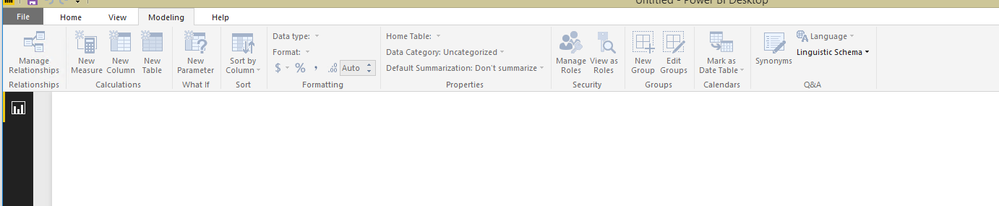
4. Almost it is not possible to use all the buttons under Modeling ribbon.

1.PNG

Regards,
Lydia

View solution in original post

3 REPLIES 3
Anonymous
Not applicable

@Anonymous,

Besides the above limitations, there are also the following points.

1.Data view and relationship view are not available in Power BI Desktop, that is to say, it is impossible to manage relationship in Desktop. And we are limited to connect to a single  SSAS database of a single server.
2. It is not possible to change data type /format of fields.
3. It is not possible to use Q&A in Power BI Desktop.
4. Almost it is not possible to use all the buttons under Modeling ribbon.

1.PNG

Regards,
Lydia

Anonymous
Not applicable

Hi Lydia, thanks for your reply, but where can I find the related official article?

Thanks

Anonymous
Not applicable

@Anonymous,

There is no dedicated official article stating the above limitations.

For Q&A, please review this article.

Regards,
Lydia

Helpful resources

Announcements
November Power BI Update Carousel

Power BI Monthly Update - November 2025

Check out the November 2025 Power BI update to learn about new features.

Fabric Data Days Carousel

Fabric Data Days

Advance your Data & AI career with 50 days of live learning, contests, hands-on challenges, study groups & certifications and more!

FabCon Atlanta 2026 carousel

FabCon Atlanta 2026

Join us at FabCon Atlanta, March 16-20, for the ultimate Fabric, Power BI, AI and SQL community-led event. Save $200 with code FABCOMM.

Top Solution Authors
Top Kudoed Authors